WhatsApp is rolling out new settings for group info on Android
WhatsApp is reorganizing the group chat info screen with new sections to simplify the interface. The update groups related options under Preferences and Privacy, making the screen easier to navigate. This change also prepares the interface for new features that WhatsApp may plan to add to these sections.
| Key Points | Details |
|---|---|
| Name of the feature: | Redesigned group chat info screen |
| Status: | Rolling out |
| Compatibility: | WhatsApp beta for Android 2.26.24.3 is a compatible update. |
| Availability info: | This feature is available to some beta testers, and it is rolling out to more users over the coming weeks. |
| Thanks: | Sc, UnluckyTester, and kingcyrious, for testing and reporting. |
| Previous news: | WhatsApp to test a home screen widget to send voice messages! |
WhatsApp introduced tab-based navigation in the group chat info screen
In the post about the WhatsApp beta for Android 2.26.20.7 update, we announced a new tab-based navigation system for the group chat info screen. Finding a specific setting in the group chat info screen was not always straightforward. As a result, WhatsApp revamped this section by introducing new tabs to facilitate navigation within the screen. The update organizes the screen into three main tabs: Members, Media, and Settings. These tabs allow users to jump directly to the relevant section instead of scrolling through the interface. WhatsApp introduced this system to reduce clutter and make navigation faster and more intuitive.
WhatsApp is now going further with two new dedicated sections
The new navigation system was a step forward for the experience in the group chat info screen. But now, WhatsApp is continuing to improve this experience with further changes. We discovered the news after installing the latest WhatsApp beta for Android 2.26.24.3 update, which is available on the Google Play Store. Specifically, WhatsApp is rolling out a redesigned group chat info screen to some beta testers.
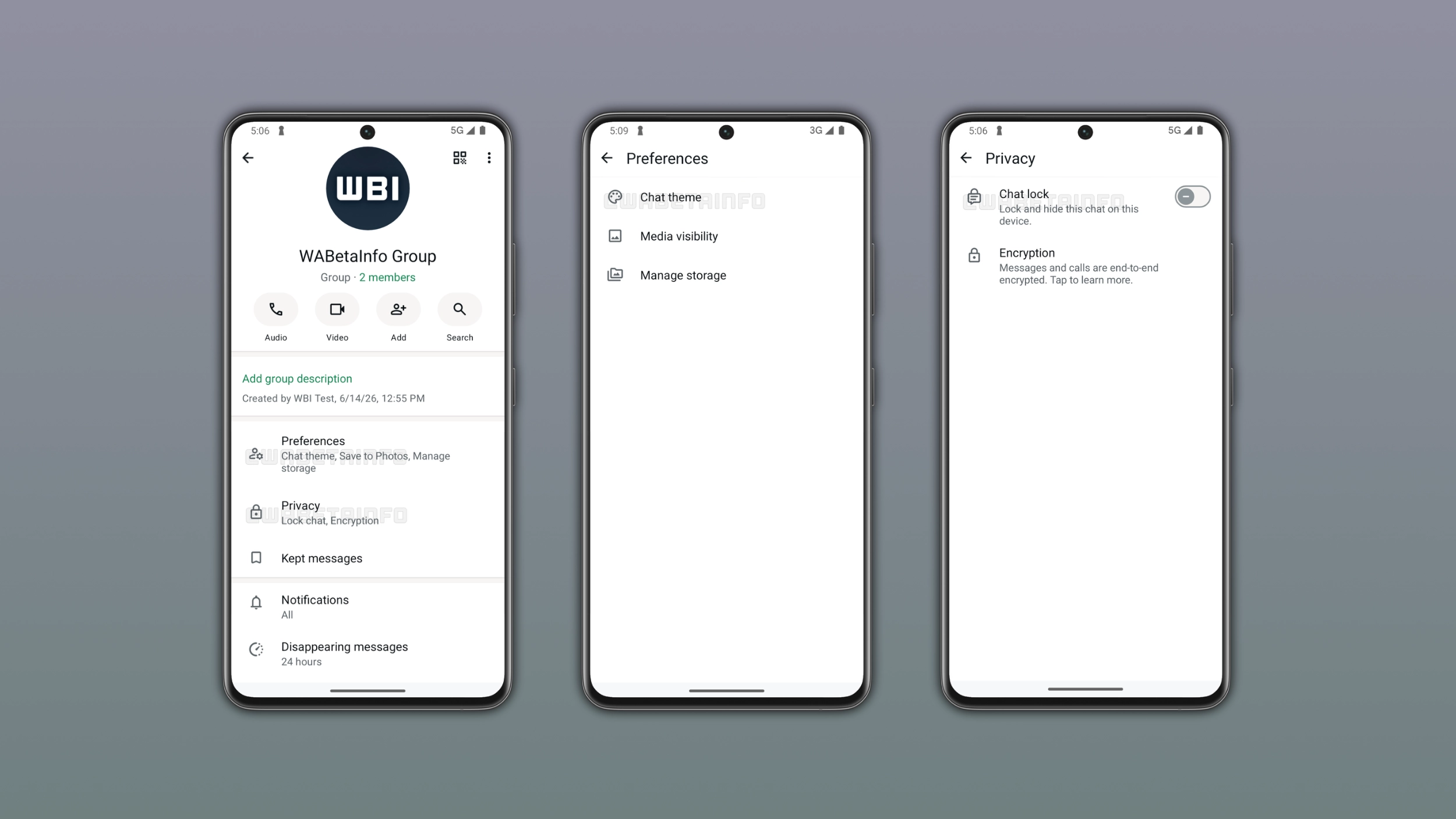
WhatsApp introduces two new sections in the group chat info screen
With the latest update, WhatsApp is introducing two additional sections in the group chat info screen: Preferences and Privacy. These sections group related settings together, making the screen easier to navigate. Rather than presenting these options in the same interface, WhatsApp now organizes them by category. This organization makes it immediately clear where to look depending on what the user wants to adjust.
What the Preferences section contains
The Preferences section brings together some settings that affect how the group chat looks. In particular, this section includes Chat Theme, Media Visibility, and Manage Storage. Chat Theme allows users to customize the appearance of the conversation. Media Visibility controls whether downloaded media from the group is saved to the device gallery. Manage Storage helps users monitor and free up the space used by the group.
What the Privacy section contains
The Privacy section groups settings related to security and confidentiality. It includes Chat Lock, which adds a new layer of protection to the conversation by requiring authentication to open it. It also includes Encryption, which provides details about end-to-end encryption for the group. Having these two options together makes it easier to manage the privacy of the group from a single place.
How to find the new sections in the group chat info screen
Preferences and Privacy are placed at the top of the group chat info screen, making them immediately visible when users open it. Users do not need to scroll down to find them, as they appear right away as soon as the screen loads. To access either section, users simply need to tap on it and WhatsApp will present the relevant settings. Their position at the top makes them hard to miss since they are the first sections users see when they open the screen.
Why this reorganization makes sense
Grouping related settings under dedicated sections makes the group chat info screen significantly easier to scan. For example, if users want to look for Chat Lock or Media Visibility, they can now go directly to the right section. Even their names help: Preferences is for personal choices, Privacy is for protection. As WhatsApp introduces new features in the future, they can fit naturally into one of these sections without making the screen feel more crowded.
WhatsApp is rolling out the redesigned group chat info screen to Android beta testers
The redesigned group chat info screen is currently available to a limited number of beta testers who have installed the latest WhatsApp beta for Android update. WhatsApp is gradually expanding access to this feature, so it may not yet be visible on your device. If you do not see the new sections after updating, they will appear in the coming weeks. WhatsApp has not announced an official timeline for the stable release, but we expect it to reach more users in the near future.
Connect with WABetaInfo
Follow WABetaInfo on X and visit our About page to learn more about what we do. We always appreciate your feedback on posts like this one.