WhatsApp beta for iOS 26.20.10.71: what's new?
WhatsApp has released a new iOS update through the TestFlight beta Program, bringing the version up to 26.20.10.71.
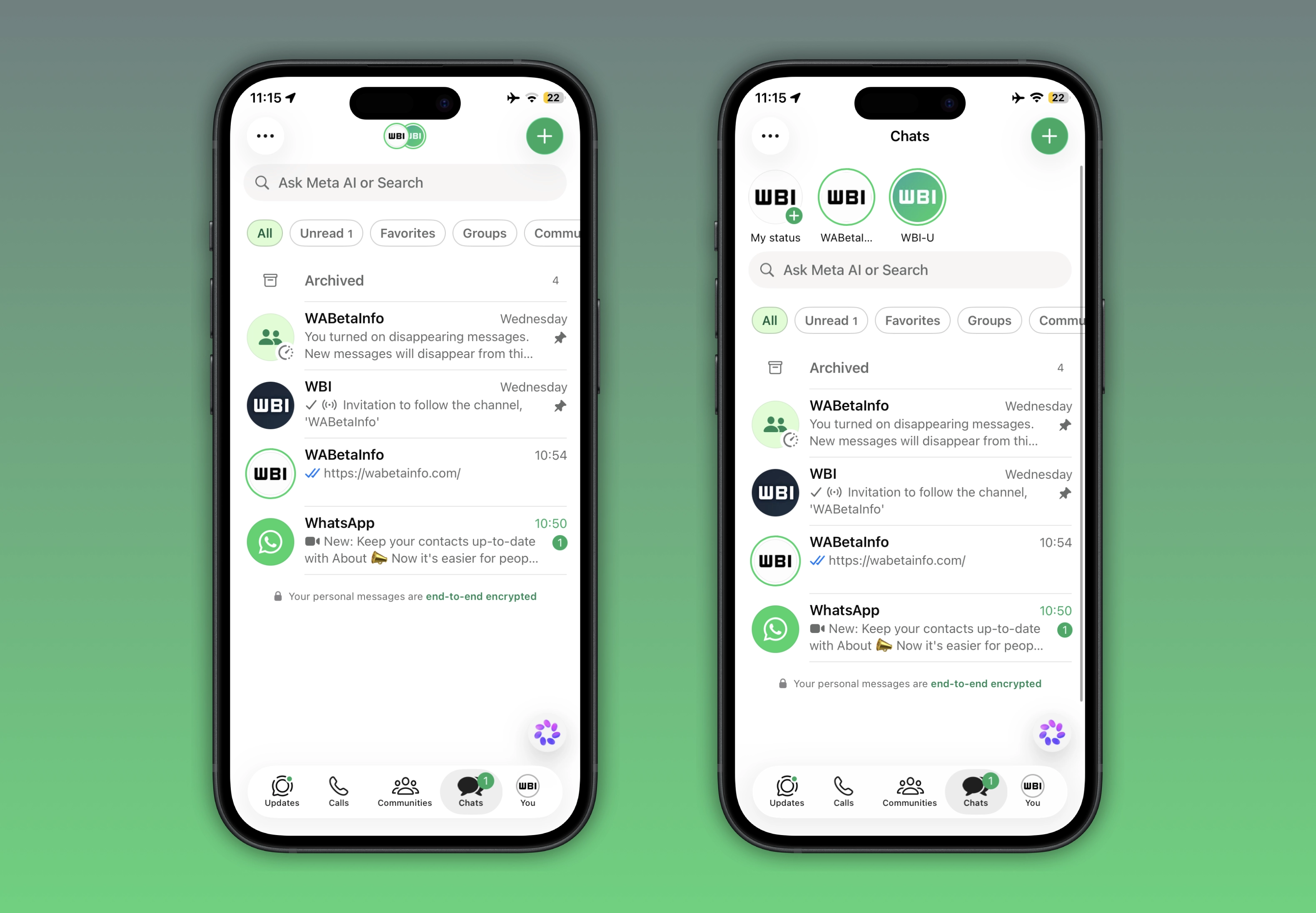
What's new in this update? WhatsApp is rolling out a feature that adds status updates to the top of the Chats tab, and it's available to some beta testers!
| Key Points | Details |
|---|---|
| Name of the feature: | Status updates at the top of the Chats tab |
| Status: | Rolling out |
| Compatibility: | WhatsApp beta for iOS 26.20.10.71 is a compatible update. |
| Availability info: | This feature is available to some beta testers, and it is rolling out to more users over the coming weeks. |
| Thanks: | Akan, for testing and reporting. |
| Previous news: | WhatsApp launches status lists to choose who can see your updates! |
WhatsApp brings status updates directly into the Chats tab on Android
In the post about the WhatsApp beta for iOS 26.14.10.70 update, we announced a feature that brings status updates to the top of the Chats tab. This feature introduces a new way for users to quickly view recent status updates directly from the top of the Chats tab. For this reason, users will reduce the need to open the Updates tab. This placement may also encourage greater engagement with status updates, since they remain constantly visible at the top of the chat list.
WhatsApp expands status updates at the top of the Chats tab to iOS
WhatsApp has initially rolled out this feature with the WhatsApp beta for Android 2.26.17.1 update. So Android beta testers had the opportunity to try and evaluate it a few weeks ago. It appears that WhatsApp is now committed to aligning both platforms by introducing the same feature to the iOS app as well. Following the release of the latest WhatsApp beta for iOS 26.20.10.71 update, which is available on the TestFlight app, we discovered that WhatsApp is rolling out a feature that adds status updates to the top of the Chats tab.
WhatsApp lets users access status updates from multiple entry points
Users can view status updates from multiple entry points. The primary location is the Updates tab, where all status updates are organized in a horizontal feed. In this section, users can also see previews of recent updates from their contacts without necessarily opening them. In the Chats tab, WhatsApp highlights contacts who have posted a status update with a ring around their profile photo. This indicator allows users to quickly notice new status activity directly within their chat list. Additionally, status updates can be accessed from a contact's chat info page. In the chat info screen, users are able to view the status shared by that specific contact.
WhatsApp highlights status updates in the navigation bar within the Chats tab
After installing the most recent updates, WhatsApp is introducing a horizontal status feed at the top of the Chats tab. When users open WhatsApp and their contacts have shared status updates, these will appear in the navigation bar area. Specifically, status updates will replace the "Chats" title. This placement brings status updates to the forefront so users can immediately notice them. To improve the interface design, WhatsApp is also removing the camera shortcut button from this section. By removing the camera entry point, WhatsApp wants to keep the navigation bar cleaner and less cluttered. As a result, the top of the Chats tab becomes more focused on status updates.
WhatsApp reveals a minimal status feed when users scroll through the chat list
To view the horizontal status feed, users need to scroll down the chat list. This action reveals the feed in a minimal interface designed to reduce visual clutter. Within this view, users can quickly see who has shared a status update and what it contains. From this interface, users can also create and share a new status update. The creation process follows the standard flow already available in the Updates tab.
WhatsApp tests a more centralized status experience that could reshape Updates tab usage
This centralization of status updates within the Chats tab should reduce reliance on the Updates tab. When users can already see all status activity in their main chat list, they may not need to open the Updates tab just to catch up on what they contacts share. As a result, the Updates tab may become less frequently used for casual viewing of contact updates. It is important to note that this feature is still in a testing phase. For now, the status feed in the Chats tab does not include any advertisements between updates. However, this could change in the future if WhatsApp will officially roll out the feature to all users.
WhatsApp is rolling out status updates at the top of the Chats tab on iOS
The feature that adds status updates to the top of the Chats tab is available to some beta testers who install the latest WhatsApp beta for iOS update from TestFlight. Note that a limited number of users may also be able to test the feature even through the version available on the App Store. Over the coming weeks, WhatsApp will expand access to more users. This will let users experience the redesigned interface and explore how status updates are integrated into the Chats tab.
Connect with WABetaInfo
Follow WABetaInfo on X to learn more about new features and updates. We love hearing your feedback, so please let us know what you think! You can also visit our About page to explore all our services and keep up with the latest announcements.