WhatsApp is rolling out a new chat theme update for iOS
WhatsApp is introducing five new categories for chat themes to iOS users, and one of these lets them choose animated wallpapers. WhatsApp also selects the bubble color automatically for every theme to keep the text readable and the interface accessible. The update makes the conversation screen more personal by giving users more control over how their chats look.
| Key Points | Details |
|---|---|
| Feature: | New chat theme categories for iOS |
| Status: | Rolling out |
| Compatibility: | WhatsApp Messenger for iOS 26.33.73 on the App Store is a compatible update. |
| Availability info: | This feature is available to some users on the App Store version. |
| Previous news: | WhatsApp is testing Scam Alert as a limited beta feature! |
WhatsApp was developing new chat theme categories for iOS
In the post about the WhatsApp beta for iOS 26.31.10.74 update, we announced a new set of chat themes. WhatsApp was working on three categories: Featured, Doodle, and Minimal. They tailor the chat experience to different styles, giving users more control over how their conversations look. When users choose a theme, WhatsApp selects the bubble color automatically to keep the interface balanced and readable.
WhatsApp is now rolling out the update to some users
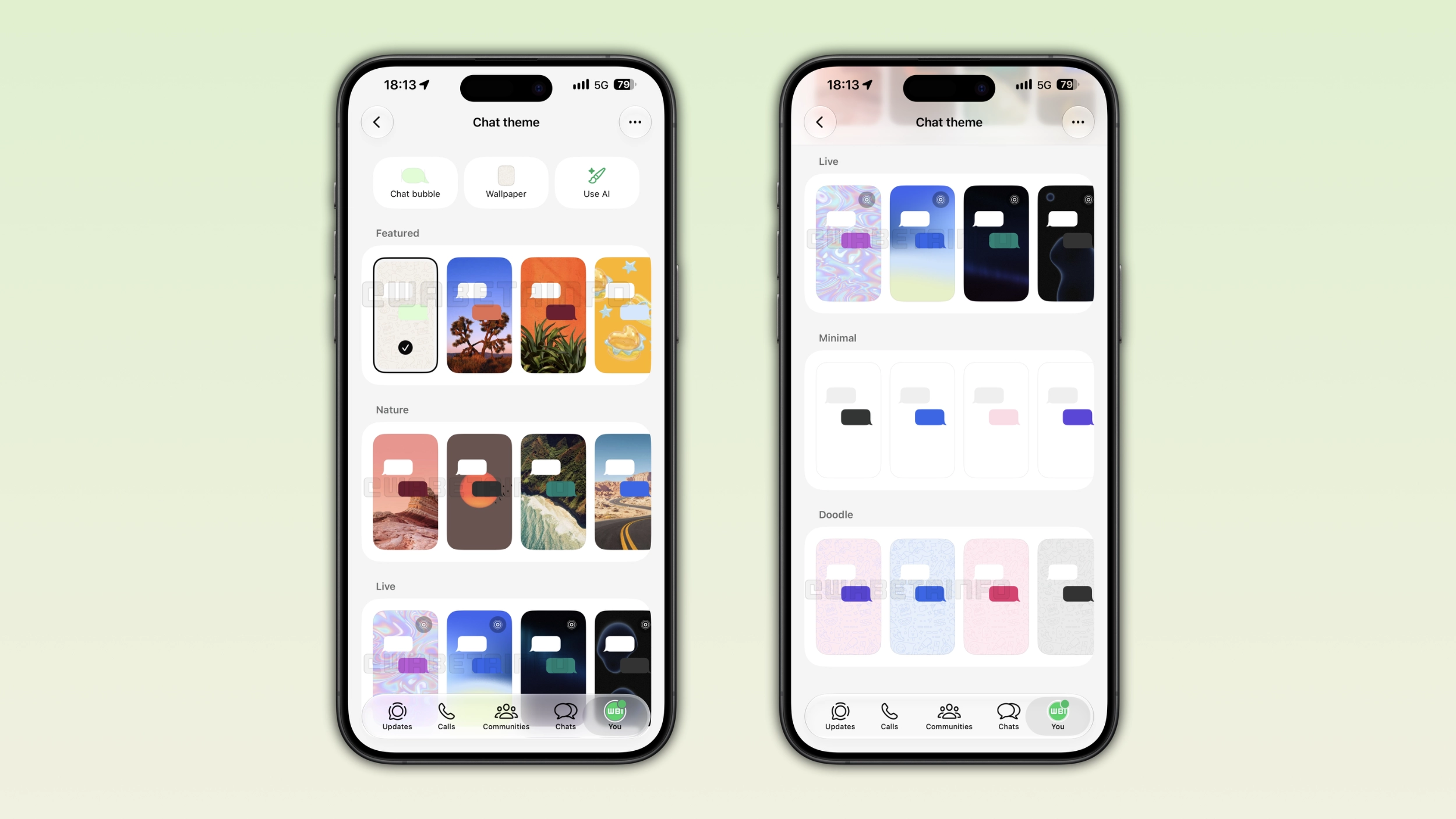
WhatsApp is finally expanding the theme selection with five distinct categories. This is more than what we announced initially, when WhatsApp only worked on three categories. Five categories make the chat theme picker one of the most complete WhatsApp has ever offered. This is the news we discovered after installing the WhatsApp for iOS 26.33.73 update, which is available on the App Store. With this update, WhatsApp is rolling out five categories for chat themes: Featured, Nature, Live, Minimal, and Doodle.
The Featured category highlights WhatsApp's top picks
The Featured category does not include specific wallpapers. Instead, WhatsApp's design team curated a selection of the best themes available. This category allows users to choose the themes WhatsApp considers the best from the entire collection. Themes in this category can mainly belong to Nature and Live, but WhatsApp may also include exclusive themes in this section. Users who do not know which theme to choose can start here to find something they may like. Users can consider this category as the recommended section of the theme picker.
The Nature category brings natural landscapes to your chats
The Nature category offers themes that bring outdoor landscapes to the chat screen. Users can find themes with dark mountain ranges, green forest scenes, ocean landscapes, and more. Users who prefer something totally new will find this category a good place to start. Even themes in this categories pair with a bubble color that WhatsApp assigns automatically to keep the contrast readable.
The Live category introduces animated wallpapers
Live is the most distinctive category for this update. This category features wallpapers that move slowly in the background. WhatsApp marks these themes by a small Live icon in the top right corner of its thumbnail. This makes it easier for users to recognize themes with an animated wallpaper, even when they are listed into the Featured category. About the animation, WhatsApp keeps it deliberately slow, just enough to give the background a dynamic feel. This is important since a faster animation would distract users from reading their messages. It could also cause discomfort for people with certain accessibility needs. As a result, this is not a technical limitation, but it is a perfect design choice.
The Minimal category keeps the interface clean
Minimal themes are at the opposite end from Live. They apply a plain background to the chat screen: white in light mode and dark in dark mode. They have no patterns or animation of any kind. With these themes, users can keep the focus on the conversation. Users who find some wallpapers distracting can choose themes from this category. Minimal themes also pair well with many bubble colors, and WhatsApp assigns one automatically to complement the plain background.
The Doodle category brings WhatsApp's classic patterns
Themes in the Doodle category use the classic pattern from the default wallpaper. A Doodle theme has a familiar and consistent design with WhatsApp's own identity. Users who like the doodle wallpaper can choose a theme from this category. It is a familiar choice for those users who want something recognizable rather than something completely new.
WhatsApp assigns bubble colors automatically for every theme
WhatsApp always selects the bubble color automatically. This means that users do not need to adjust the bubble color manually. WhatsApp chooses the color that works well with the chat wallpaper to ensure enough contrast for the text. This keeps the contrast consistent so the text is always easy to read on any theme. Note that users who want a different color can still change it manually at the top of the screen. However, the default color already works well for most situations.
WhatsApp is rolling out the new chat themes for iPhone users
The five chat theme categories are available to some users who install the latest WhatsApp update from the App Store. The feature is also available to some beta testers after installing the latest beta version from TestFlight. WhatsApp is rolling out this functionality gradually, so not every user will see it after installing the update. If the categories do not appear yet in the theme picker, they should become available to more accounts over the coming weeks. WhatsApp has not announced when this feature will be available to everyone.
Connect with WABetaInfo
Follow WABetaInfo on X and visit our About page to learn more about what we do. We always appreciate your feedback on posts like this one.