WhatsApp is testing Scam Alert as a limited beta feature
WhatsApp is gradually introducing a feature that helps users detect potential scam messages from unknown contacts. The functionality relies on a machine learning model, so messages never leave the device. Since WhatsApp detects scam messages on the device, the feature is fully compatible with end-to-end encryption.
| Key Points | Details |
|---|---|
| Feature: | Scam Alert |
| Status: | Limited rollout |
| Compatibility: | WhatsApp beta for Android 2.26.34.2 is a compatible update. |
| Availability info: | This feature is available to some beta testers, and it is rolling out to more accounts in the future. |
| Thanks: | Sc, FastenM, shw_9876, and Muhammad Hammad, for testing and reporting. |
| Previous news: | WhatsApp launches three new account security updates! |
WhatsApp was developing a tool to flag suspicious messages
In the post about the WhatsApp beta for Android 2.26.22.2 update, we announced a new feature called Scam Alert. This functionality would warn users when a message from an unknown contact is a potential scam. When Scam Alert detected a suspicious message, WhatsApp would ask users to block and report the contact, or trust the chat to continue the conversation. This feature is optional and disabled by default, and the sender cannot see when the other person uses Scam Alert.
WhatsApp is introducing Scam Alert to a limited number of Android beta testers
WhatsApp worked on Scam Alert for several weeks before making it available to the public. WhatsApp worked on the on-device model and the system that identifies suspicious messages locally. Now, WhatsApp can detect potential scams without reading the content of a message. With the latest WhatsApp beta for Android 2.26.34.1 update, which is available on the Google Play Store, some beta testers can finally enable Scam Alert. This feature improves how WhatsApp protects users from suspicious accounts, without compromising the privacy of their conversations.
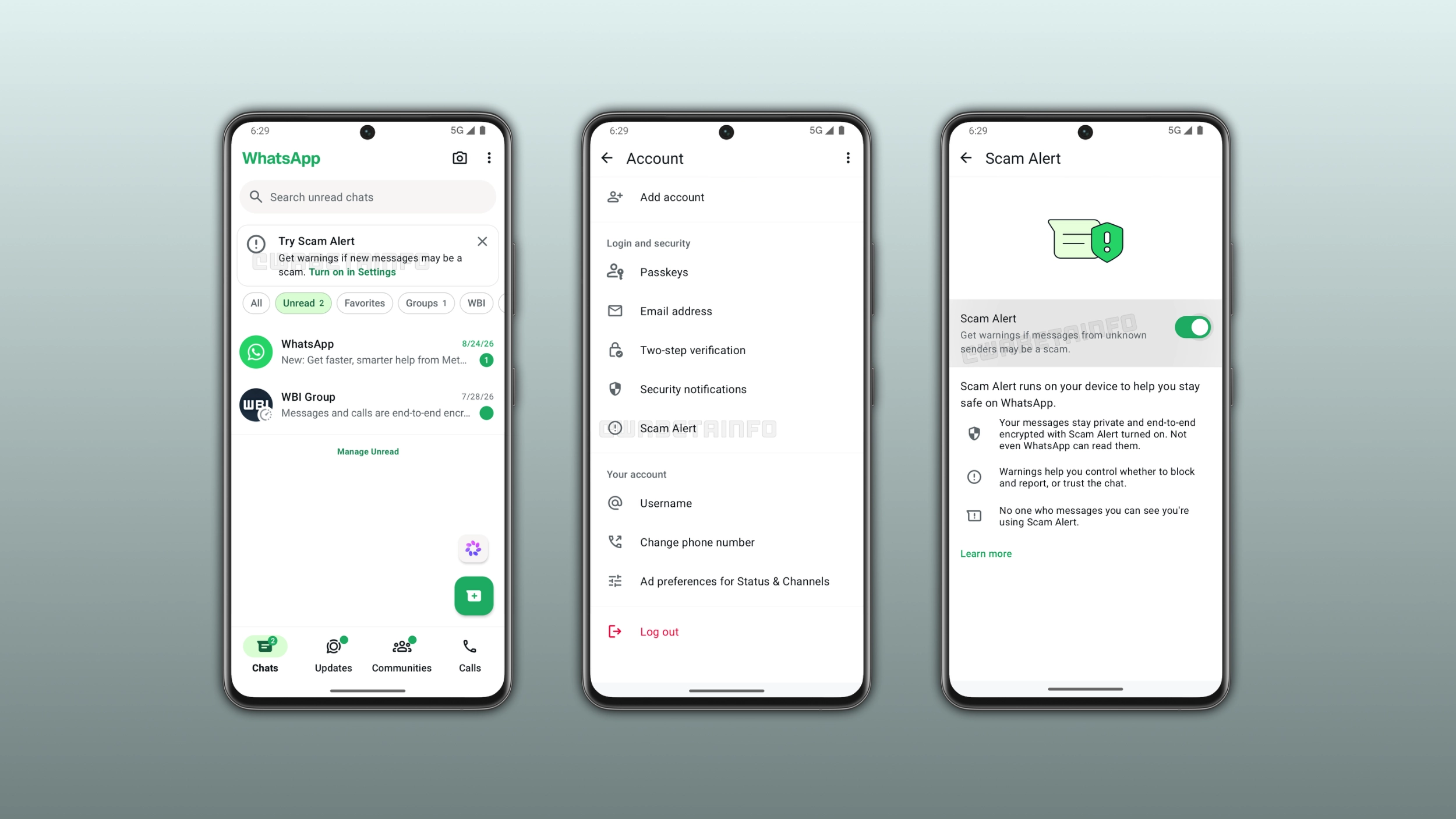
How to enable Scam Alert on your Android device
Beta testers who want to enable Scam Alert can find the option right within the account screen. When they enable this option, the feature monitors incoming messages from unknown contacts. WhatsApp uses an on-device model to analyze incoming messages and flag those that match known scam patterns. As soon as it detects suspicious messages, WhatsApp immediately alerts users with a warning right within the chat. Users can disable this feature from the same account screen at any time.
What happens when Scam Alert detects a suspicious message
When the on-device model flags an incoming message as a potential scam, WhatsApp shows a warning that says "This may be a scam". The warning is only visible to the user who received the message. This means that the sender never knows that it appeared. Users can block and report the contact, which prevents the scammer from sending new messages. The option also sends a report to WhatsApp, making it simpler to flag the scammer. Users can also mark the chat as trusted to remove the warning and tell Scam Alert not to flag the contact again.
How Scam Alert works without reading your messages
Meta published a detailed engineering blog post to explain how Scam Alert works. The feature runs a machine learning model on the user's device. When a message arrives from an unknown contact, the model analyzes its content locally to determine whether it matches known scam patterns. With this feature, the app does not send messages to WhatsApp, Meta, or any external server during this analysis. Meta trained the model on patterns observed in scam conversations from reports that users manually sent to WhatsApp. To improve detection over time, WhatsApp downloads updated model versions in the background without requiring an app update.
How Meta ensures the model cannot be used to target specific users
All users use the same model, as Meta built the system to make it impossible for anyone to send a different model to a specific user. Meta records every version on a public transparency log before it is distributed to any device. The app verifies the model's integrity before downloading the update. When a device requests an update for the model, the request goes through a relay that removes the user's IP address. This makes it impossible for the server to identify who is making the request. Meta also expanded the Bug Bounty program to include Scam Alert. With this expansion, Meta is inviting external security researchers to verify that the model only detects scams and nothing else.
What users can share to help improve Scam Alert
When users mark a suspicious chat as trusted, WhatsApp gives them the option to share the last five messages from the conversation with WhatsApp. This helps the team understand when the model produces a false positive. WhatsApp can also improve the model accuracy over time by considering new scam patterns. Since reporting is optional, users can choose not to share the last five messages.
How users can review Scam Alert activity on their device
Users can review an activity log to understand how Scam Alert works. The log allows users to see when they enabled the feature, the messages it flagged, and the model used. WhatsApp stores these logs on the device, and they are never shared with Meta. As a result, these logs let users verify how the feature works on their own phone.
Scam Alert is optional and users remain in control
Users are in full control of Scam Alert at every step. The feature is disabled by default, so users need to enable it manually. Once they enable Scam Alert, it only monitors messages from unknown contacts. Users can mark a chat as trusted to stop Scam Alert from flagging it. Users will be able to disable the feature at any time. In addition, every action requires the user to make a deliberate choice.
WhatsApp is gradually rolling out Scam Alert to some Android beta testers
This feature is available to some beta testers who install the latest WhatsApp update from the Google Play Store. At the moment, the rollout is very limited and focused on the Android app. This means that only a small number of accounts can enable this feature. Since WhatsApp is rolling out this functionality gradually, it is not available to all users after installing the latest update. For the iOS app, WhatsApp will release the feature at a later date. WhatsApp has not announced when it will be available to everyone.
Connect with WABetaInfo
Follow WABetaInfo on X and visit our About page to learn more about what we do. We always appreciate your feedback on posts like this one.