WhatsApp adds parental controls to the Android settings screen
WhatsApp is introducing a dedicated section to make parental controls easier to find. The new entry point is now visible directly within the settings screen, where parents can find it right away. This makes a feature that was already available much easier to discover and set up.
| Key Points | Details |
|---|---|
| Feature: | Parent controls entry point in settings |
| Status: | Rolling out |
| Compatibility: | WhatsApp beta for Android 2.26.29.5 is a compatible update, but some users may get the same feature by installing certain previous updates. |
| Availability info: | This feature is available to some beta testers, and it's rolling out to more users over the coming weeks. |
| Previous news: | WhatsApp launches a new design for message bubbles on iOS! |
WhatsApp launched parent-managed accounts earlier this year
Back in March, WhatsApp officially launched parent-managed accounts. This feature gives parents visibility into their child's account activity without reading the child's messages. Parents can link their account to their child's account directly within the app. Once they link their accounts, WhatsApp moves messages from unknown contacts into a separate inbox called "Requests". Then, the parent can review and approve these requests from their devices. The child keeps full privacy over their conversations since the parent can only see account-level activity.
WhatsApp is now making parental controls easier to find
The parent-managed account is not a new feature. WhatsApp released it about four months ago. However, not everyone knows where to look to configure it. WhatsApp is now addressing that by adding a dedicated "Parent controls" entry point to the settings screen. This is the news we discovered with the WhatsApp beta for Android 2.26.29.5 update, which is available on the Google Play Store. Specifically, WhatsApp is rolling out a new "Parent controls" section to some beta testers.
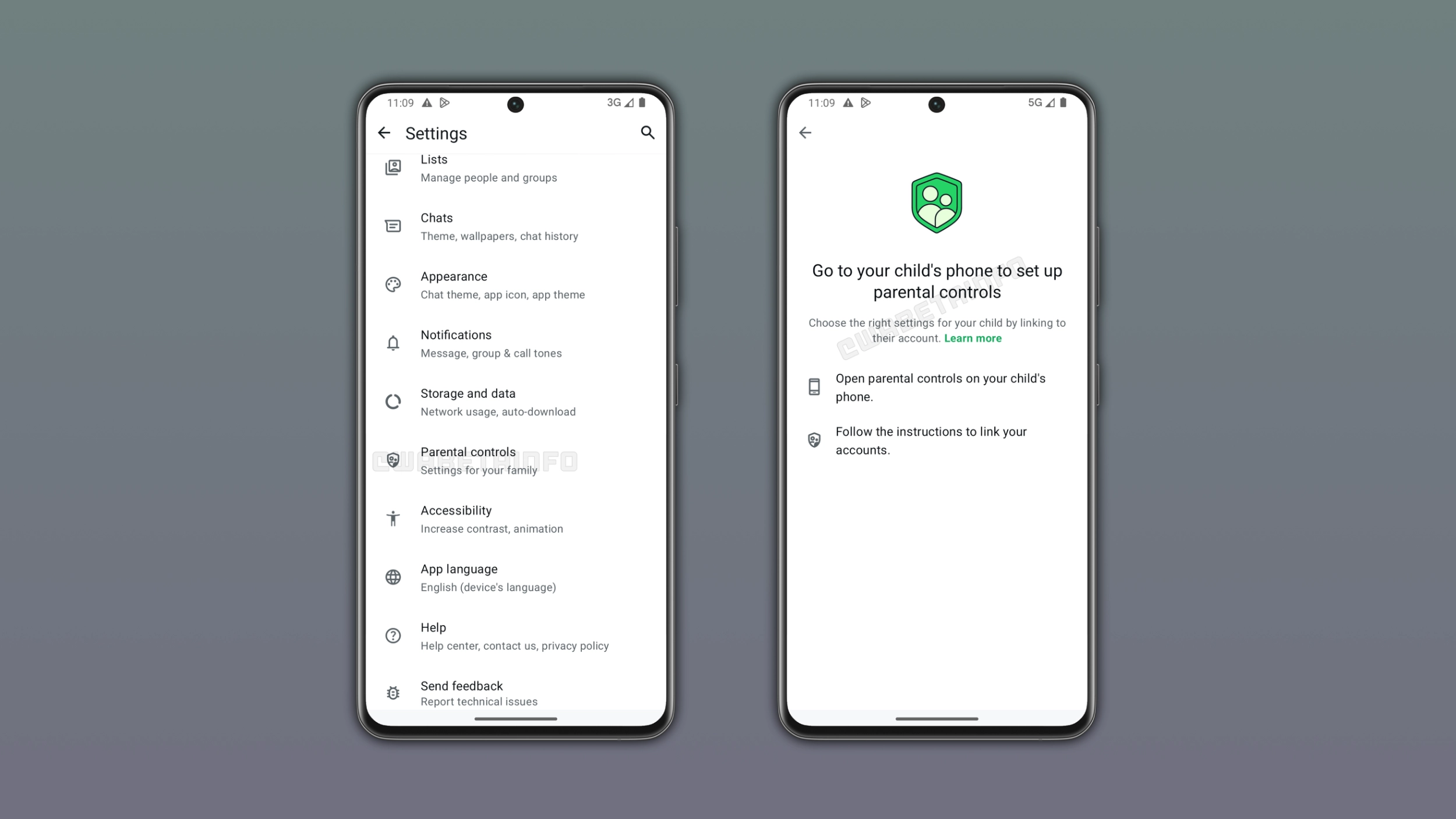
What the Parent controls section shows on the parent's device
When a parent opens the "Parent controls" section, WhatsApp explains what the feature does and how to set it up. WhatsApp instructs parents to pick up the child's phone and open the same "Parent controls" section. Here, the parent must follow the steps to link the two accounts. WhatsApp guides the parent through the process without requiring any technical knowledge.
What appears on the child's device
On the child's side, WhatsApp shows the appropriate screen based on whether Meta has already identified the account as belonging to a minor. When Meta already knows the account belongs to a minor, just like when it turns on the username key by default, WhatsApp shows the right setup screen automatically. If the child is not yet logged in, the option to set up parental controls appears directly on the login screen, just as it did before this update. As a result, parents do not need to search for the option regardless of the child's account status.
How to set up parental controls from the child's device
Once the parent has the child's phone, it is easy to configure the account. The parent opens the app settings on the child's device and taps "Parent controls". Here, WhatsApp walks through the steps to connect the two accounts, including a verification step to confirm the relationship between parent and child. Only authorized guardians can complete this step, so users cannot link the child's account to a random account by mistake.
What parents can and cannot see
Just like before, parents who link their account to a child's account do not get access to the child's messages. The connection focuses entirely on account-level activity. Parents can receive notifications when the child adds a new contact, changes account settings, or receives a message request from an unknown number. They can review and approve those requests, but messages and calls remain private. WhatsApp made a clear choice here: parents know what is happening, but nobody outside the conversation can read its content.
The child can see that the account is linked
WhatsApp does not hide the parental connection from the child. The child can see that WhatsApp linked their account to their parent's account, and they know what information is visible. This transparency is intentional. With this feature, children are already aware of the oversight from the start, rather than finding out about it later.
Why WhatsApp is highlighting this feature now
WhatsApp added parent-managed accounts some months ago, but many families never set them up since they did not know the option existed. A dedicated entry point in the settings could make a real difference from the start. By adding the "Parent controls" entry point, WhatsApp brings the feature to a spot where parents are more likely to notice it. It is the same feature it always was, just easier to find.
WhatsApp is rolling out the Parent controls section on Android
The new entry point for parent controls is currently available to some users on the latest versions of WhatsApp for Android. WhatsApp is rolling out the entry point gradually. This means that you may not see it right now. If the section is not yet visible in the app settings, it should become available to more accounts over the coming weeks. WhatsApp has not announced when this will be available to everyone.
Connect with WABetaInfo
Follow WABetaInfo on X and visit our About page to learn more about what we do. We always appreciate your feedback on posts like this one.