WhatsApp is rolling out group voice and video calls on the Web
WhatsApp is finally expanding voice and video calling to group chats on the web, making it easier for users to start calls directly from their browser. The update builds on the individual calling support that rolled out earlier this year. The feature allows beta testers to experiment with group voice and video calls on the web for the first time.
| Key Points | Details |
|---|---|
| Name of the feature: | Voice and video calls in group chats |
| Status: | Rolling out |
| Availability info: | This feature is available to some beta testers, and it is rolling out to more users over the coming weeks. |
| Thanks: | Sc and 2gigabitguru, for testing and reporting. |
| Previous news: | WhatsApp is working on scheduled messages on iOS! |
WhatsApp introduced voice and video calling on the web
In February 2026, we announced that WhatsApp was rolling out voice and video calling on the web client for the first time. This feature allows users to place calls with their contacts directly from their browser without installing the desktop app. However, the update only covered individual chats since group calling was still under development at the time. Even on WhatsApp Web, calls are secured by end-to-end encryption and include support for screen sharing during video calls.
WhatsApp beta is now expanding web calling to group chats
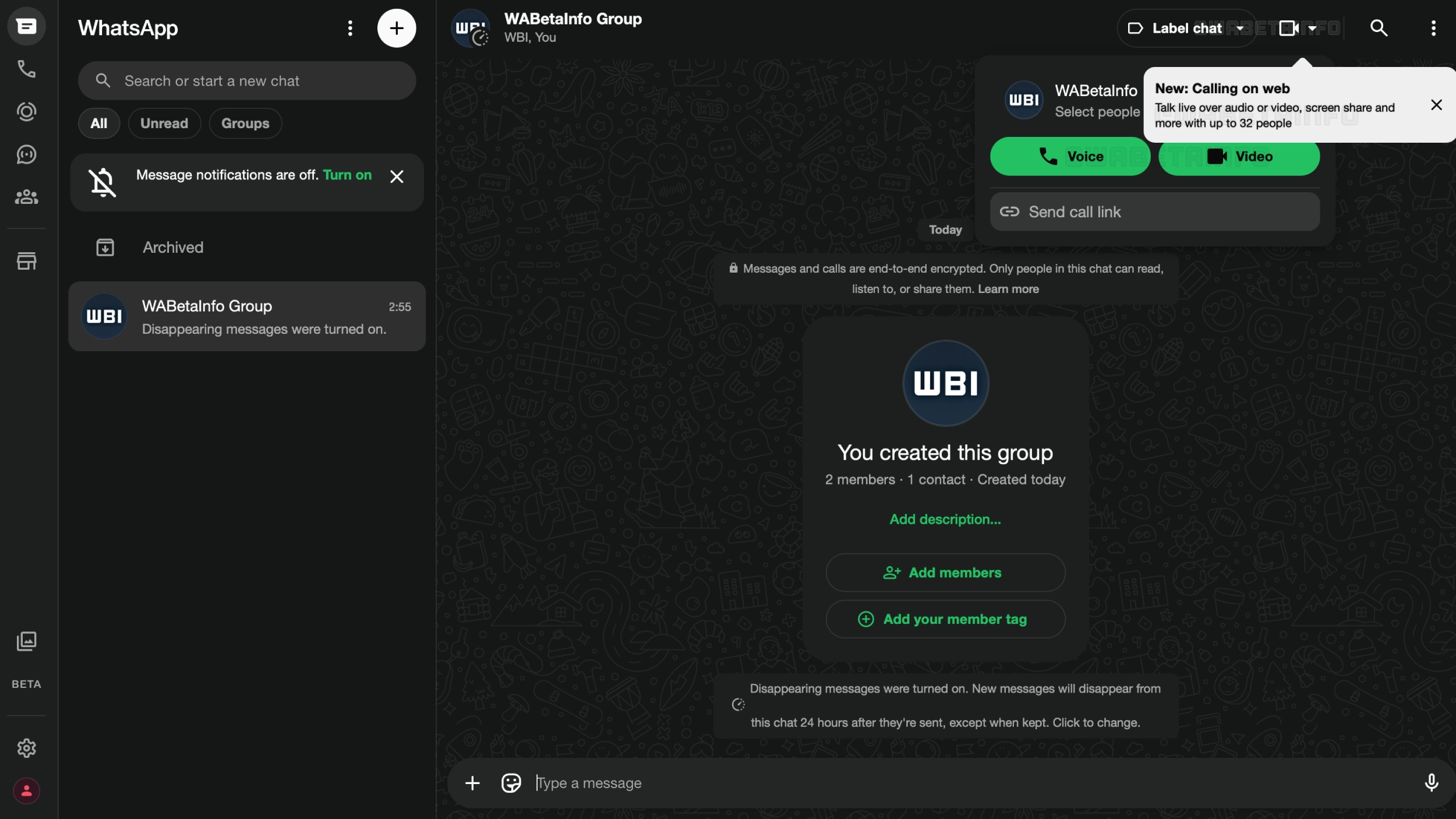
After rolling out individual calls, WhatsApp is now taking the next step by introducing voice and video calling to group chats on the web. Instead of limiting calls to individual chats, WhatsApp is expanding this feature to group chats as well. This means that some beta testers can now start a group call from their browser. Additionally, this update brings the web client closer to the full calling experience available on mobile and desktop.
How to start a group call on WhatsApp Web and check if it is available
Starting a group call on WhatsApp Web works the same way as in individual chats. After opening a group chat, you should look for the call button at the top of the conversation. If you can see the call button, the feature is already available for your account. Clicking the button will let you choose between a voice call and a video call before connecting with the group. In addition, users can select people to include in the group call. This gives users the option to call a specific subset of the group instead of including everyone automatically.
Group calls on WhatsApp Web support up to 32 participants
Group calls on WhatsApp Web support up to 32 participants, matching the limit already in place on mobile and desktop. This applies to both voice and video calls, so there is no difference between the two in terms of how many people can join. Whether you are catching up with family or joining a work meeting, the limit is rarely a constraint. For most people, 32 participants is more than enough.
Group calls on WhatsApp Web are end-to-end encrypted
Just like individual calls on the web, group calls are protected by end-to-end encryption. This means that only the participants in the call can hear the conversation, and not even WhatsApp or Meta can access its content. Encryption is applied automatically using the Signal protocol, the same technology that protects all messages and calls on WhatsApp. No special settings are required to enable it, as it works by default for every call regardless of how many participants are on the line.
WhatsApp Web introduces call links for group calling
Group calls offer call links, making it simple to invite someone to join. Users can generate a link and share it with anyone, who can then tap it to join the call. Every call link has a unique and secure URL, so no one can guess or replicate it. They expire automatically after 30 days of inactivity. For calls that require more control over who can join, users can also enable a waiting room. Note that anyone with the link can join the call, so you should only share it with people you trust.
Group video calls on WhatsApp Web support screen sharing
Screen sharing is available during group video calls on WhatsApp Web, just as it is for individual video calls. This allows participants to show their screen in real time directly from the browser, making it easier to present documents, and slides during a call. However, screen sharing is only available during video calls and does not work during voice calls. As always, it is important to be mindful of what is visible on your screen before sharing, since all participants in the call will be able to see everything you display.
Group calls on the Web matter most for Linux and Windows users
This update matters a lot for users who use WhatsApp primarily from the browser. On Windows, some users prefer not to use the desktop app and have been using WhatsApp Web as their primary interface. For Linux users, the impact is even greater: since WhatsApp does not offer a desktop app for Linux, users on that platform have always had to switch to their phone to join a group call. With this update, Linux users can finally participate in group calls directly from their browser, without needing their mobile device at all.
WhatsApp is rolling out group calls on the Web to beta testers
Group voice and video calls on WhatsApp Web are available to some users enrolled in the WhatsApp Web beta program. WhatsApp is currently testing this feature with a limited number of beta testers, and it is not yet available to everyone. If you do not see the call button in your group chats after signing into WhatsApp Web, the feature may be available to your account in a future update. WhatsApp has not announced an official timeline for the stable version. However, we expect the feature to reach more users over the coming weeks.
Connect with WABetaInfo
Follow WABetaInfo on X and visit our About page to learn more about what we do. We always appreciate your feedback on posts like this one.