WhatsApp beta is testing notification bubbles on Android
WhatsApp is working on notification bubbles to improve how conversations appear on Android in the future. This feature is designed to make messaging more accessible, faster, and better integrated into the system.
| Key Points | Details |
|---|---|
| Name of the feature: | Notification bubbles |
| Status: | Under development |
| Availability info: | This feature is currently in development, and it is not available for beta testing. In the meantime, you can read this article for a sneak peek. |
| Previous news: | WhatsApp beta for Android 2.26.16.7: what's new? WhatsApp is rolling out a feature that lets users quickly create and copy stickers from images! |
WhatsApp will redesign the top app bar with a logo
Last week, we reported that WhatsApp is working on a redesigned top app bar. In the new layout, WhatsApp plans to replace the app name with its official logo in the top bar. The app name in the top app bar has been a recognizable navigation pattern for users since 2013. Due to the potential introduction of status updates in the top app bar, WhatsApp may need to reorganize this area by redesigning the interface with the official logo.
WhatsApp is exploring new ways to respond to messages
The redesigned top app bar is just one part of what WhatsApp is working on for the future. WhatsApp is also experimenting with new tools aimed at offering a faster messaging experience. These features are designed to simplify how people interact with their contacts in order to make the flow of the conversation feel more immediate. At the same time, they are expected to integrate more closely with the operating system.
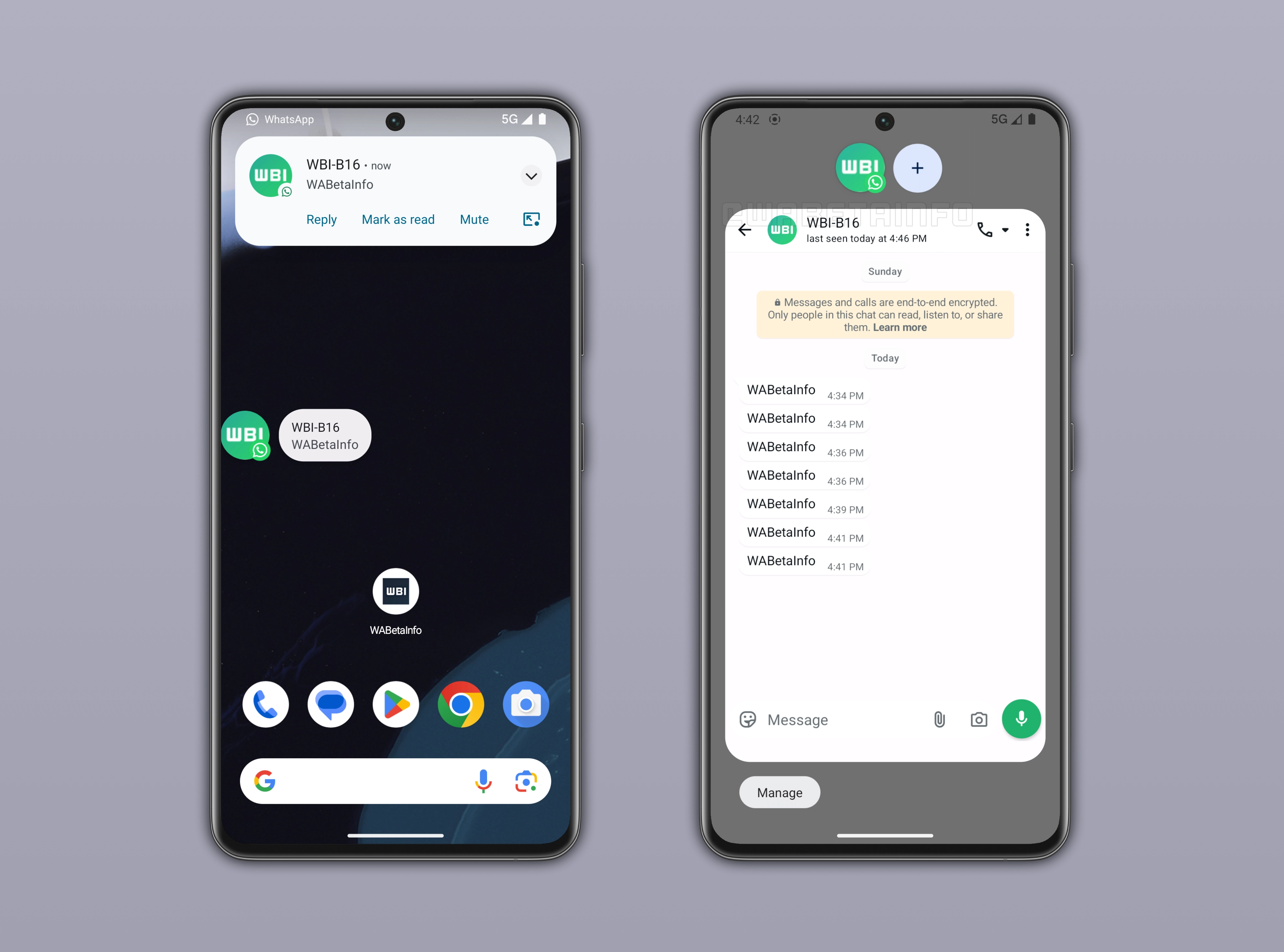
WhatsApp is working on notification bubbles
WhatsApp is working on integrating Android's notification bubbles feature into its messaging experience. Notification bubbles allow conversations to appear as floating icons on the screen, making it easier for users to access their chats without leaving the current app. This system will offer a real-time messaging experience, and it is deeply tied to the Android notification framework. Bubbles will support ongoing conversations by keeping them accessible and interactive at all times. Users will be able to disable this feature at any time if they find it intrusive.
How notification bubbles work on WhatsApp
WhatsApp bubbles will work in the same way as in other apps that support this feature on Android. When a message arrives from a contact or a group, a floating bubble appears on the screen regardless of which app is currently in use, whether it is the home screen or a third-party app like Instagram. Notification bubbles display the contact's profile picture from WhatsApp, and they include a small WhatsApp icon to indicate the message source. Tapping the bubble opens a compact version of the WhatsApp chat interface. This will allow users to read and reply to messages directly without fully opening the app. As a result, the notification bubble is designed as a quick messaging window that keeps conversations accessible at all times.
Android compatibility and availability of notification bubbles
Notification bubbles are officially supported starting from Android 10, but it seems that their functionality is very limited. On Android 11 and later, bubbles became more stable and better integrated into the system, making them more widely usable for messaging apps like WhatsApp. The feature is still dependent on app support and system settings. This means that not every device or configuration will enable it by default. Users will have to check if the system allows apps to show bubbles by opening the Settings app. Since newer Android versions provide a smoother experience for bubbles, WhatsApp may choose to enable this feature only on devices running newer versions than Android 10 in the future.
How notification bubbles improve multitasking on WhatsApp
This feature will be particularly useful in situations where users need to multitask without interrupting what they are doing. For example, someone might be watching a video. When a WhatsApp bubble appears, it will allow them to quickly open the conversation without leaving their current screen. This will make it easier to reply since users can respond instantly and see the latest messages shared in the conversation. Instead of switching back and forth between the current app and WhatsApp, users will be able to handle conversations without leaving the app they are currently using.
Notification bubbles are under development
Notification bubbles are currently under development, and they will be available in a future update. WhatsApp is refining how the feature integrates into the app to ensure a smooth experience. Once testing is complete, WhatsApp will gradually roll out the feature to select beta testers. These users will be able to start experimenting with a more multitasking-oriented messaging experience.
Connect with WABetaInfo
Follow WABetaInfo on X to learn more about new features and updates. We love hearing your feedback, so please let us know what you think! You can also visit our About page to explore all our services and keep up with the latest announcements.