WhatsApp beta for Android 2.26.16.7: what's new?
WhatsApp has released a new Android update through the Google Play Beta Program, bringing the version up to 2.26.16.7.
What's new in this update? WhatsApp is rolling out a feature that lets users quickly create and copy stickers from images, and it's available to some beta testers!
| Key Points | Details |
|---|---|
| Name of the feature: | Create and copy stickers from images |
| Status: | Rolling out |
| Compatibility: | WhatsApp beta for Android 2.26.16.7 has been designated as a compatible update, but some users may get the same feature by installing certain previous updates. |
| Availability info: | This feature is available to some beta testers, and it is rolling out to more users over the coming days. |
| Thanks: | shw_9876, UnluckyTester, kingcyrious, FastenM, for testing and reporting. |
| Previous news: | WhatsApp beta for Android 2.26.16.1: what's new? WhatsApp is working on a feature that helps users stop messages from business accounts! |
Saving and organizing stickers in WhatsApp
In the post about the WhatsApp beta for Android 2.25.24.23 update, we announced a feature that allows users to create a sticker and store it immediately into their collection. With this functionality, users can decide whether to save the new sticker directly into one of their personal sticker packs. If users don't have a personal sticker pack, they also have the option to quickly generate one. In the same menu, users can also mark the sticker as a favorite. This will make the sticker easy to access without cluttering the entire collection since it can be retrieved quickly from the favorites section whenever needed.
WhatsApp explores a more immediate process to sticker creation
Stickers have become an essential part of modern digital communication. As a result, WhatsApp aims to introduce new ways to make the sticker creation process more immediate. This includes additional shortcuts that allow users to quickly extract elements from images. Following the release of the latest WhatsApp beta for Android 2.26.16.7 update, which is available on the Google Play Store, we discovered that WhatsApp is rolling out a feature that lets users quickly create and copy stickers from images.
Users can create stickers directly from the overflow menu
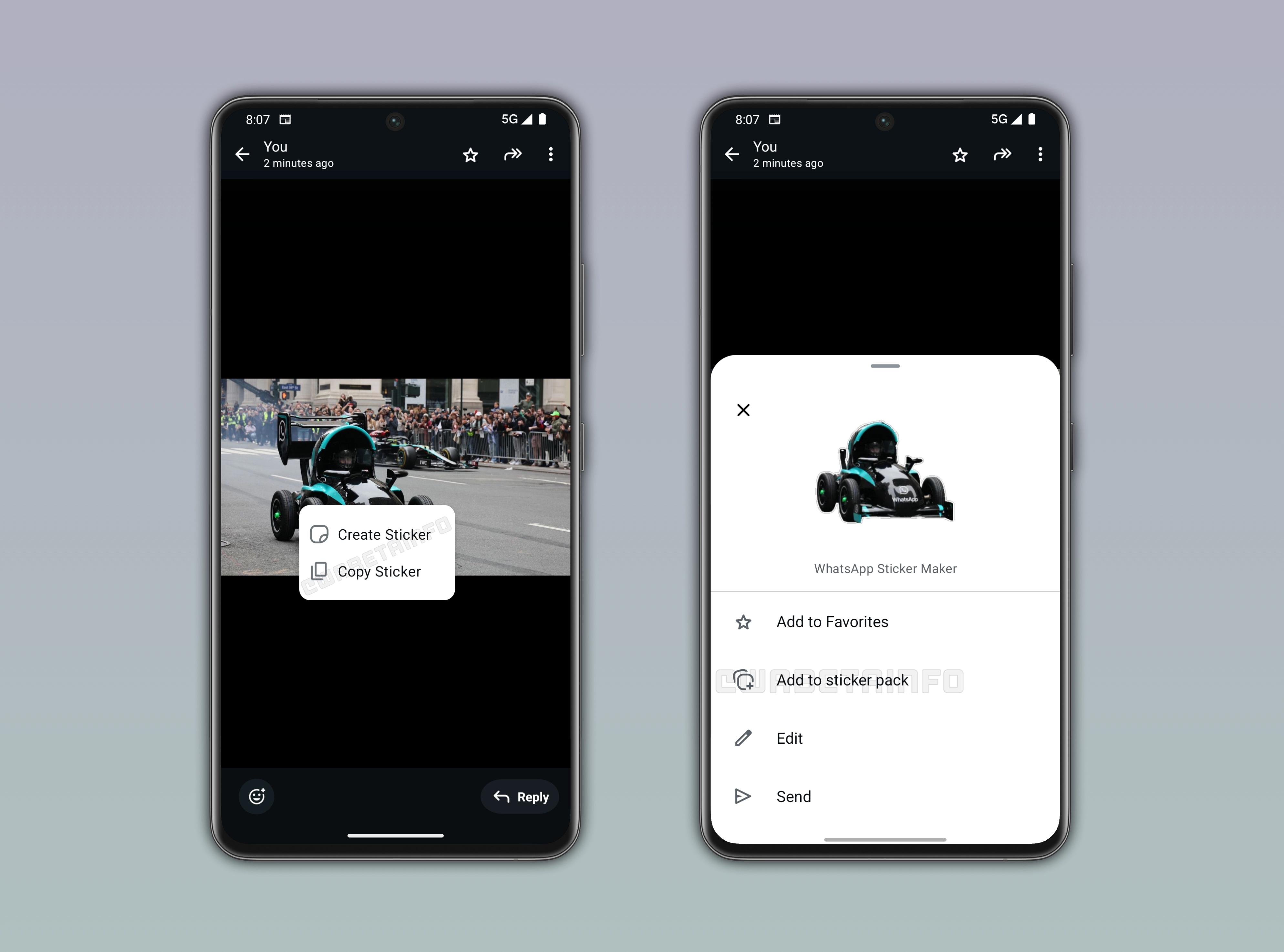
As you can see from the attached screenshot, some beta testers can access a feature that allows them to quickly create stickers. In the previous updates, users could convert an image to a sticker by viewing the photo. In this section, users can select the option "create sticker" from the overflow menu. This action present the sticker editor, where users can choose how the new sticker should be customized before sharing it. Here, they can also choose whether to save the sticker for later use or mark it as a favorite. These actions allow users to decide what to do with the sticker since they can immediately choose whether to save it, favorite it, further edit it, or send it directly in a chat.
A new menu that mirrors the full editor experience
In the latest update, WhatsApp is introducing an additional shortcut to make sticker creation more seamless. When tapping on an image, WhatsApp will display a menu dedicated to sticker creation. This menu includes two options. The first option allows users to open the sticker editor and create a sticker. In the sticker editor, users can choose from different variations which one to use as a sticker, just as they already do normally. Consequently, this shortcut opens the sticker editor, and it performs the same action already available through the overflow menu.
Automatic sticker generation with instant customization options
The second option available in the menu allows users to copy the sticker, and it is the most interesting one. Instead of opening the sticker editor where users can choose from multiple variations, WhatsApp will automatically select the most suitable option as the sticker. After this selection, WhatsApp presents a bottom sheet that offers several actions. Users can add it to their favorites to find it easily later, or include it in a sticker pack. They can also further edit it by opening the sticker editor, or send it directly in the current chat. This makes the option particularly interesting because it allows users to quickly generate a sticker using the most appropriate default variation without any manual selection. As a result, the entire process becomes faster and more efficient. Note that if the feature is not available, WhatsApp will show the reaction tray instead.
Create stickers with a more intuitive flow
This feature is similar to the subject extraction tool available on iOS. On iOS, users can long-press or select a subject within an image, and the system automatically isolates it from the background. From there, the extracted element can be moved into other apps for different uses. In compatible apps like WhatsApp, this extracted content can be turned directly into a sticker. WhatsApp is now bringing a similar experience to Android. By tapping on an image, users will be able to generate a sticker immediately without opening the overflow menu. So, this brings a more direct and streamlined way to create stickers since it reduces the number of steps required to complete the process.
WhatsApp is rolling out the new menu to create stickers on Android
The feature that lets users quickly create and copy stickers from images is available to some beta testers who install the latest WhatsApp beta for Android update from the Google Play Store. This feature is currently available to some beta testers. This means that this feature isn't yet available to everyone. Over the next few weeks, WhatsApp will gradually expand availability, making it easier for users to create and share stickers from their photos.
Connect with WABetaInfo
Follow WABetaInfo on X to learn more about new features and updates. We love hearing your feedback, so please let us know what you think! You can also visit our About page to explore all our services and keep up with the latest announcements.