WhatsApp beta for Android 2.26.22.5: what's new?
WhatsApp has released a new Android update through the Google Play Beta Program, bringing the version up to 2.26.22.5.
What's new in this update? WhatsApp is working on a feature that lets users edit status captions, and it will be available in a future update!
| Key Points | Details |
|---|---|
| Name of the feature: | Edit status caption |
| Status: | Under development |
| Availability info: | This feature is currently in development, and it is not available for beta testing. In the meantime, you can read this article for a sneak peek. |
| Previous news: | WhatsApp to flag potential scam messages without reading your chats! |
WhatsApp brings status updates directly into the Chats tab
In the post about the WhatsApp beta for iOS 26.20.10.71 update, we announced a feature that adds status updates to the top of the Chats tab. With this feature, WhatsApp added a horizontal status feed at the top of the Chats tab. When contacts share new status updates, these will appear directly within the navigation bar. By scrolling down the chat list, users can view the full horizontal status feed. So this centralization of status updates will reduce reliance on the Updates tab.
WhatsApp explores improvements to status sharing features
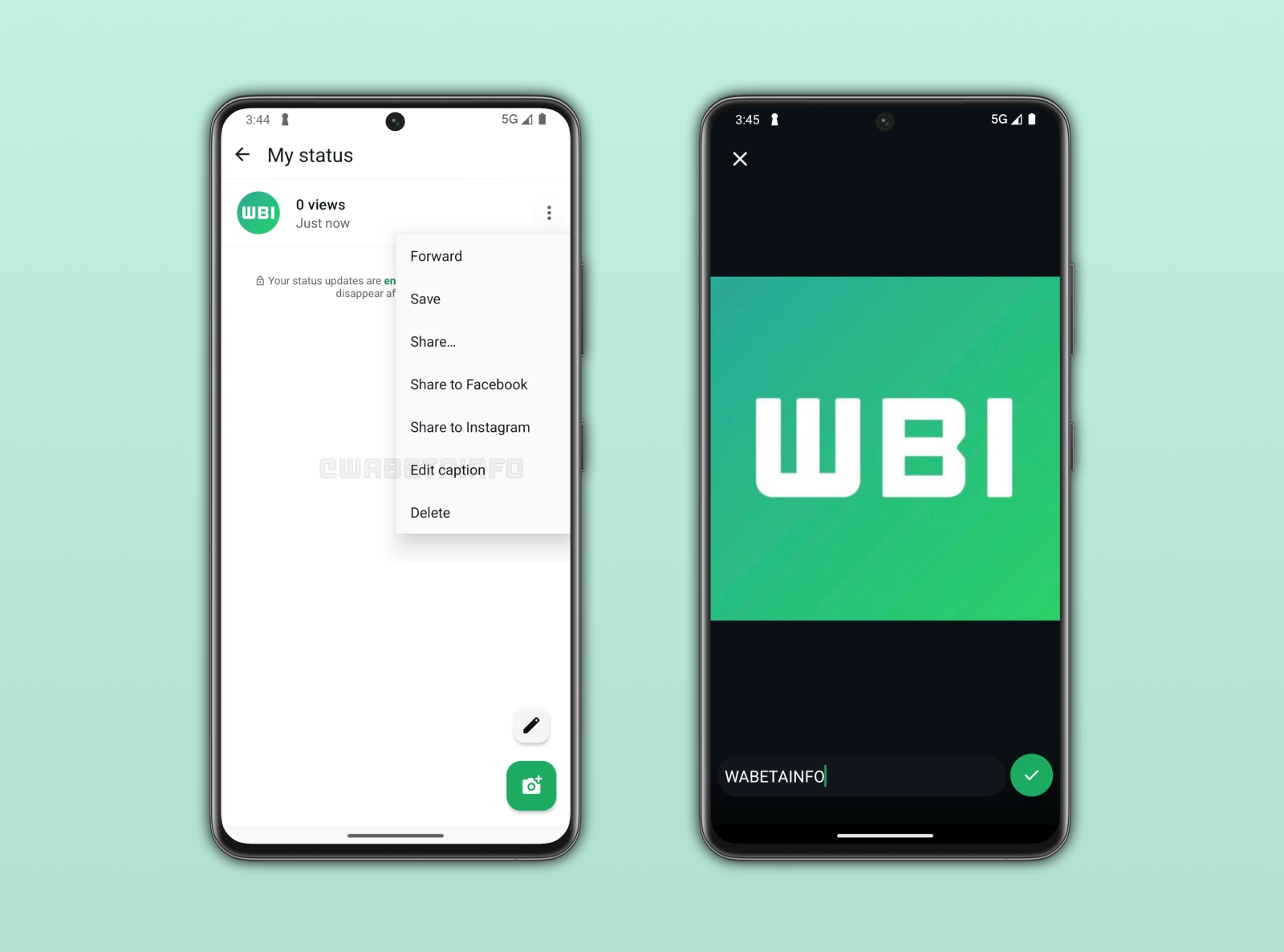
WhatsApp is exploring new features to improve the Status experience. Specifically, WhatsApp will implement enhancements that make status updates easier to share. Following the release of the latest WhatsApp beta for Android 2.26.22.5 update, which is available on the Google Play Store, we discovered that WhatsApp is working on a feature that lets users edit status captions.
WhatsApp doesn't allow users to edit status updates
When users want to share a status update on WhatsApp, they can choose from several formats. These include photos, videos, text, layouts, and voice messages. When sharing a photo or video, users can also add a caption. Once they share the status update, viewers can see both the media content and its caption. However, the caption cannot be edited after the status is shared. If it contains a typo or any other mistake, users cannot edit it anymore. They will have to delete the status update and share it again with the correct caption.
WhatsApp to add the ability to edit status captions after posting
In a future update, WhatsApp will address this issue by introducing a status editing feature. This functionality will allow users to modify the caption after they share the status update. By editing the caption, users will be able to easily update it without deleting the status update. This will give people more control over their shared updates. As a result, the feature will make the Status experience more flexible and convenient.
WhatsApp to enable easier correction of status captions after sharing
For example, someone might share a photo from a concert and add a caption with the wrong date by mistake. With the new editing feature, they would be able to correct the date in the caption without deleting the update. Similarly, someone who share a travel update could fix a typo in a location name after posting the status. This would make it easier to keep status updates accurate and up to date.
WhatsApp to introduce a short time window for editing captions
Users will be able to update the caption within 15 minutes after publishing a status update. This time limit will prevent major changes to updates after they have already been widely viewed. However, the short editing window will still give users enough flexibility to quickly fix mistakes. After the 15-minute period, users will no longer be able to edit the caption. WhatsApp will update the caption for everyone who received the update and when they are using the latest version of the app.
WhatsApp is developing status editing feature for a future update
This feature is currently under development. This means it is not available to users yet and it is not enabled for beta testers at this stage. WhatsApp has not announced an official timeline for its release. However, it will be available to beta testers in the future before rolling out in the stable version.
Connect with WABetaInfo
Follow WABetaInfo on X to learn more about new features and updates. We love hearing your feedback, so please let us know what you think! You can also visit our About page to explore all our services and keep up with the latest announcements.