WhatsApp to flag potential scam messages without reading your chats
WhatsApp is working on a new feature called Scam Alert to warn users when a message from an unknown contact looks like a potential scam. The feature processes everything on the user's device, so WhatsApp never reads your messages to detect suspicious activity.
| Key Points | Details |
|---|---|
| Name of the feature: | Scam Alert |
| Status: | Under development |
| Availability info: | This feature is currently in development, and it is not available for beta testing. In the meantime, you can read this article for a sneak peek. |
| Previous news: | WhatsApp is testing a new Liquid Glass interface for the Mac app! |
WhatsApp lets users read voice messages as text with voice transcripts
Voice transcripts is a feature that converts voice messages into text directly on the user's device. When users receive a voice message, they can long-press it and select the option "Transcribe" to generate its transcript. It is only visible to the recipient, and it is never shared with others. Voice transcripts are useful when users are in a noisy environment or cannot play audio out loud. But even when users simply prefer to read the messages instead of listening to them.
WhatsApp processes voice transcripts on your device using private in-house technology
The voice transcription runs entirely on-device. This means that the audio never leaves the phone, and it is never sent to WhatsApp or Meta's servers. Meta developed the speech recognition algorithms specifically for this purpose, making them an in-house technology rather than a third-party solution. This also keeps the feature fully compatible with end-to-end encryption. However, users will have to download a language pack to preserve privacy.
WhatsApp develops new feature to flag potential scam messages
WhatsApp is also developing other in-house technologies to help protect users against fraudulent activity. Specifically, WhatsApp is working on a new feature that can detect potential scam messages without sending any content to external servers. That's what we discovered with the latest WhatsApp beta for Android 2.26.22.2 update available on the Google Play Store. Just like voice transcripts, the feature will work entirely on the user's device, and it is fully compatible with end-to-end encryption.
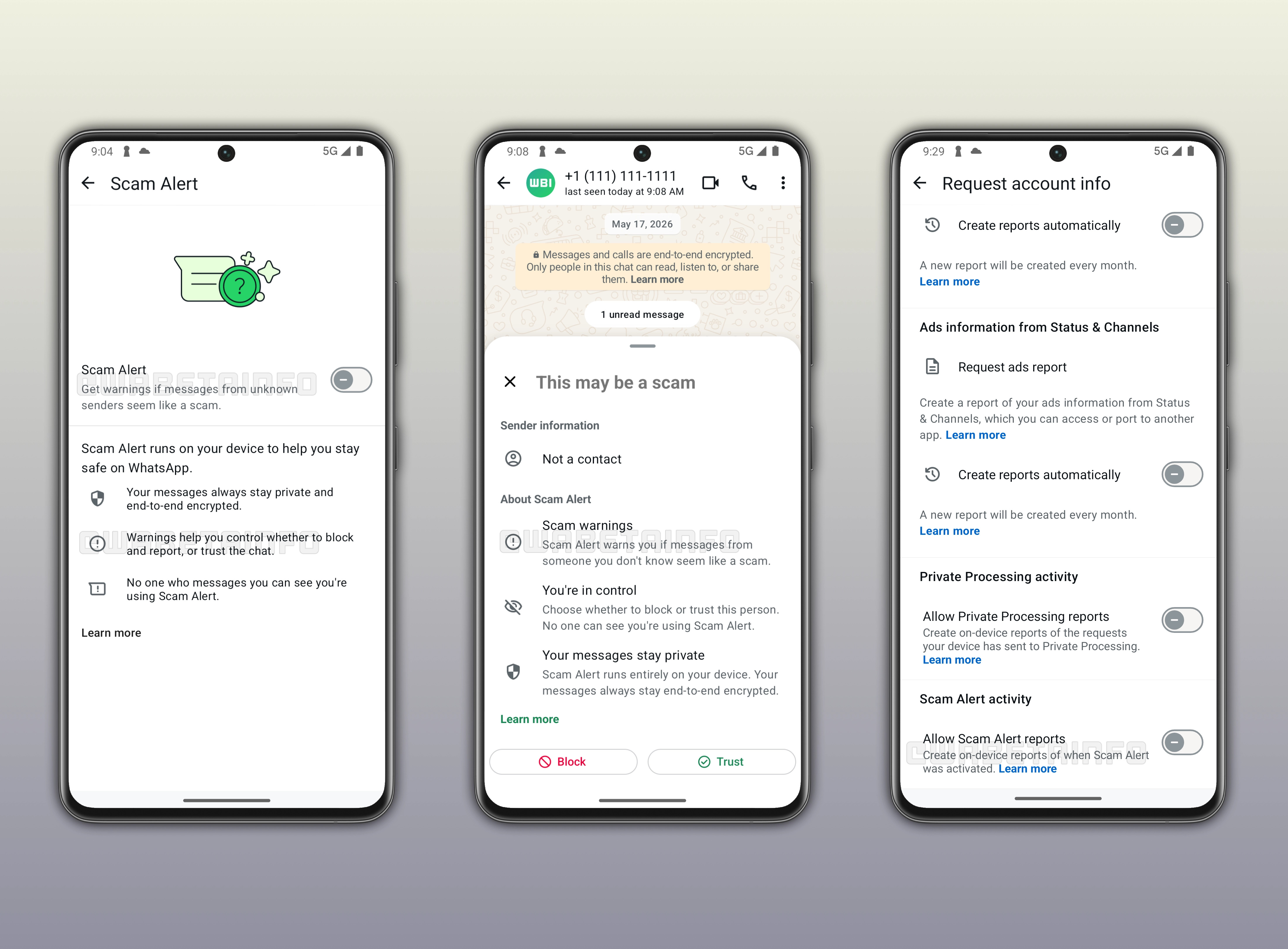
WhatsApp to develop Scam Alert to detect suspicious messages from unknown contacts
Scam Alert will warn users when a message from someone they don't know appears to be a scam. When Scam Alert is active, WhatsApp reviews incoming messages from unknown senders, and it shows a warning directly inside the chat. With this feature, users will still be in control over their interactions. They will be able to decide whether to block and report the contact, or trust the chat and continue the conversation. So Scam Alert doesn't prevent users from interacting with unknown contacts. Instead, it gives users an additional layer of information to help them make safer decisions.
WhatsApp runs Scam Alert entirely on your device to keep messages private
One of the most important aspects of Scam Alert is how it handles privacy. The feature runs entirely on the user's device, although WhatsApp has not yet disclosed further details about this implementation. This means that WhatsApp does not send your messages to external servers to analyze them. So your messages will still be end-to-end encrypted, and no one at WhatsApp can read them to detect potential scams. Additionally, other users cannot see that you are using Scam Alert. The feature works silently in the background without affecting the experience for the other person.
WhatsApp will show a warning with block and trust options
When Scam Alert detects a suspicious message, WhatsApp displays a warning inside the chat that says "This may be a scam". The warning also shows that the suspicious message is from an unknown contact. Below the warning, users will find two options: block and report the contact, or trust the chat. This will give users full control over how to handle the situation, without WhatsApp making any automatic decisions on their behalf.
WhatsApp to let users generate on-device reports of Scam Alert activity
WhatsApp is also working on an on-device transparency component of the feature to see how and when Scam Alert was activated. These logs are generated locally on the device, and they are not shared with WhatsApp. Users will be able to manage this feature from the app settings at any time. If there is no Scam Alert activity during a selected time period, the on-device report will indicate that no suspicious messages were detected. Instead, the on-device report will include information about when Scam Alert detected potential scam activity.
The new Scam Alert feature will be optional and disabled by default
Scam Alert is optional and disabled by default. Users who want to use it will need to enable it manually from the app settings. Once turned on, the feature will automatically warn users when a message from an unknown sender seems like a potential scam. Enabling this feature will make it easier for users to identify suspicious activity before they start to interact with the contact. Users may also suggest to their friends and family to enable the feature if they think they could be exposed to suspicious activity.
WhatsApp is developing Scam Alert for a future Android update
This feature is currently under development, and it is not available to users yet. As a result, it is not enabled for beta testers at this stage. WhatsApp has not announced an official timeline for its release. However, Scam Alert will be available to beta testers in a future update before rolling out in the stable version.
Connect with WABetaInfo
Follow WABetaInfo on X to learn more about new features and updates. We love hearing your feedback, so please let us know what you think! You can also visit our About page to explore all our services and keep up with the latest announcements.