WhatsApp beta for Android 2.26.16.1: what's new?
WhatsApp is exploring a feature that will offer Android users more control over the messages they receive from business accounts. The update will introduce new shortcuts that allow users to limit messages from business accounts directly within the chat interface.
| Key Points | Details |
|---|---|
| Name of the feature: | Stop business interactions |
| Status: | Under development |
| Availability info: | This feature is currently in development, and it is not available for beta testing. In the meantime, you can read this article for a sneak peek. |
| Previous news: | WhatsApp is testing private summaries of multiple unread chats! |
WhatsApp will automatically organise certain business chats
In the post about the WhatsApp beta for Android 2.26.15.9 update, we announced a feature to automatically organise business chats and reduce spam. With this functionality, users will be able to move business messages to a dedicated business section after 24 hours after they are received. This would make it easier for users to keep the main chat list more focused on their personal chats. So users will be able reduce both disruption and spam, as these chats can be filtered out of the primary inbox.
Features to locate and manage business chats are in development
The feature to organise business chats is still under development. WhatsApp is currently refining how the app can move and filter business chats. But now, WhatsApp is also developing a feature designed to further reduce interactions from business accounts. Following the release of the latest WhatsApp beta for Android 2.26.16.1 update, which is available on the Google Play Store, we discovered that WhatsApp is working on a feature that helps users stop messages from business accounts.
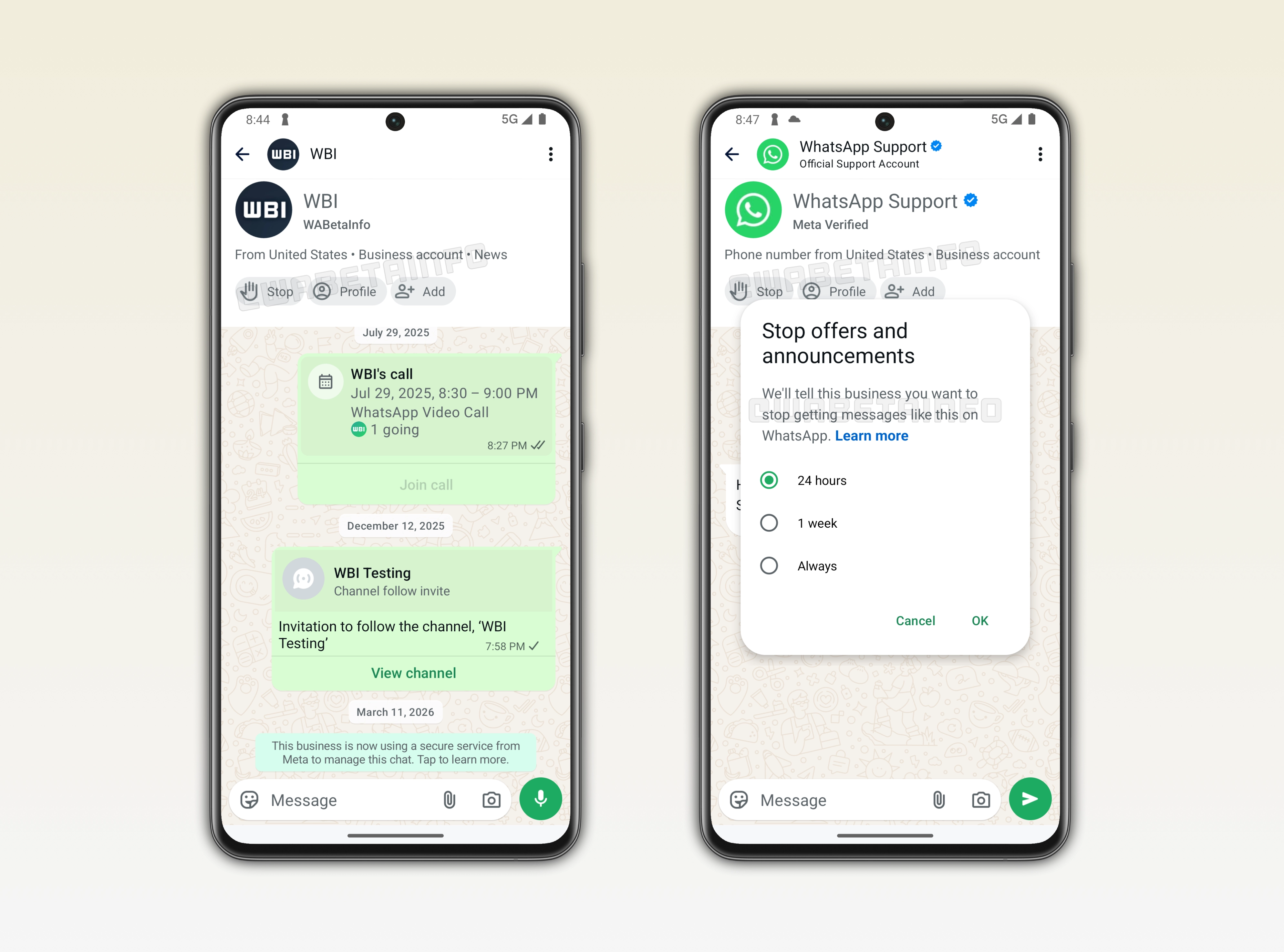
WhatsApp is working on making it easier to stop receiving messages from businesses
As you can see from the attached image, WhatsApp is exploring a feature that makes it easier for users to stop messages from business accounts. Even though this feature is in development and scheduled for release in a future update, we can already say that it will add a new layer of convenience to the user experience. At the moment, users can block any account, including business accounts, from the chat info screen. Here, they can also select the reason why they are choosing to block the account. However, this may require a few additional steps. Additionally, users may not necessarily want to block a business just to stop receiving its messages.
New shortcuts to quickly manage business interactions
In a future update, WhatsApp will address this issue by introducing a new shortcut to manage interactions with businesses. This feature will let users stop offers and announcements from businesses right from the chat interface. If users decide they do not want to receive messages from a businesses, WhatsApp will tell the business they want to stop their messages. The feature offers a set of three options, including 1 hour, 1 week, and always. It's important to note that it is already possible to stop marketing messages from the block screen. However, this feature will make the process easier to access without opening the chat info screen and tap "block".
New business chat overview with key details
The new feature will also introduce a redesigned interface in business chats. For accounts that rely on cloud providers, users will be able to see a brief overview of the account. The overview is placed directly under the top app bar. It will contain basic information such as the business name and the location of the business, based on the phone number. When available, the overview will also include the business category. These information will help users quickly understand the context of the business they are interacting with.
Quick actions to manage business conversations
The overview will also include a set of shortcuts to help users quickly manage their interaction with a business. The first shortcut is "Stop". which allows users to stop receiving messages from the business. The second option will let users view the business profile and access additional details. The third option will allow users to quickly add the business to their contacts. As a result, this overview will make it easier to decide whether to continue the conversation or take action.
The feature to quickly stop business messages is under development
The feature that helps users stop messages from business accounts is under development, and it is expected to be released in a future update. WhatsApp is currently working on how the app can improve the way users manage their interactions with businesses. Once testing is complete, WhatsApp will roll out this feature to select beta testers, making it simpler to control the messages they receive from business accounts.
Connect with WABetaInfo
Follow WABetaInfo on X to learn more about new features and updates. We love hearing your feedback, so please let us know what you think! You can also visit our About page to explore all our services and keep up with the latest announcements.