WhatsApp launches new features to manage chats on Wear OS
WhatsApp is rolling out new features that make it easier for users to manage their conversations on Wear OS. Users can now start new chats, mark them as read or unread, pin, archive, and mute them directly from the watch. With this update, users no longer need their phone for any of these actions.
| Key Points | Details |
|---|---|
| Feature: | Tools to manage chats on Wear OS |
| Status: | Rolling out |
| Compatibility: | WhatsApp beta for Android 2.26.7.2 is a compatible update. |
| Availability info: | This feature is available to some users. Some earlier builds may also support it. |
| Thanks: | Valer, for testing and reporting. |
| Previous news: | WhatsApp is updating the group chat info interface on iOS! |
WhatsApp launched an official app for Wear OS
In the post about the WhatsApp beta for Android 2.23.10.10 update, we announced a dedicated smartwatch app for Wear OS. The app allows users to read and reply to messages directly from the wrist, and it also supports voice messages. However, it didn't support voice calls and other features to manage chats at the time. The Wear OS app works as a companion to the Android phone, so users need to enter a code to sync the watch with their mobile device.
WhatsApp is now expanding the Wear OS app with new features
WhatsApp launched the Wear OS app with limited features in 2023. For example, users could only read and reply to messages from the watch at that time. WhatsApp is now taking another step forward with the latest WhatsApp beta for Android 2.26.27.2 update, which is available on the Google Play Store. Specifically, WhatsApp is rolling out new tools to manage chats on the Wear OS app to some beta testers.
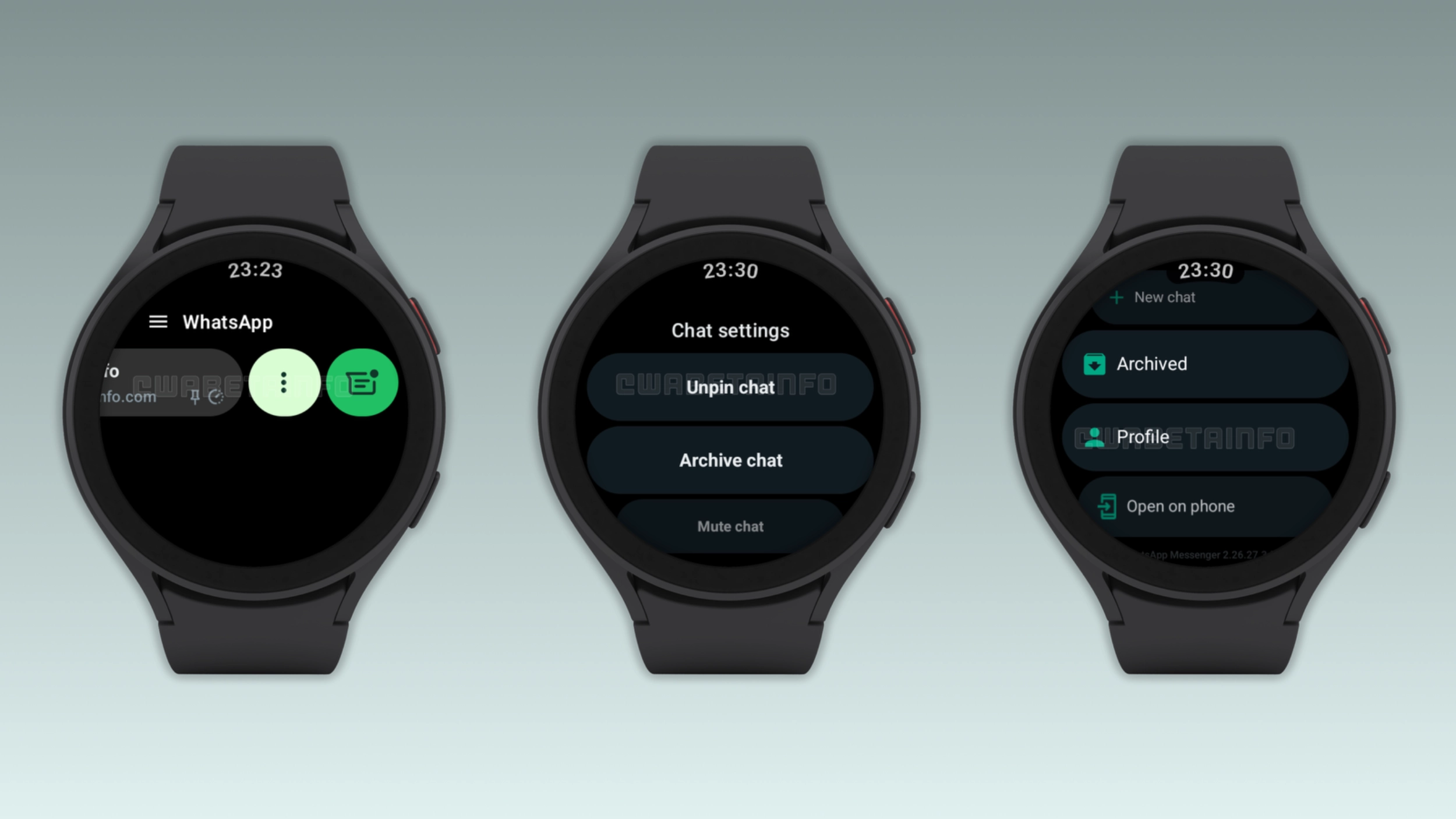
Users can now start new conversations from the watch
With the new update, users can finally start a new conversation directly from the wrist. Before this update, users could only reply to their existing conversations from the watch. Now, they can finally open a new chat with any contact without relying on the phone. This is particularly useful when the phone is not available, and users want to send a quick message to a new contact.
WhatsApp adds read and unread controls for Wear OS
WhatsApp now lets users mark their conversations as read or unread directly from the watch. This is useful when users want to mark a chat to read later, or when they want to clear a notification without opening the conversation. For group chats, users can clear the notification count directly from the wrist. Both actions now work directly from the chat list on the watch. Users just need to swipe on a chat to see these actions.
Users can pin, unpin, archive, and mute conversations
WhatsApp also introduced three more actions to help users manage their conversations. Users can pin a conversation to the top of the chat list, or unpin it when they no longer need quick access to it. It is also possible to archive a conversation and move it away from the main chat list. If users receive many notifications from a specific chat, they can now mute it to silence its alerts. These new actions are available directly from the watch, so users no longer need their phone to manage their conversations.
Why these additions matter for Wear OS users
Before this update, users could read and reply to messages from the watch, but they needed their phone to do anything beyond that. Users who wanted to pin, archive, or mute a chat had to pull out the phone to do it. These new actions close that gap and make the Wear OS app feel more independent. For anyone who relies on a smartwatch as a quick way to handle their notifications, this makes a real difference.
WhatsApp is rolling out these features for Wear OS
The new chat management features are available to some users who install the latest WhatsApp beta for Android updates. Some users who install certain previous updates may also see these features, since WhatsApp is currently rolling out these changes from the server. If these new options do not appear yet, users should wait a few weeks. At the moment, WhatsApp has not announced when these updates will be available to everyone.
Connect with WABetaInfo
Follow WABetaInfo on X and visit our About page to learn more about what we do. We always appreciate your feedback on posts like this one.