WhatsApp is rolling out admin profiles for channels
WhatsApp is introducing a new feature that lets channel admins create a dedicated profile. The channel profile includes a custom name, photo, and it is visible on their updates. Followers who see an update will know the channel profile who posted it, but other information remain private.
| Key Points | Details |
|---|---|
| Feature: | Admin profiles for channel updates |
| Status: | Rolling out |
| Compatibility: | WhatsApp beta for Android 2.26.33.7 is a compatible update. |
| Availability info: | This feature is available to some beta testers on the latest versions of WhatsApp for Android. |
| Previous news: | WhatsApp may expand payments to more countries! |
WhatsApp was working on admin profiles for channel updates
In the post about the WhatsApp beta for Android 2.25.37.6 update, we announced a feature that would let channel admins create a dedicated profile for their updates. The profile would include a custom name and photo, and they are separate from the admin's personal account. This means that the admin's phone number and their personal account details would never be visible to followers. The option to enable the profile would be disabled by default, so admins would need to turn it on manually.
WhatsApp is now rolling out this feature to some beta testers
Eight months after our first report, the feature is now available to some users. WhatsApp worked on refining the functionality before making it available for testing. We discovered this feature after installing the WhatsApp beta for Android 2.26.33.7 update, which is available on the Google Play Store. With this update, WhatsApp is rolling out the admin profile feature for channels. This makes it easier for both channel admins and followers to recognize who posted a specific update.
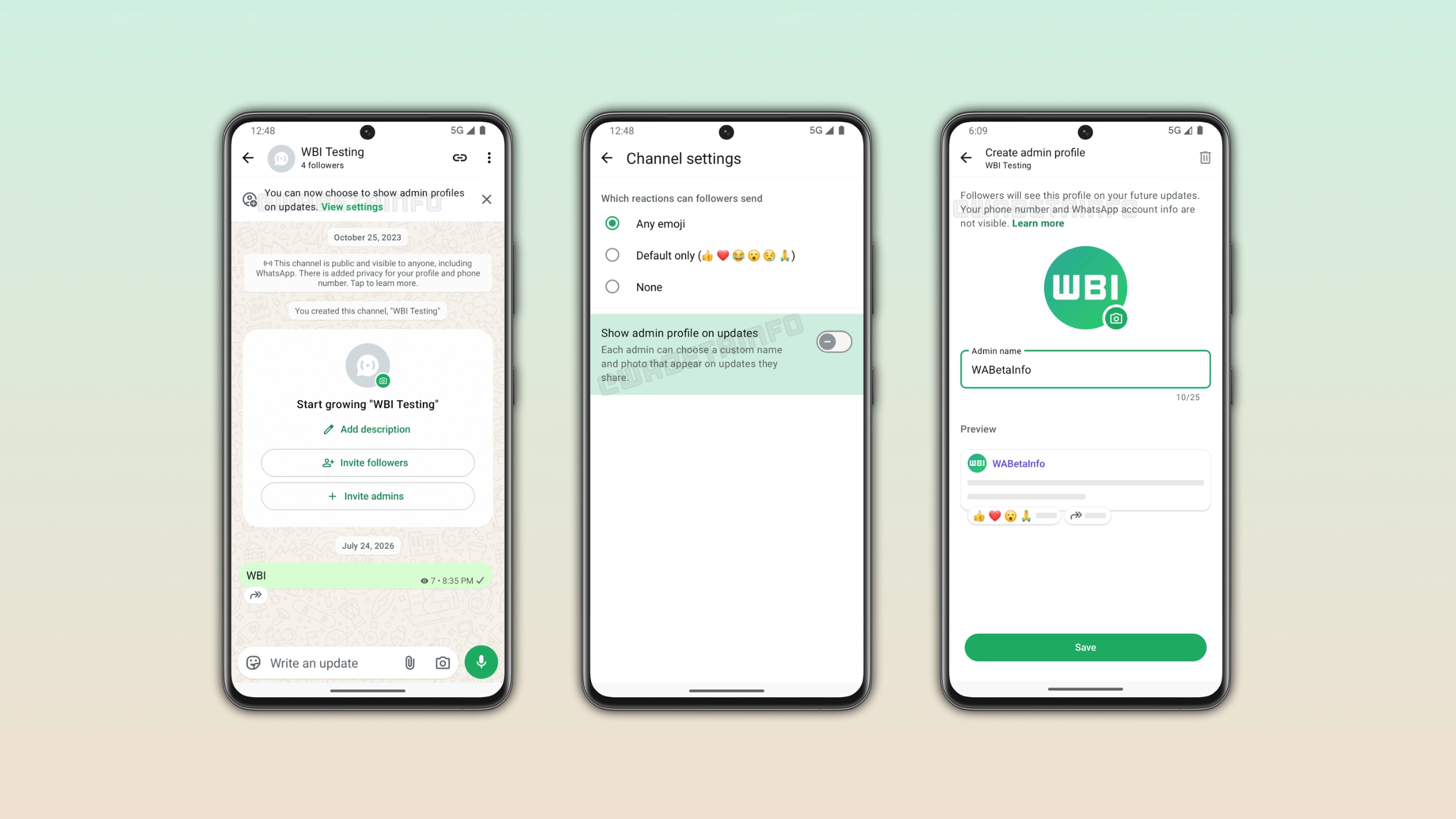
How to enable the admin profile in channel settings
Admins who want to show a profile on their updates need to open the channel settings. Here, they can see a new toggle called "Show admin profile on updates". This option is disabled by default, so admins need to enable it manually. Once enabled, WhatsApp will display the admin's name and photo on every update they post. It is possible to disable this feature from the channel info screen at any time. Note that WhatsApp notifies admins right within the channel interface when they can create a profile.
How to create an admin profile
Admins can create a profile after enabling the toggle. The screen includes a field for the admin name, with a limit of 25 characters. It is also possible to add a profile photo. WhatsApp displays a preview at the bottom of the screen to show exactly how the profile looks on updates before the admin saves it. When everything looks good, admins can apply the changes by saving the profile. Channel admins can update the profile name its photo at any time from the same screen.
The admin profile is completely separate from the personal account
The profile admins set up for their channel is completely separate from their personal WhatsApp account. Users can choose a different name and a photo specifically for that channel. The admin's real name and photo from their personal account are never visible by default. In addition, WhatsApp also keeps the phone number hidden in any case, even when the admin sets up a profile. Admins who manage multiple channels can also create a different profile for every channel they run. As a result, channel admins can create different profiles and keep their channel identity separate.
What followers and admins see when the profile is enabled
When an admin turns on the profile, their name and photo appear directly on every update they share in the channel. Followers no longer see updates from an anonymous source, but they can tell who posted the content. In channels with multiple admins, this makes it easier to distinguish between contributions from different people. A quick look at the update is enough to know which admin shared it. This feature can also be useful for admins, since they can see who published a certain update without asking privately.
WhatsApp is rolling out admin profiles to Android beta testers
The admin profile feature for channel updates is currently available to some beta testers who install the latest update from the Google Play Store. WhatsApp is rolling out this functionality gradually, so not every beta tester will see it immediately. If this feature does not appear yet in the channel settings, it should become available to more accounts over the coming weeks. WhatsApp has not announced when this feature will be available to everyone.
Connect with WABetaInfo
Follow WABetaInfo on X and visit our About page to learn more about what we do. We always appreciate your feedback on posts like this one.