WhatsApp is rolling out a new system to manage chat lists on iOS
WhatsApp is introducing a new feature that allows users to manage their chat lists easily. The update improves how chat lists are organized and accessed within the Chats tab by moving secondary lists into a separate menu.
| Key Points | Details |
|---|---|
| Name of the feature: | New interface for chat lists |
| Status: | Rolling out |
| Compatibility: | WhatsApp for iOS 26.21.74 is a compatible update. |
| Availability info: | This feature is available to some users, and it is rolling out to more accounts over the coming weeks. |
| Thanks: | Akan and O1iveira, for testing and reporting. |
| Previous news: | WhatsApp beta for Android 2.26.22.5: what's new? WhatsApp is working on a feature that lets users edit status captions! |
WhatsApp redesigns chat lists to improve organization on Android
In the post about the WhatsApp beta for Android 2.26.20.2 update, we announced a feature that redesigns the chat lists interface. This update makes the interface feel more structured and easier to navigate. It lets users choose which lists are immediately visible in the Chats tab. Other lists are "archived" and moved into a separate section. This system helps users reduce clutter in the Chats tab by keeping only the most relevant lists visible.
WhatsApp extends new chat list management to iOS users
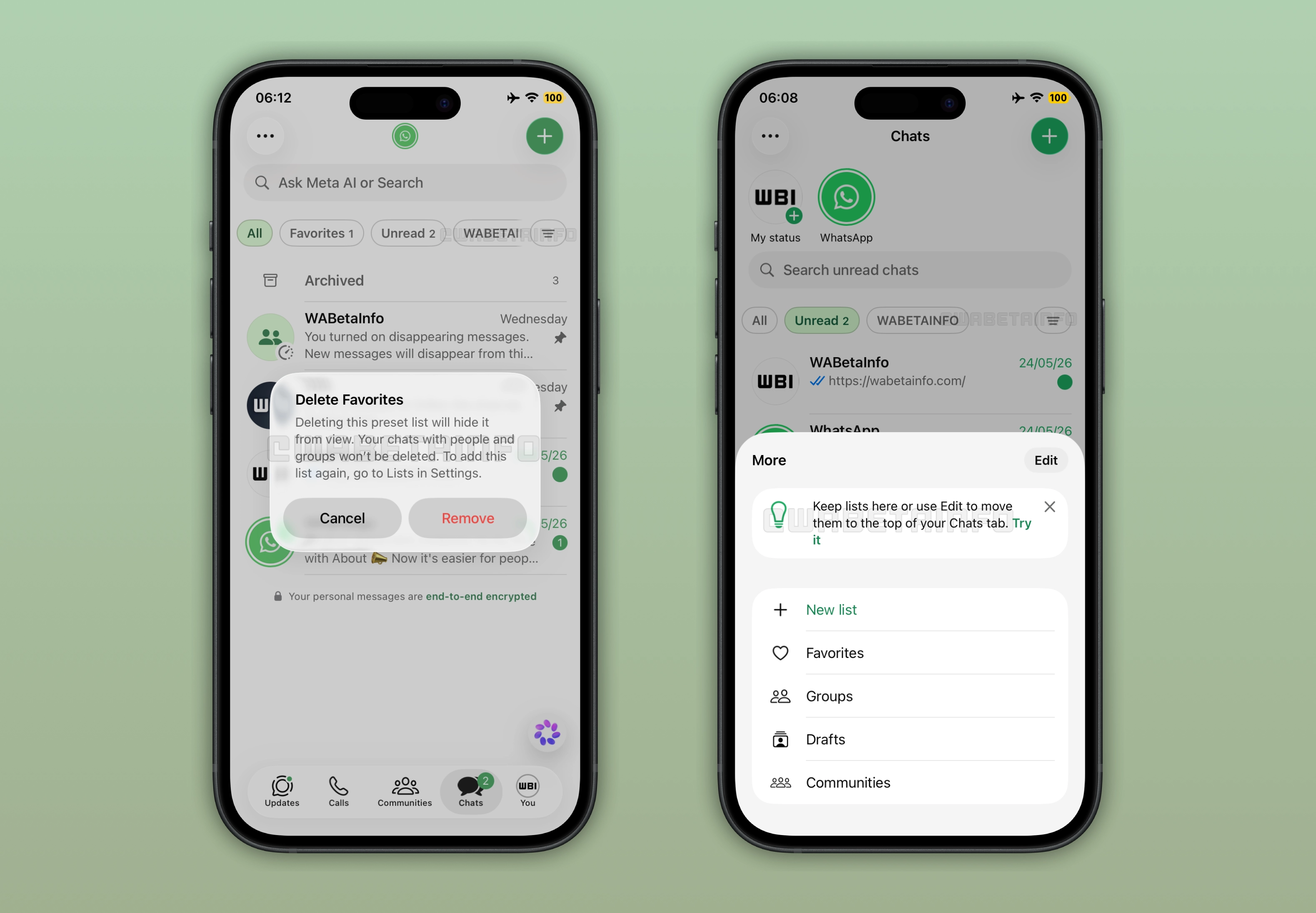
Initially, WhatsApp made this new chat list management system available only to Android users. Now, WhatsApp is starting to test this feature with some iOS users as well. That's what we discovered with the latest WhatsApp for iOS 26.21.74 update available on the App Store. Just like the Android version, iOS users can finally choose which chat lists appear directly in the Chats tab.
WhatsApp organizes chats with preset and custom filters in a scrollable row
A chat list organizes specific conversations to help users find them quickly. WhatsApp provides some important preset filters to help users get started. These include filters to locate favorites, unread chats, groups, and communities. Additionally, users can create custom chat lists by selecting which chats to include. The app displays these chat lists in a horizontal row at the top of the Chats tab. Users must scroll horizontally to browse and switch between their lists. So chat lists can help users organize their conversations, and they keep quick access to the most important chat categories.
WhatsApp chat lists become harder to manage as users add more custom filters
Users can create multiple custom chat lists alongside the preset filters offered by WhatsApp. As a result, the number of available lists can grow quickly and become difficult to manage. Users often see many chat lists at the top of the Chats tab, and they can feel very complicated to follow. This makes it harder to find a specific chat list without scrolling through the full set of chat lists. Over time, this can slow down access to the most frequently used chat lists.
WhatsApp moves unused chat lists into a separate menu for cleaner navigation
In the latest update, WhatsApp is making chat list management much easier than before on iPhone. Chat lists that users choose to keep visible remain in the main row at the top of the Chats tab. All other lists are automatically placed in a separate section to reduce clutter and improve navigation. Users can access this section by tapping the "Filter" button. Here, the app displays all archived chat lists in a dedicated menu. If users want to bring one of these lists back to the main view, they can tap the "Edit" button to adjust their preferences.
WhatsApp lets users hide default filters to customize the Chats tab view
The update allows users to remove any default filter from the main view. For example, users could not previously hide the Favorites filter, even if they had not selected any favorite contacts. As a result, WhatsApp still displayed the filter in the Chats tab even when users did not use it. With the new system, users can finally move the Favorites filter to the secondary menu. This gives users more control over how chat lists appear in the Chats tab, as they can keep the main view focused on the lists they use most.
WhatsApp adds a drafts filter to help users find their unfinished messages
The update also introduces a new filter for drafts. A draft is a message that users start typing in the chat bar but do not send. Then, WhatsApp marks these conversations in the chat list with a green "Draft" label. The secondary menu now includes a filter that shows all chats where users have left an unsent message. The filter makes it easier for users to quickly find and return to their unfinished messages.
WhatsApp launches new system to manage chat lists for App Store and TestFlight versions
WhatsApp is currently rolling out this feature to users on the App Store version. However, WhatsApp is also rolling out the same functionality to some beta testers who install the latest update from TestFlight. Although WhatsApp has not announced an official timeline for a wider release, the feature should reach more users over the coming weeks.
Connect with WABetaInfo
Follow WABetaInfo on X to learn more about new features and updates. We love hearing your feedback, so please let us know what you think! You can also visit our About page to explore all our services and keep up with the latest announcements.