WhatsApp beta for Android 2.25.31.13: what's new?
WhatsApp has released a new Android update through the Google Play Beta Program, bringing the version up to 2.25.31.13.
What's new in this update? WhatsApp is rolling out a feature to manage storage directly within the chat info screen, and it's available to some beta testers!
| Key Points | Details |
|---|---|
| Name of the feature: | Manage Chat Storage |
| Status: | Rolling out |
| Compatibility: | WhatsApp beta for Android 2.25.31.13 has been designated as a compatible update, but some users may experiment with the same feature by installing the previous update. |
| Availability info: | This feature is available to some beta testers, and it is rolling out to more users over the coming weeks. |
| Thanks: | Sc, kingcyrious, flakoflow, Muhammad Hammad, for testing and reporting. |
| Previous news: | WhatsApp beta for Android 2.25.31.10: what's new? WhatsApp is rolling out a feature that lets users filter their media files, including stickers! |
WhatsApp Improves Storage Management with New In-Chat Tools
In the article about the WhatsApp beta for Android 2.24.10.8 update, we announced that a feature to filter chats and channels right within the manage storage screen was available. This functionality enables users to easily distinguish between personal conversations and channels when reviewing storage usage. By isolating different types of content, users can quickly identify which chats or channels are consuming the most space, making cleanup more efficient and reducing the risk of mistakenly deleting important data.
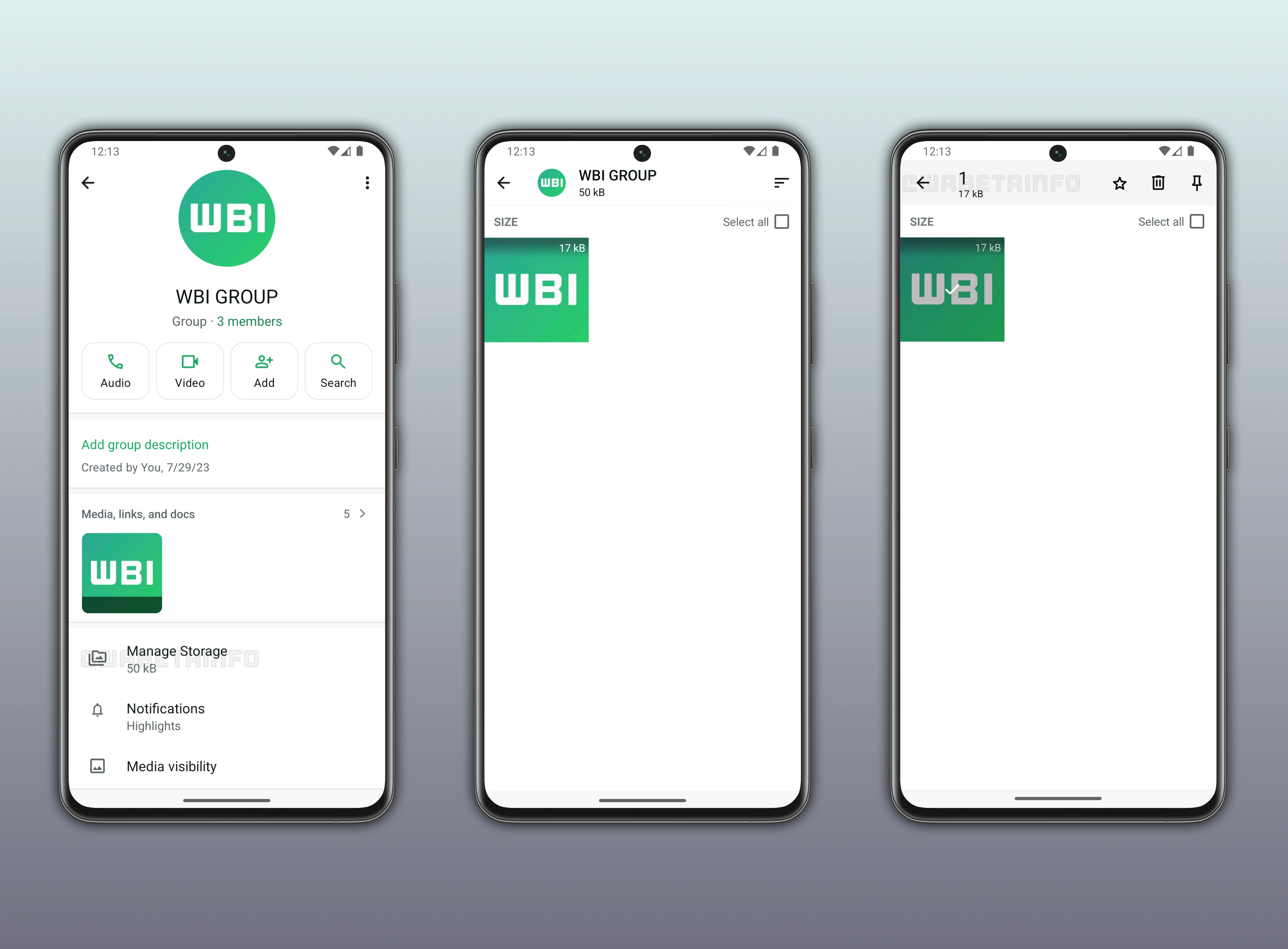
It seems that WhatsApp now aims to offer a new tool capable of managing storage directly from the conversation interface. This addition is designed to make it easier for users to monitor and free up space without navigating through different sections of the app. Following the release of the latest WhatsApp beta for Android 2.25.31.13 update, which is available on the Google Play Store, we discovered that WhatsApp is rolling out a feature to manage storage directly within the chat info screen!
New Chat Storage Management Feature Makes Cleanup Faster
With the latest update, some beta testers can explore a feature that lets them manage storage by navigating through the chat info screen. Within this interface, users can access a complete overview of every file shared across their conversations, neatly organized in descending order of size. This tool is essentially the same one already available in the app's storage settings, where users can review and delete large media files to free up space. However, WhatsApp is now integrating it directly into the chat info screen, making it easier and faster to access without having to go back to the general settings.
This shortcut makes it simpler for users to quickly identify the largest items that may be impacting the device's storage capacity directly from the chat info screen. It's possible to instantly see which photos, videos, or documents take up the most space and decide whether to keep or delete them. By simplifying this process, WhatsApp helps users manage their device storage more efficiently and keep their chats organized. In addition, having the feature embedded in each chat encourages regular maintenance, preventing storage from filling up unexpectedly.
Easily Identify and Delete Large Files in WhatsApp Chats
Since this new shortcut provides a direct view of the media shared within a specific conversation, users can easily spot which files are taking up the most space. From the chat info screen, they can quickly review photos, videos, and documents shared in that chat and decide what to delete without leaving the conversation. This focused approach allows users to clean up storage on a per-chat basis, making it more convenient to manage space without having to navigate through the general storage management section.
Similar to the feature available in the app settings, users can also perform bulk deletion operations directly from this screen. They can select multiple items at once to remove unnecessary media more efficiently. In addition, WhatsApp offers options to mark certain photos or videos as starred even from this new entry point, preventing them from being accidentally deleted during cleanup. It's also possible to pin specific content at the top of the screen, making it easier to keep track of valuable files within a conversation.
How the New Tool Improves Daily Chat Management
For many users, chat storage issues often go unnoticed until their device starts running low on space. This happens because users don't usually check the "Manage Storage" section very often. As a result, many users remain unaware of how quickly photos and videos accumulate in their chats. By placing the same information inside the chat info screen, a section users access far more frequently, WhatsApp ensures storage details are more noticeable during regular interactions.
This new in-chat storage tool helps prevent that situation by encouraging users to monitor their media usage more regularly. It's especially helpful for people who frequently share photos, videos, and documents in active group chats. It brings awareness to how much space each conversation consumes, helping users stay on top of their storage habits before problems occur. Instead of waiting for a full cleanup, users can now make small adjustments on the spot whenever they notice storage building up.
This proactive approach keeps conversations lighter and reduces the need for lengthy cleanups later from the app settings. The tool also benefits users who manage professional or community chats, where large files are shared daily and need quick review. By integrating the feature into each chat, WhatsApp turns storage maintenance into a simple, ongoing habit rather than an occasional task. As a result, users enjoy a smoother messaging experience and avoid interruptions caused by limited storage.
Feature to Manage Chat Storage is Rolling out on Android Beta
The feature to manage storage directly within the chat info screen is available to some beta testers through the latest WhatsApp beta for Android update. However, even if users install the newest version, the feature may not be visible to everyone right away. WhatsApp is gradually rolling it out to ensure stability and gather feedback before expanding its availability. Over the coming weeks, more users are expected to receive the update as part of this phased rollout.
Following WABetaInfo on X is the best way to stay informed about new features under development and those released to WhatsApp beta for Android, iOS, Web, and Desktop. We love hearing your feedback, so let us know what you think! You can also explore our dedicated page to discover all our services, or join our Discord Server to chat with others, get help and advice, and stay up to date with the latest WABetaInfo announcements.