WhatsApp is widely rolling out the multi-account feature on iOS
WhatsApp released the multiple accounts feature on iOS, making it easier for users to manage more than one account on the same iPhone. The update allows user to switch between their accounts and keep their chats, notifications, and settings separate. It introduces a more flexible way to separate conversations without needing the business app.
| Key Points | Details |
|---|---|
| Name of the feature: | Multiple accounts |
| Status: | Rolling out |
| Compatibility: | WhatsApp for iOS 26.22.76 is a compatible update. |
| Availability info: | This feature is available to all users. If you do not have it yet, make sure to keep the app updated from the App Store. |
| Previous news: | WhatsApp is developing secure system to detect scam messages! |
The multiple accounts feature is available on WhatsApp for iOS
WhatsApp announced the multiple accounts feature in March 2026. This feature allows users to manage more than one WhatsApp account on the same device. It helps people who want to keep personal and work conversations separate without using a secondary phones. Users can add and switch between accounts directly within the app. Accounts have their own chat history, notifications, and settings, making it easier for users to keep their conversations separated.
WhatsApp expands access to multiple accounts with the latest iOS update
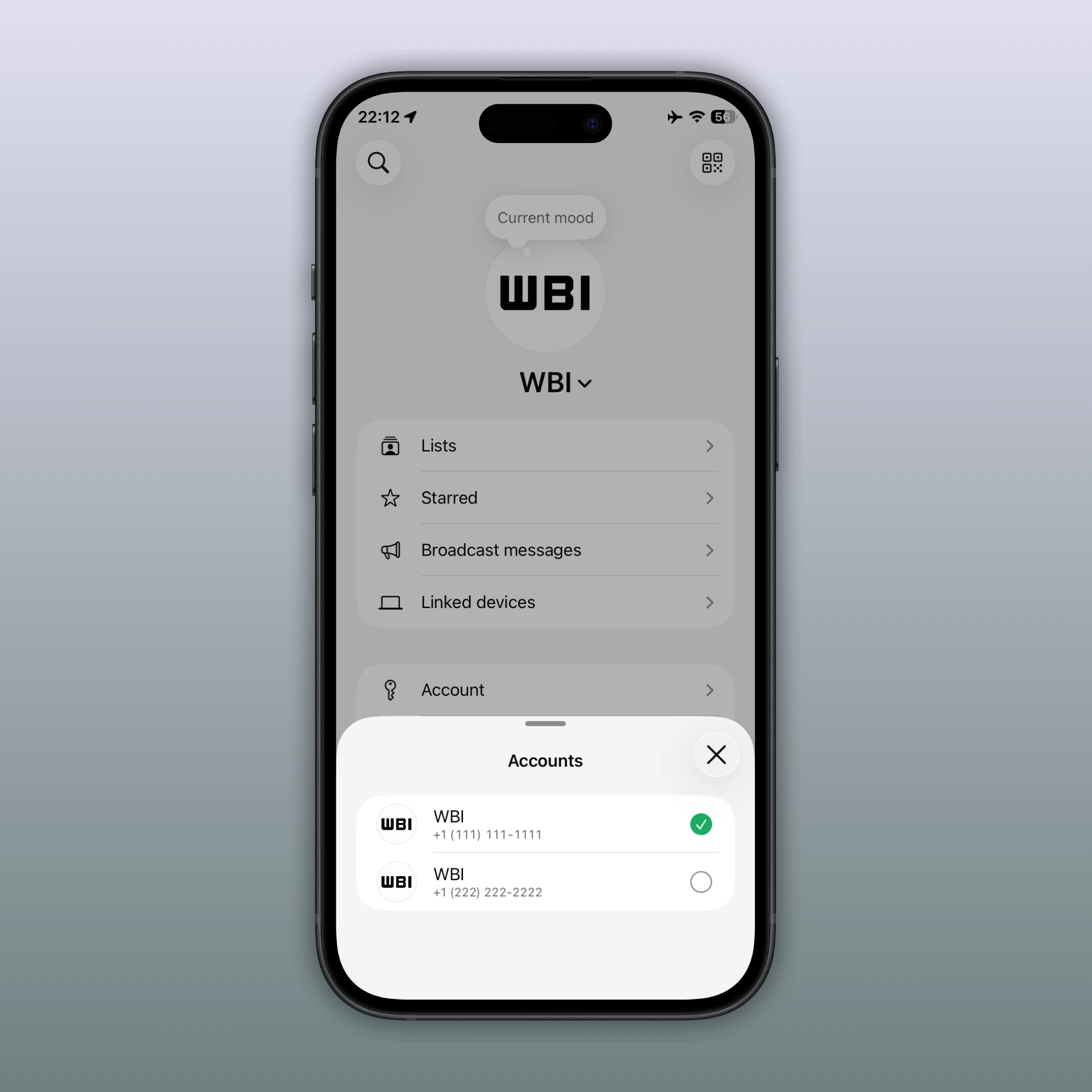
Although WhatsApp officially announced this feature for iOS users three months ago, not all users were able to add a second account immediately. The feature was still available only to a limited number of users. Finally, most people can finally add a second account with the latest WhatsApp update. That's what we discovered with the latest WhatsApp for iOS 26.22.76 update available on the App Store.
WhatsApp users turn to workarounds before official multi-account support
Until now, users who wanted to use a second account on WhatsApp had to rely on some workarounds. For example, users could install WhatsApp Business alongside the standard app. Alternately, users could register their second account on a different phone. These methods were not always convenient for users who only needed a second personal account on the same device and app.
How to add and set up a second WhatsApp account on iPhone
The multiple account feature lets users have two different accounts on their iPhone. It is a way to manage different conversations separately on the same device, without needing a second phone or WhatsApp Business. To register a second account on WhatsApp, users can tap "Add account" right within the app settings. Here, they will have to enter their second phone number. It is also possible to scan the QR code to set up the account as a linked device.
WhatsApp makes it easier for users to switch between their accounts on iOS
Once users register the second account, they can easily switch between them on the same device. Users can open the Account section and tap "Switch account". If they want to quickly switch to the other account, they can tap and hold the You tab. It is also possible to see which accounts are registered in the app by tapping the You tab once. This makes it simpler for users to manage multiple accounts without logging out. At the moment, the app only supports up to two accounts at a time.
WhatsApp keeps chat history and settings separate
WhatsApp keeps your chats, calls, notifications, and settings always separate. This means that your accounts have their own chat history. Notifications are customized for your accounts. If you choose a specific tone for one account, it will not affect the other. WhatsApp also stores your settings such as privacy, profile information, and other preferences individually.
How WhatsApp keeps users updated with notifications
When users are not using one of their accounts, WhatsApp still sends notifications for incoming messages and calls on that idle account. If someone calls the inactive account, WhatsApp will still send a push notification. The user can choose to ignore the call and switch to that account directly from the notification. Once switched, they can then answer the call as usual.
How to remove a WhatsApp account and keep data
If users want to remove an account, they can use the option "remove account" directly from the app settings. Before proceeding, WhatsApp will suggest to back up the chat history. Additionally, WhatsApp will ask to confirm the phone number before removing the account from the device. Note that removing an account only affects the device currently in use. If users remove the account from a primary device, companion devices will be logged out after 14 days. WhatsApp groups and channels will not be deleted when users remove the account from the device. However, users will love any messages or data that have not been backed up.
How WhatsApp makes signing back in faster with saved phone numbers
After logging out of an account, users can easily sign back in by adding the account from the app settings. WhatsApp will show the previously used phone number, making it quicker to restore access to the account on the device. To make the process even faster, users can create a passkey from the account settings. The passkey allows users to verify their identity without requesting the 6-digit code. This will make it faster for users to log back into their account.
How to check if the multiple accounts feature is available
If the multiple accounts feature is not yet available, or if users are unsure whether they have access to it, they can try a simple workaround. Users can open this deeplink within the app to access the "Add account" option. This can help users to discover whether the feature is available on their device. This method can be a useful way to check availability.
WhatsApp rolls out multiple accounts to all users with the latest iOS update
WhatsApp just released this feature to all users on the App Store version. The same functionality is also available to beta testers who install the latest update from TestFlight. WhatsApp has also confirmed through its official channel that the feature is finally available. Users should update the app to the latest version to access the feature.
Connect with WABetaInfo
Follow WABetaInfo on X to learn more about new features and updates. We love hearing your feedback, so please let us know what you think! You can also visit our About page to explore all our services and keep up with the latest announcements.