This week, WhatsApp is rolling out the Liquid Glass design to a larger number of accounts. The update is designed to let more users experiment with the new interface while continuing to monitor performance ahead of the next rollout.
| Key points | Details |
|---|---|
| Name of the feature: | Liquid Glass |
| Feature availability: | Some features may be under development, and they are not available to beta testers. Others may become available to users over time. If you're unable to access a certain feature, you will need to wait for a future update. Keep reading to learn more. |
| News shared last week: | WhatsApp for CarPlay is available on the App Store! |
| Previous article: | WhatsApp explores custom status lists for close friends! |
Weekly WhatsApp Beta Updates: New Features and Improvements
This new weekly roundup brings together all the latest updates about WhatsApp beta shared this week. As a result, you can finally catch up on everything you might have missed from our past announcements. You can consider this summary as a way to keep up new features, improvements, and fixes. This week's highlight focuses on the Liquid Glass design, which is gradually available to more users as WhatsApp continues to refine and optimize the experience. See what else has been announced this week.
WhatsApp is experimenting with chat themes on the Web
WhatsApp is developing a feature that will let users choose their favorite chat theme on the web client. The web client has never offered much customization for chats. However, this upcoming update will introduce up to 49 different options. The set will give users far more control over how their chats look. Chat themes will change the background wallpaper and the message bubble color. Users will also be able to apply a global default theme or assign different themes to individual chats for easier identification.
Chat themes will be available in many variations that differ slightly in tone and intensity. This means that users will be able to easily find the theme from multiple shades of the same color rather than a single preset. Chat themes will be private, so only the user who selects them can see the changes, and they do not affect how conversations appear to others.
WhatsApp is rolling out the Liquid Glass design
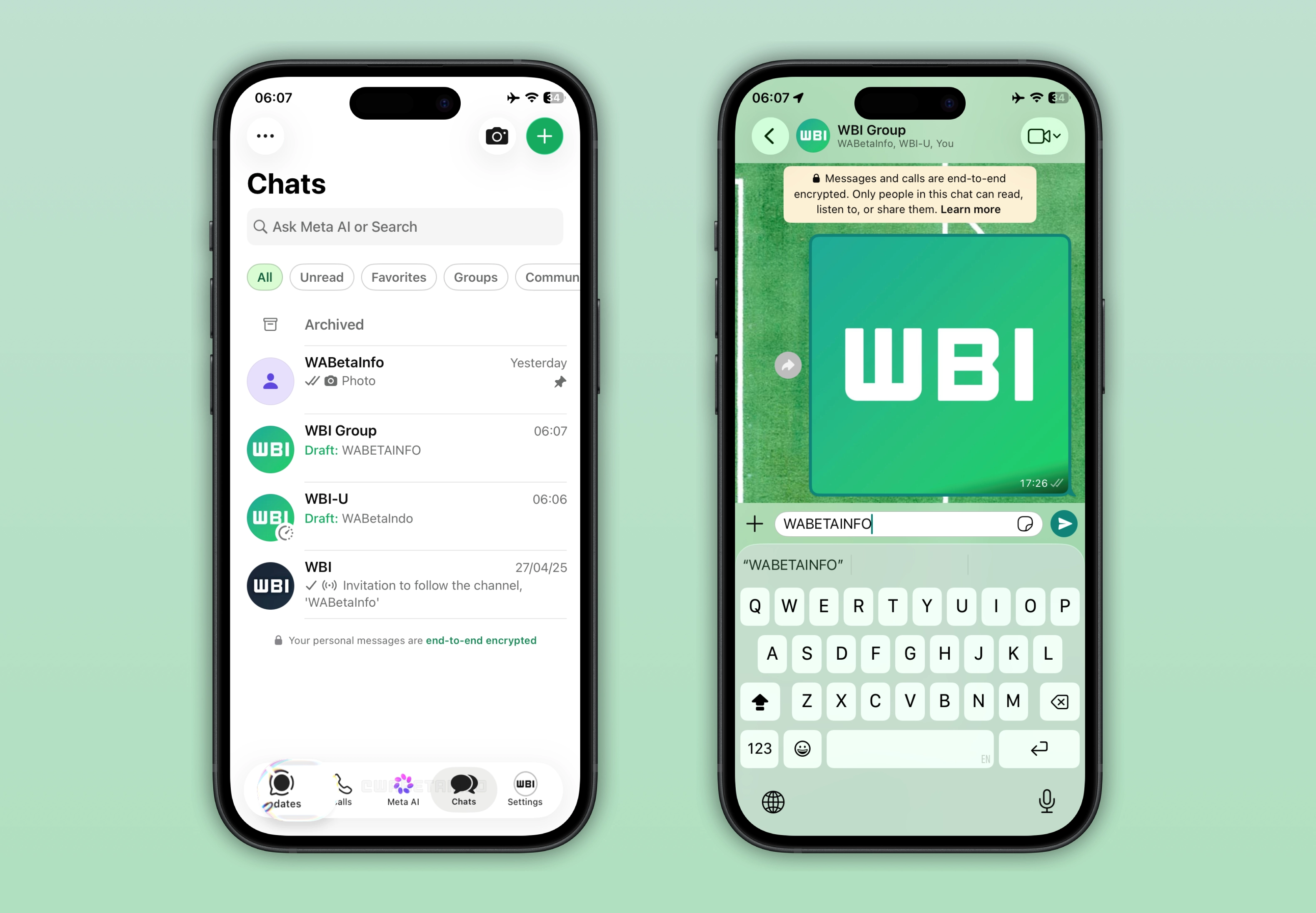
With the WhatsApp for iOS 26.14.76 update available on the App Store, WhatsApp is expanding the Liquid Glass design to more users. The Liquid Glass design introduces a more translucent and layered visual style across the app. It creates a glass-like effect that blends elements of the interface with blurred backgrounds. This update allows more accounts to experiment with the new interface, including the redesigned tab bar and the keyboard. Over time, more elements of the interface will adopt this design language.
How WhatsApp is expanding Liquid Glass interface
Although WhatsApp is expanding the Liquid Glass interface to a much larger number of users, it is still not available to everyone. WhatsApp uses this gradual rollout to monitor performance and stability before making it available to all users. The rollout is now moving faster than before, and more accounts are gaining access every day in different regions. This means that more users are now able to test the new design. This is why many users are already reporting the new interface on platforms like X and Threads. However, it is still being activated in stages, so a large number of users have not received it yet. Over the next few weeks, even more accounts will receive the update.
WhatsApp is working on moving business chats to a separate section
WhatsApp is developing a feature that will make it easier for users to manage their business chats. With this feature, users will be able to move certain business chats to a separate inbox. WhatsApp will handle the separation in the background after 24 hours the user receives the message from a business. So these conversations would no longer appear in the main chat list. This means that users can reduce both disruption and spam, as certain business messages will be automatically organized away from personal conversations. However, it seems that only business chats that rely on cloud providers will be automatically moved.
WhatsApp is developing a feature to monitor activity of linked devices
WhatsApp is currently working on a feature that introduces a new way to improve user control over account activity across linked devices. The feature will help users monitor when their linked devices are active. Specifically, it will send real-time notifications if another device on the same account becomes active while the primary device is in use. This will make it easier for users to detect suspicious or unauthorized access quickly and respond immediately.
WhatsApp will let messages disappear after the recipient reads them
In the post about the WhatsApp beta for Android 2.26.15.11 update, we announced a feature that makes messages disappear after they're sent or read. This option will give users more control over how long their messages remain visible in a conversation. Once the recipient views the message, the app automatically removes it from the chat after a certain amount of time. For example, a user might normally share an address that stays in the conversation indefinitely. With the new option, that address would vanish once the recipient has viewed it. The feature is currently under development, and it will be available in a future update.
WhatsApp will use the official logo in the top app bar
WhatsApp plans to replace the app bar name with the official logo. This is part of a project aimed at redesigning the top app bar. Since WhatsApp will likely add status updates to the top app bar, the interface needs to feel visually cleaner to avoid distraction. Using the logo instead of the app name will give more space for status updates without overcrowding the top app bar.
WhatsApp is working on custom lists for status updates
WhatsApp will make it easier for users to share status updates with custom lists. Custom lists will allow users to group their contacts into different audiences, such as close friends, family, or work. So status updates can be shared with a specific group instead of everyone or the same set of contacts. This feature will make status sharing more flexible, since users can quickly choose who should see their updates without manually adjusting privacy settings every time. These lists can be created and managed in advance, and they can include a selected set of contacts with its own name and optional emoji for easier identification. People included in the list can see the list name and its emoji, but they will not be able to see who else is part of the same list.
Connect with WABetaInfo
Follow WABetaInfo on X to learn more about new features and updates. We love hearing your feedback, so please let us know what you think! You can also visit our About page to explore all our services and keep up with the latest announcements.