WhatsApp is finally getting a Log Out button, and your chats won't be deleted
The latest WhatsApp beta for Android 2.26.21.9 update introduces a new feature that lets users log out of the app without deleting it or losing data. The update enables users to temporarily disconnect from their account and keep all chats and login information safely stored on the device.
| Key Points | Details |
|---|---|
| Name of the feature: | Log out |
| Status: | Rolling out |
| Compatibility: | WhatsApp beta for Android 2.26.21.9 is a compatible update, but some users may get the same feature by installing the previous update. |
| Availability info: | This feature is available to some beta testers, and it is rolling out to more users over the coming weeks. |
| Thanks: | Sc, Wawan, and Aditya, for testing and reporting. |
| Previous news: | WhatsApp is rolling out the FIFA World Cup 2026 Hub for Channels! |
WhatsApp introduces a flexible way to sign out without losing chats
In the post about the WhatsApp beta for Android 2.26.11.5 update, we announced a feature that allows users to log out of the app. This feature will let users temporarily sign out of their WhatsApp account without losing their chat history. Specifically, messages and notification settings will remain intact, so everything is preserved for when the user logs back in. With this option, WhatsApp aims to offer a more flexible alternative to uninstalling the app.
WhatsApp tests the new logout option with beta testers
WhatsApp is now testing this feature with some users enrolled in the beta program. Some beta testers are reporting that they can now log out of their account directly from the app settings. Following the release of the latest WhatsApp beta for Android 2.26.21.9 update, which is available on the Google Play Store, we discovered that WhatsApp is rolling out a feature to log out of the app without deleting it or losing data.
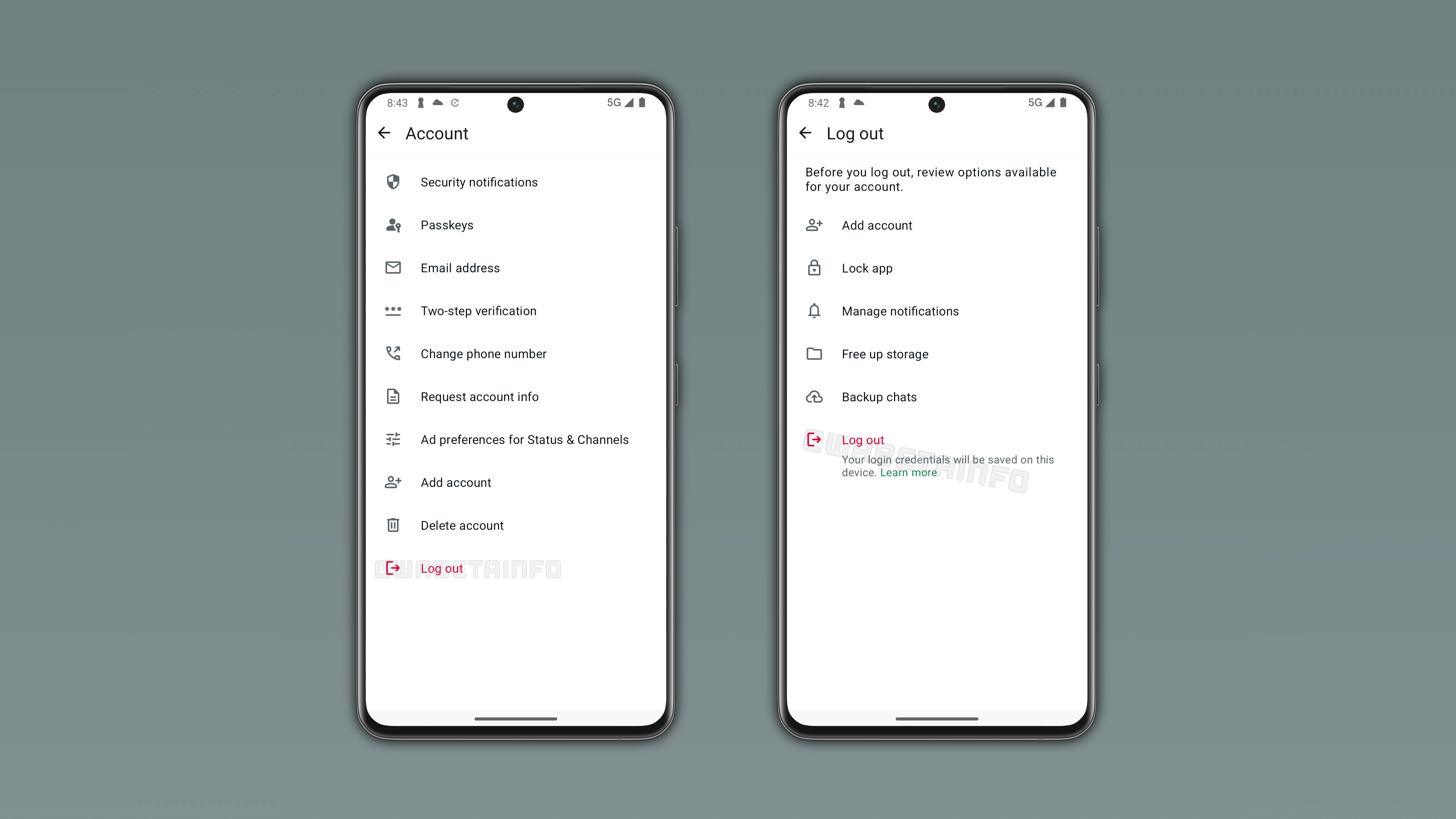
WhatsApp users previously had no option to log out without uninstalling the app
WhatsApp has never offered a dedicated logout option for users. People who wanted to disconnect from the account on their device had to uninstall the app. Uninstalling the app requires reinstalling it and setting everything up again to regain access. This could also cause unnecessary disruption, especially for those users who simply wanted a break from messaging. In some cases, it discouraged users from stepping away at all because the process may be too drastic.
WhatsApp simplifies access with a logout feature that preserves data and login details
In the recent update, WhatsApp has finally introduced a native logout feature. When users log out, their data remains saved within the app. This means that the chat history is preserved. The same applies to login credentials, which are stored locally on the device rather than being erased. As a result, users will not need to go through a full re-setup process when they decide to log into the app. Re-accessing the account becomes much faster and more convenient, since the app can restore the previous state immediately.
WhatsApp adds a guided logout process inside the Account settings for beta users
Users who participate in the beta program can find the "Log out" option within the app settings. Specifically, under the "Account" screen. In this section, selecting the option will start the sign-out process. The app guides users through a simple confirmation flow before completing the logout. Once confirmed, the account is disconnected from the device, and it preserves stored data and access details. However, WhatsApp will show users several suggestions that could help them avoid logging out in specific situations.
WhatsApp promotes multi-account support as an alternative to logging out
WhatsApp reminds users that they can add another account directly in the app. Some people may still not know that WhatsApp supports using up to two accounts simultaneously on the same device, making it possible to switch between them without logging out. This option already helps users manage two accounts more conveniently. By highlighting this functionality, WhatsApp may encourage users to consider this alternative solution before disconnecting from their main account.
WhatsApp encourages app lock as a privacy alternative to logging out
WhatsApp suggests enabling the app lock feature. This feature adds a new layer of privacy by requiring biometric authentication to open the app, such as a fingerprint, facial recognition, or the device passcode. Users who share their device with other people may want to keep their conversations protected. So they may consider logging out only to prevent unauthorized access to their chats. By enabling app lock instead, users can keep their account active and preserve their privacy.
WhatsApp helps users reduce interruptions by managing notification settings
WhatsApp recommends that users manage their notifications. This feature allows users to customize how and when alerts appear. For example, muting specific chats can help users avoid constant interruptions without logging out completely. WhatsApp suggests this option because some users may feel overwhelmed by too many notifications and consider disconnecting as a solution. By adjusting notification settings, users can better control their messaging experience and avoid unnecessary distractions.
WhatsApp offers storage management tools to avoid unnecessary logout
The log out feature suggests freeing up storage. This tool helps users identify and remove large files that may be taking up space on their device. Some users consider logging out or uninstalling the app when storage becomes limited. By using this built-in storage management tools, users can quickly recover space without losing access to their account.
WhatsApp highlights chat backups as an extra layer of long-term protection
WhatsApp also mentions the option to back up chats. This feature is a general precaution that helps users keep a secure copy of their messages and media in case they reinstall the app in the future. Some users may be unaware that backups are available or not regularly updated. Even though logging out with the new feature preserves local data, backups remain useful for longer-term protection. By encouraging this option, WhatsApp ensures users have an additional safety layer for their chat history beyond the current device.
WhatsApp lets users decide freely while keeping backup protection in mind
Users can decide whether any action suggested by WhatsApp is relevant to their situation before proceeding with the logout process. If none of the recommendations address their needs, they can simply continue with the sign-out as planned. Although data remains preserved on the device after logging out, it is still advisable to perform regular backups as an additional precaution. Backups helps protect against unexpected issues such as device loss, software errors, or accidental data corruption that are beyond user control.
WhatsApp is rolling out the log out feature on Android
The feature to log out of the app without deleting it or losing data is available to some beta testers who install the latest WhatsApp beta for Android updates from the Google Play Store. WhatsApp is currently testing this feature with a limited number of users. This means that it is still not available to everyone. Over the next few weeks, WhatsApp will make this feature available to more users, making it easier to sign out of the app without uninstalling it.
Connect with WABetaInfo
Follow WABetaInfo on X to learn more about new features and updates. We love hearing your feedback, so please let us know what you think! You can also visit our About page to explore all our services and keep up with the latest announcements.