WhatsApp is rolling out archived chats on WhatsApp UWP
After introducing the ability to open view once photos and videos on the WhatsApp beta UWP 2.2212.2.0 update, WhatsApp is now releasing another feature that was missing in the UWP version: archived chats!
| Common questions | Answers |
|---|---|
| Name of the feature? | Archived Chats |
| Status? | Rolling out |
| Compatibility? | WhatsApp beta for Windows 2.2213.3.0 is marked as compatible update. |
| I've installed this update but I do not see this feature. Why? | WhatsApp is enabling the feature after installing the new update, so be sure to use the latest beta update from the Microsoft Store. |
| Thanks: | Hypogriff and rubiokarim for testing and reporting! |
| Previous news? | WhatsApp beta for iOS 22.8.0.72: what’s new? WhatsApp is working on creating poll options for groups, for a future update of the app! |
ARCHIVED CHATS
The new WhatsApp beta for Windows offers a more stable experience: it is a native app compatible with Windows 10 and newer OS versions, and it has been developed to be immediately compatible with multi-device. Unfortunately, some features are still not available, such as the ability to send view once photos and videos, better management of sticker packs, voice recordings, etc... but WhatsApp is always working on bringing the latest features to the new beta app.
Today, WhatsApp has released the new WhatsApp beta for Windows 2.2213.3.0 update, bringing another missing feature:
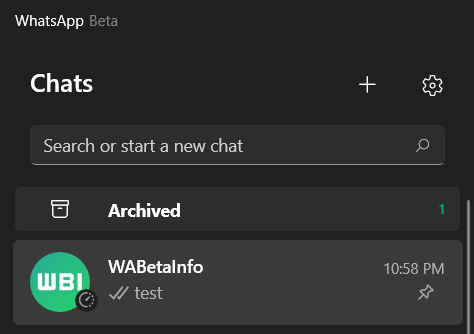
As you can see in this screenshot, it is finally possible to view your archived chats, but there is more: you can also archive and unarchive chats, even if there are some bugs (for example, the action to unarchive a chat won't refresh the chats list). Being a beta version, things like that can happen since WhatsApp is developing and releasing new features update by update. The version of the archive implemented in this update is the newest one, so you are using the new archive: archived chats always stay in the archive when new messages arrive.
In addition, WhatsApp has also introduced new icons when opening the chat options (Media, Files, Links, Encryption, and Groups) in the new update.
Note that more features will be introduced in the next updates, and this is one of the reasons why you should always update to the most recent beta. So be sure to update to the latest beta version available on the Microsoft Store in order to view your archived chats today.
Follow WABetaInfo on Twitter to discover news and all other changes implemented on WhatsApp beta for Android, iOS, Web/Desktop builds!
Let us know on Twitter if you like this article and you can visit this page to discover where you can find WABetaInfo!
WABetaInfo has a Discord Server about WhatsApp, where you can chat, give advice, ask for help,and read my announcements!