WhatsApp is releasing an app sidebar and status reply on Windows beta
Last week, WhatsApp released a new beta version for the native Windows application to some users: the build number is 2.2240.1.0. After installing this update, an app sidebar shows up and users can now reply to status updates!
| Common questions | Answers |
|---|---|
| Name of the feature? | App sidebar and status reply |
| Status? | Enabled |
| Compatibility? | WhatsApp beta for Windows 2.2240.1.0 is marked as a compatible update. |
| I've installed this update but I don't see the sidebar and the ability to reply to status updates. Why? | Some people may be unable to see the sidebar when opening WhatsApp after the update. In this case, please kill and reopen the app. About the ability to reply to status updates, this feature reached all users so be sure to stay on a compatible update. |
| Thanks: | A lot of users reported the new sidebar but the first people were AnonymousWP, Traiti, Hypogriff, rubiokarim, and Saadh Jawwadh. |
| Previous news? | Summary of recent new features for WhatsApp Business: new linked device interface, track ad, and reorder collections! |
APP SIDEBAR AND STATUS REPLY
In August, WhatsApp released some updates that implement two important features for WhatsApp beta for Windows. The first feature was about the ability to react to messages by using any emoji, already available on WhatsApp for Android, iOS, and Desktop. The second one lets users see status updates. As we explained in the previous article about status updates, some features may still be missing since it is a beta, for example, the ability to reply to status updates. Finally, WhatsApp is bringing this feature to the most recent 2.2240.1.0 update that has been released last week to some beta testers:

Since this is a beta version, you still cannot create a new status update in this build but maybe it will be possible in the future since the ability to reply to status updates has been implemented after a short time.
But this isn't the only new feature available in the newest update. In fact, a lot of users noticed that a new app sidebar showed up after installing the update from the Microsoft Store and it is very similar to the one we see in the Mac Catalyst app. Thanks to the new app sidebar, users can easily reach status updates, settings, and their profile:
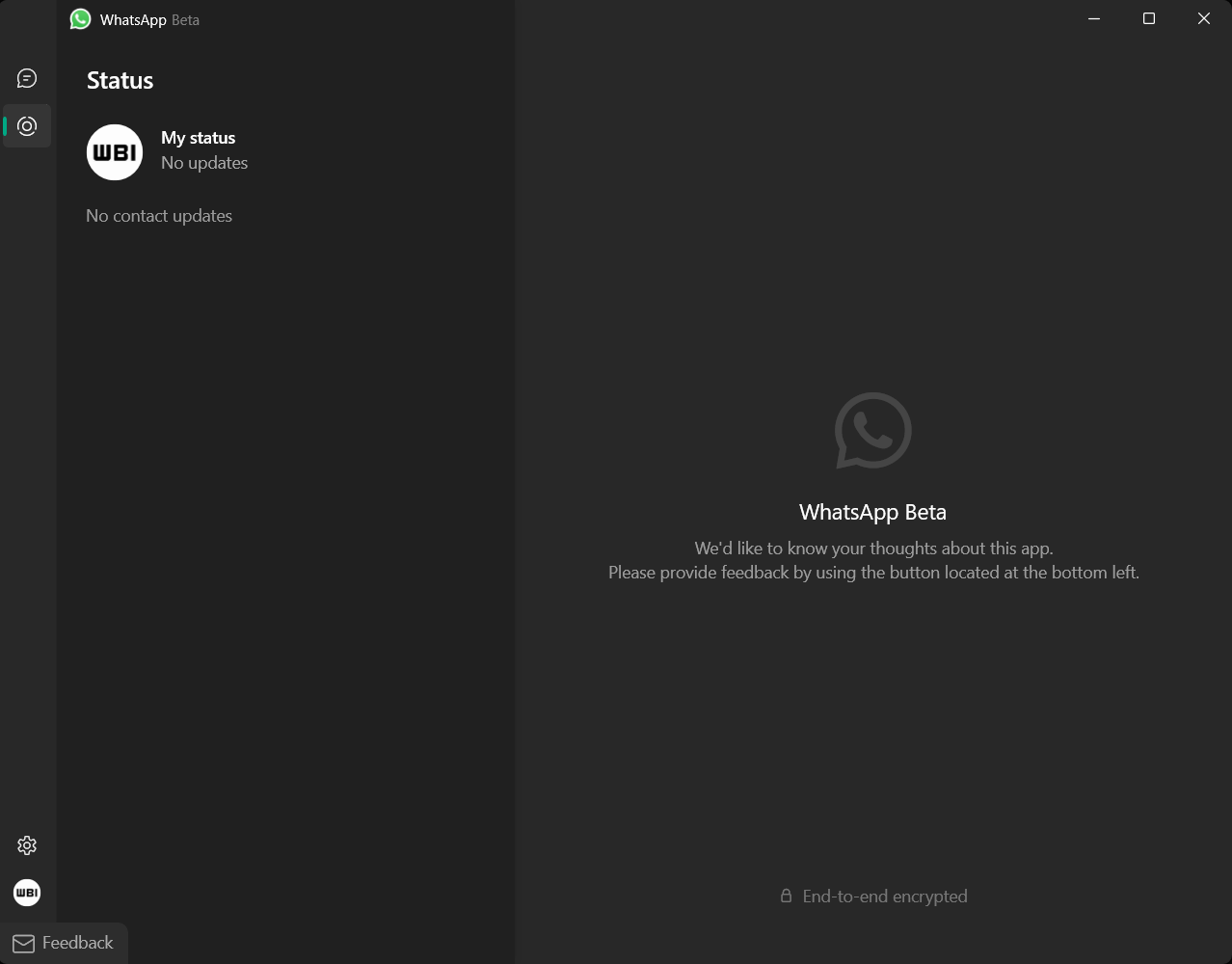
As we said above, these features are available after installing the most updated version of WhatsApp beta for Windows. This update has been rolled out to some beta testers last week and it should be released to everyone on the Microsoft Store today so be sure to update to the 2.2240.1.0 beta build in order to get these features.
Follow WABetaInfo on Twitter to always be up to date about WhatsApp news, and you can discover all other changes implemented on WhatsApp beta for Android, iOS, Web/Desktop, and Windows!
Do you like this news? Please, let us know on Twitter: we love hearing your feedback! If you're curious to know where you can find WABetaInfo, there is a dedicated page where you can discover our services.
In addition, a Discord Server invite link is available! You can join to discover more about WhatsApp: you can chat in different channels, give advice, ask for help, and read my announcements faster thanks to push notifications!