WhatsApp beta for Android 2.25.21.24: what's new?
WhatsApp has released a new Android update through the Google Play Beta Program, bringing the version up to 2.25.21.24.
What's new in this update? WhatsApp is rolling out a feature to send a greeting message with a wave emoji, and it's available to some beta testers!
| Common questions | Answers |
|---|---|
| Name of the feature? | Greeting message with wave emoji |
| Status? | Rolling out |
| Compatibility? | WhatsApp beta for Android 2.25.21.24 has been designated as a compatible update, but some users may get the same feature by installing certain previous updates. |
| I've installed this update but I don't have this feature. Why? | This feature is available to some beta testers, and it is rolling out to more users over the coming weeks. |
| Thanks: | Saadh Jawwadh, for testing and reporting. |
| Previous news? | WhatsApp news of the week: Android update with enhanced voice chats with Meta AI is available! |
GREETING MESSAGE WITH WAVE EMOJI
In the article about the WhatsApp beta for Android 2.24.9.5 update, we announced that a feature to suggest contacts to chat with was available. This feature introduces a new section at the bottom of the chats list that highlights suggested contacts from the user's address book with whom they haven't previously interacted. This section is also visible to new users after the registration process, helping them quickly establish connections right from the start. It seems that WhatsApp now aims to provide a prompt to start a new chat with contacts the user has never interacted with. Following the release of the latest WhatsApp beta for Android 2.25.21.24 update, which is available on the Google Play Store, we discovered that WhatsApp is rolling out a feature to send a greeting message with a wave emoji!
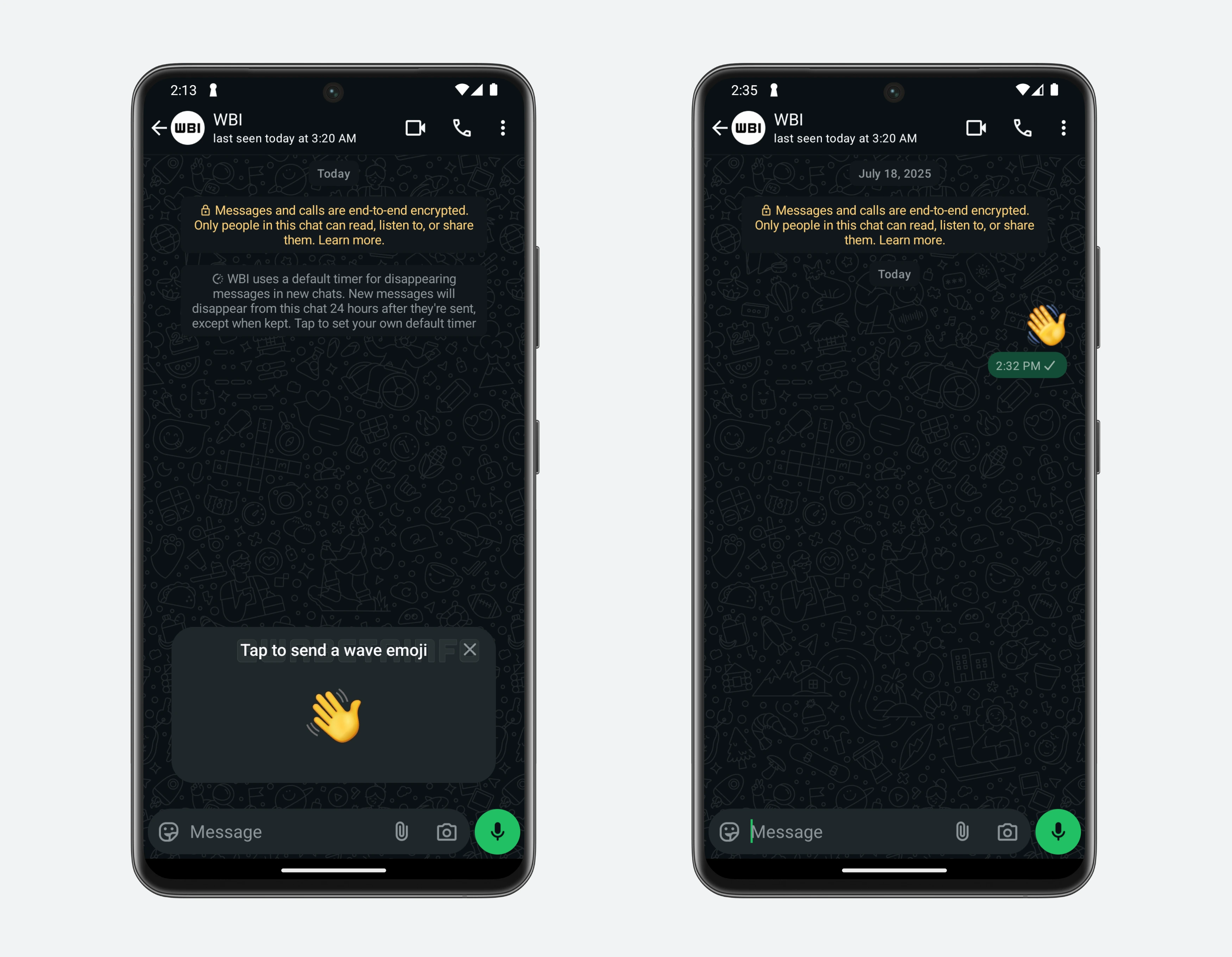
As you can see from the attached screenshot, some beta testers can now explore a new suggestion that is displayed at the bottom of the conversation screen when opening a chat with a contact they've never messaged before. This new visual prompt is designed to appear in one-on-one chats that have no message history, drawing attention to the opportunity to start a new interaction. In particular, WhatsApp encourages users to send a wave emoji, presenting it as a light, friendly gesture to initiate communication. By introducing this subtle nudge, WhatsApp aims to help users overcome the hesitation of starting a conversation from scratch.
The wave emoji appears to be the standard prompt chosen by WhatsApp specifically for these kinds of initial interactions between users. In fact, this same emoji has been incorporated into other parts of the app's functionality, such as voice chats, where the "Wave All" option lets users quickly notify every member of a group to join the ongoing conversation. By reusing this particular emoji across different features, WhatsApp creates a consistent visual language that users can easily recognize. This consistency also helps users understand that the wave emoji represents a gentle invitation to start communicating.
By introducing this small visual prompt, WhatsApp makes it easier for users to take the first step in chatting with someone new. It reduces the friction of thinking about what to say and provides a universal, casual way to say hello. This is particularly convenient for users who are hesitant to initiate conversations or for those who might feel awkward starting a chat without context. For those who don't want to engage with the prompt, WhatsApp also offers the option to dismiss it. Users can simply tap the small close button next to the suggestion to remove it from the chat screen.
A feature to send a greeting message with a wave emoji is available to some beta testers who install the latest updates of WhatsApp beta for Android from the Google Play Store, and it is rolling out to even more people over the coming weeks.
Stay up-to-date on WhatsApp news by following WABetaInfo on X. You can also discover other new features for WhatsApp beta for Android, iOS, Web/Desktop, and Windows.
Do you like this news? Please, let us know on X: we love hearing your feedback! If you're curious to see where you can find WABetaInfo, there is a dedicated page where you can discover our services.
In addition, we have set up a Discord Server where you can chat with other people, get help and advice, and stay up to date with the latest announcements from WABetaInfo.