WhatsApp beta for Android 2.25.14.7: what's new?
WhatsApp has released a new Android update through the Google Play Beta Program, bringing the version up to 2.25.14.7.
What's new in this update? WhatsApp is rolling out a feature to choose how voice messages are transcribed, and it's available to some beta testers!
| Common questions | Answers |
|---|---|
| Name of the feature? | Voice message transcripts |
| Status? | Rolling out |
| Compatibility? | WhatsApp beta for Android 2.25.14.7 has been designated as a compatible update, but some users may get the same feature by installing certain previous updates. |
| I've installed this update but I don't have this feature. Why? | This feature is available to some beta testers, and it is rolling out to more users over the coming weeks. |
| Thanks: | FastenM, for testing and reporting. |
| Previous news? | WhatsApp is working on bringing voice and video calling capabilities to the web client! |
VOICE MESSAGE TRANSCRIPTS
In the article about the WhatsApp beta for iOS 25.12.10.70 update, we announced that a feature to control how voice messages are transcribed was available. This feature introduces a dedicated section within the app settings where users can now manage transcription preferences more precisely. It offers three configuration options that allow users to decide whether voice messages should be transcribed automatically, only upon manual request, or not at all. It appears that WhatsApp now intends to offer Android users the same control over voice transcripts as it already does for the iOS version, aiming to provide a consistent experience across both platforms. Following the release of the latest WhatsApp beta for Android 2.25.14.7 update, which is available on the Google Play Store, we discovered that WhatsApp is rolling out a feature to choose how voice messages are transcribed!
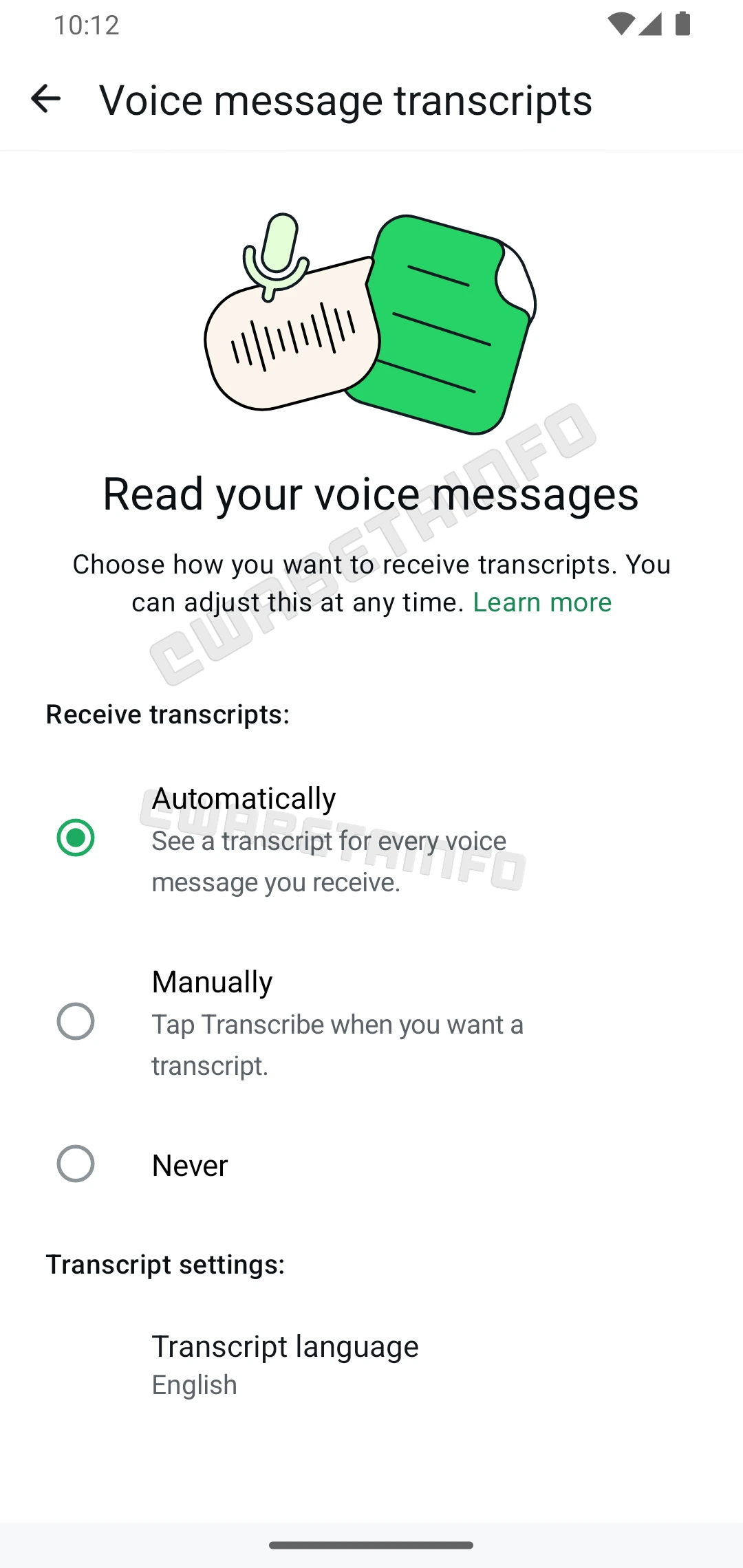
As you can see from the attached screenshot, some beta testers can explore a new section specifically dedicated to voice message transcription settings. This section allows users to customize their experience according to their needs and preferences, offering three different options to control how voice messages are transcribed. The first available option is automatic transcription, where every supported voice message is transcribed as soon as it is received. This is extremely convenient for users who prefer reading messages instead of listening to audio, especially in situations where listening to voice messages might be inappropriate or impractical. It also saves time, as users can quickly scan through a transcription without playing the message.
The second option is manual transcription, where users have to manually request a transcription each time they wish to see one. This setting is ideal for those who occasionally find themselves needing a transcript but do not want every voice message to be automatically processed. It provides more control and avoids unnecessary transcriptions, especially if most voice messages do not require a written version. The third option prevents voice messages from being automatically and manually transcribed. This option is ideal for users who prefer to listen to voice messages in their original form and do not wish to use the transcription feature at all.
Each of these options is designed to cater to different user preferences, making the feature highly versatile. Automatic transcription benefits those who prioritize speed and accessibility. Manual transcription serves users who value selective control, allowing them to avoid automatically transcribing every voice message and instead manually transcribe only those they consider important or necessary. Disabling transcription altogether respects the choice of users who are comfortable with the traditional voice message experience.
It is worth noting that both the automatic and manual transcription options will only work if the voice message is in a supported language. Since WhatsApp uses an in-house transcription solution based on downloadable language packs, this approach ensures that voice message content remains protected by end-to-end encryption. As a result, transcription processing happens locally on the device, rather than on external servers. Currently, WhatsApp supports English, Spanish, Portuguese (Brazil), Russian, and Hindi for voice message transcription. However, more languages may be supported in the future as the service expands.
Additionally, it is important to highlight that the rollout of this feature might differ slightly from previous updates. Specifically, some users on the stable version of WhatsApp may also gain access to the new transcription settings, even if they are not enrolled in the beta program. This suggests that WhatsApp is conducting a broader test phase, possibly to gather feedback from a wider user base before the official release of this section.
A feature to choose how voice messages are transcribed is available to some beta testers who install the latest updates of WhatsApp beta for Android from the Google Play Store, and it is rolling out to even more people over the coming weeks.
Stay up-to-date on WhatsApp news by following WABetaInfo on X. You can also discover other new features for WhatsApp beta for Android, iOS, Web/Desktop, and Windows.
Do you like this news? Please, let us know on X: we love hearing your feedback! If you're curious to see where you can find WABetaInfo, there is a dedicated page where you can discover our services.
In addition, we have set up a Discord Server where you can chat with other people, get help and advice, and stay up to date with the latest announcements from WABetaInfo.