WhatsApp beta for Android 2.24.7.17: what's new?
WhatsApp is rolling out a new update through the Google Play Beta Program, bringing the version up to 2.24.7.17.
What's new in this update? WhatsApp is rolling out a feature to manage media upload quality, and it's available to some beta testers!
| Common questions | Answers |
|---|---|
| Name of the feature? | Media upload quality |
| Status? | Rolling out |
| Compatibility? | WhatsApp beta for Android 2.24.7.17 is marked as a compatible update. |
| I've installed this update but I don't have this feature. Why? | This feature is available to some beta testers, and it is rolling out to more users over the coming days. |
| Thanks: | FastenM, for testing and reporting. |
| Previous news? | WhatsApp beta for Android 2.24.7.16: what’s new? WhatsApp is working on a new interface to share status updates! |
WhatsApp worked on media upload quality
In the article about the WhatsApp beta for Android 2.24.5.6 update, we announced a feature to manage media upload quality. This functionality will offer users greater control over their sharing experience. Specifically, WhatsApp will make it easier for users to preserve important details in their photos and videos. By managing media upload quality, WhatsApp will help users decide how much compression to apply to their photos and videos before sending them.
WhatsApp is introducing media upload quality
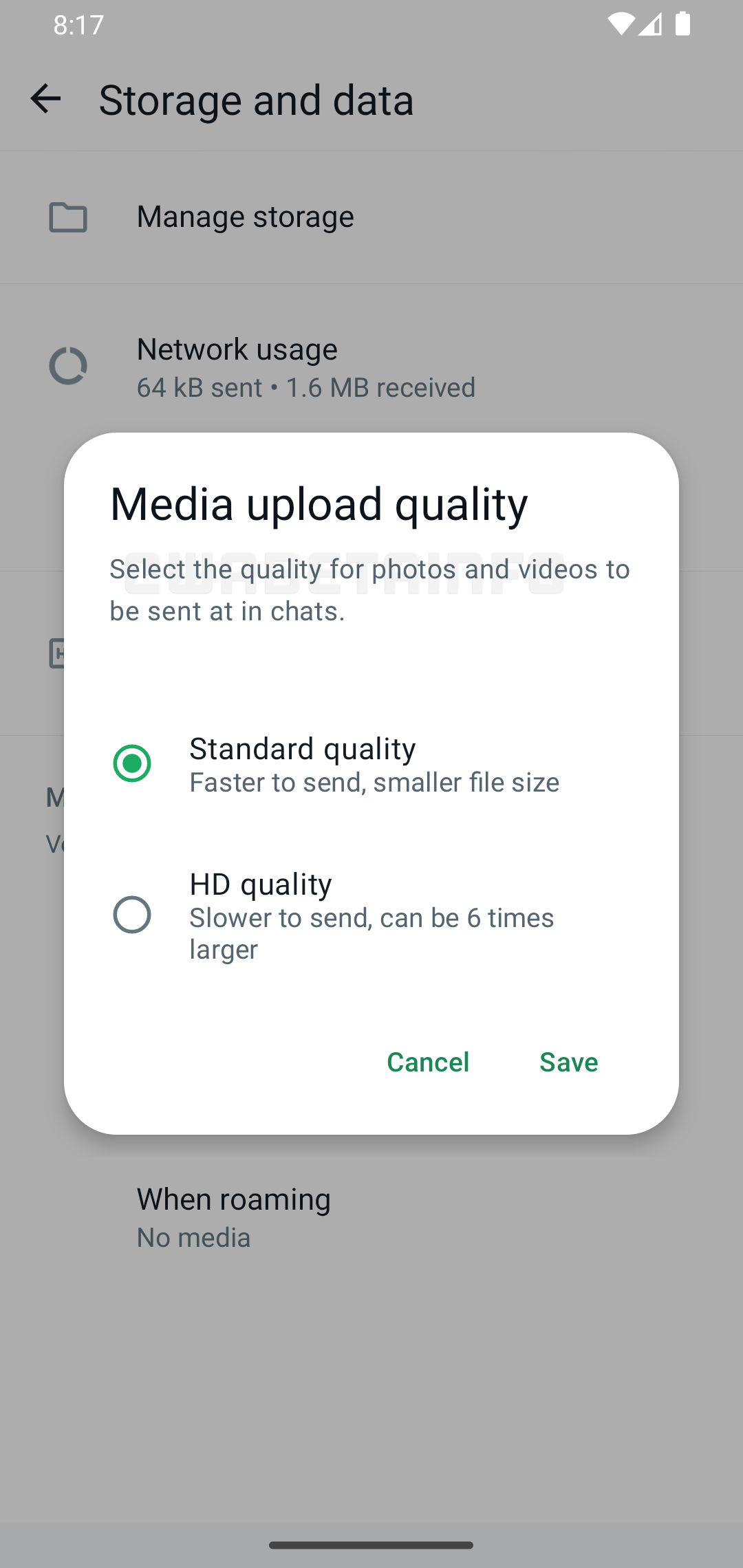
Finally, WhatsApp is testing the feature to manage media upload quality with the public. Today, some beta testers reported that they can now decide the default quality of photos and videos before sending them. With the latest WhatsApp beta for Android 2.24.7.17 update, which is available on the Google Play Store, WhatsApp is rolling out the feature to manage media upload quality. This will make it easier for users to control the balance between file size and image quality.
What Standard quality and HD quality mean
Some beta testers can now choose which quality to use when sharing their photos and videos. When users choose the standard quality, WhatsApp shares images and videos faster. Since WhatsApp compresses them, the file size is smaller and the upload is faster. Instead, the high-quality option ensures that users share their photos and videos with clarity and fidelity. Note that the high-quality option doesn't allow users to share original quality media directly. Instead, they need to share their photos and videos as documents to maintain their original quality. Users can manage this feature from the app settings.
How WhatsApp applies the quality setting automatically
This feature helps users decide the default quality for their photos and videos. Instead of adjusting manually the quality for individual images and videos, users can now set the default quality for their media files. With this update, WhatsApp will also remember the last quality setting users chose in the drawing editor. This means that WhatsApp will apply it automatically the next time users share a photo or video.
WhatsApp is rolling out media upload quality to Android beta testers
The feature to manage media upload quality is available to some beta testers. Users need to install the latest update of WhatsApp beta for Android from the Google Play Store. Since WhatsApp is gradually rolling it out, the feature is not available to everyone. However, WhatsApp will release it to more accounts over the coming weeks.
Connect with WABetaInfo
Follow WABetaInfo on X and visit our About page to learn more about what we do. We always appreciate your feedback on posts like this one.