This week, WhatsApp is testing Strict Account Security Settings, letting iOS beta testers enable advanced protections with a single toggle. The update will ensure stronger safeguards against unknown contacts and potential threats while keeping accounts private and secure.
| Key points | Details |
|---|---|
| Name of the feature: | Strict account security settings |
| Feature availability: | Some features announced in this article may be under development and not yet available to all beta testers, or they may be gradually rolling out to users. If you're unable to access a certain feature, you will need to wait for a future update. Keep reading for more information. |
| News of last week: | WhatsApp is Developing a Recent History Sharing Feature For Group Chats! |
| Previous article: | WhatsApp beta for Android 2.25.37.6: what's new? WhatsApp is working on a feature that lets channel admins create and show a profile! |
Weekly WhatsApp Beta Updates: New Features and Improvements
This weekly roundup brings together all the latest WhatsApp beta updates from the past week, giving you a single place to catch up on everything you might have missed. Whether you follow our updates closely or only check in occasionally, this summary ensures you stay informed about new features, improvements, and fixes. This week's highlight is the Strict Account Security Settings on the iOS beta, which let testers enable advanced protections with a single toggle, strengthening defenses against unknown contacts and potential threats. Stay in the loop and see what's new in WhatsApp before the next updates are available.
WhatsApp Tests New Rounded Message Bubble Design
In the article about the WhatsApp beta for Android 2.25.36.16 update, we announced that WhatsApp is working on a new style for message bubbles with a more rounded shape. The current bubbles have lightly curved corners that have defined chats for years and feel familiar during daily use. Their compact look helps messages stay organized, especially in busy group conversations. Because this style has stayed mostly the same through many updates, it feels dependable and easy to recognize.
The upcoming design shifts to taller, pill shaped bubbles that soften the look of each message. This change gives conversations a calmer, more modern feel while keeping the layout users already understand. The difference may seem subtle at first, but it becomes clear when the two designs are compared side by side. The update suggests a gentle visual refresh that modernizes chats without disrupting how people use the app.
Strict Account Settings Available on WhatsApp for iOS
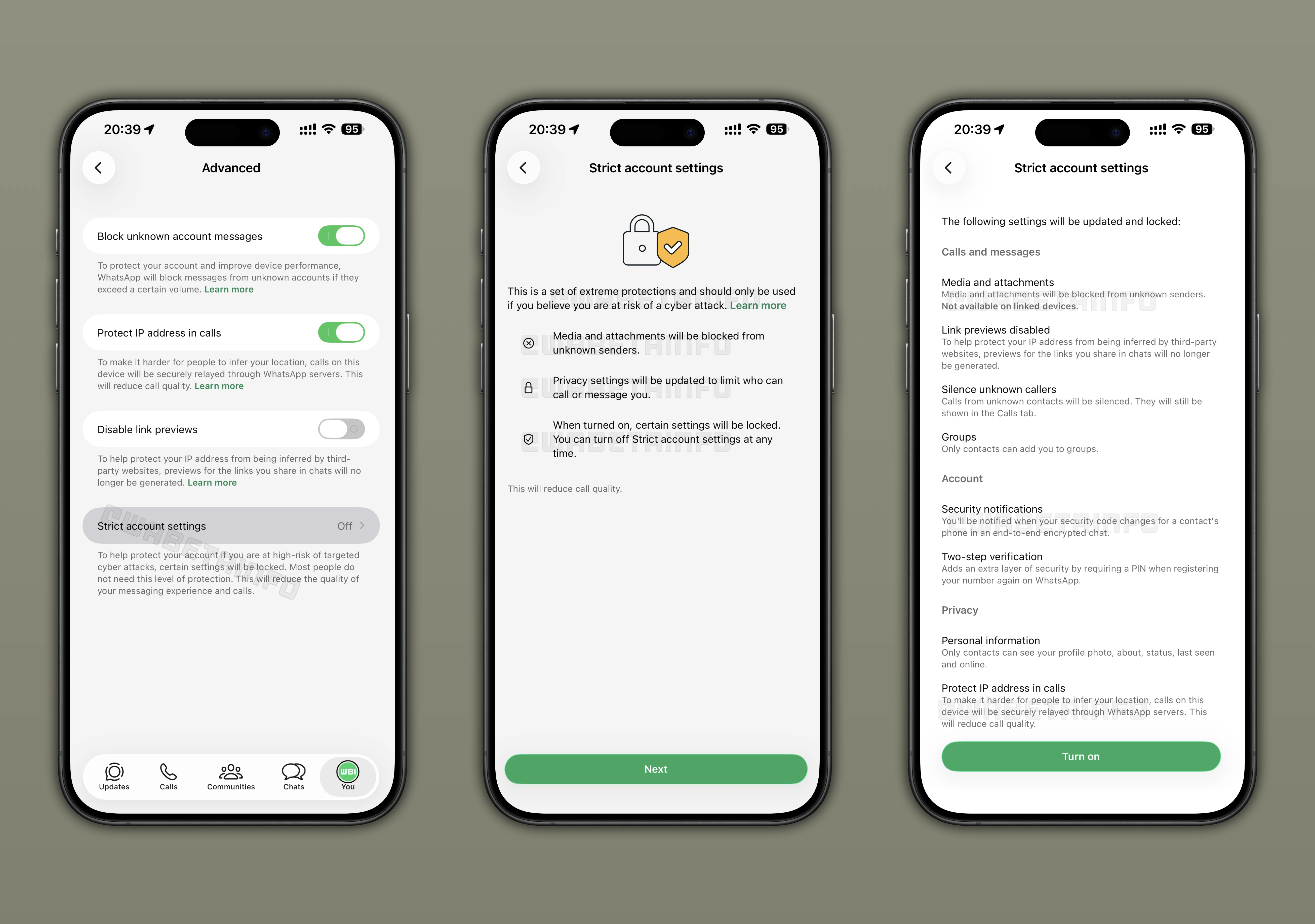
With the WhatsApp beta for iOS 25.36.10.70 update, some testers can access a new option that activates the strongest security protections using a single switch instead of multiple manual changes. The feature appears under Settings, Privacy, and Advanced, where users can see if strict account settings are available for their account. Once enabled, the app automatically applies its most advanced safeguards without requiring technical knowledge. Unknown contacts face tighter limits, with blocked file attachments, disabled link previews, muted calls, and stricter controls on who can add users to group chats.
Security notifications appear when a contact's encryption code changes, helping users verify that conversations remain private. Two step verification becomes mandatory, profile details are limited to contacts only, and calls are routed through WhatsApp servers to hide IP addresses. Some protections stay active even if the mode is later turned off, while certain settings remain locked to keep everything working together properly. The main benefit is convenience, since users can raise their protection level quickly, while those with higher exposure to targeted threats gain an easy way to apply consistent safeguards.
WhatsApp Beta Adds Status Draft Saving Feature
Following the release of the WhatsApp beta for Android 2.25.37.1 update, some beta testers can now see a new option in the status editor to save the item. This feature helps users pause their work when creating a status with text, drawings, or stickers and return to it later without losing changes. It is especially helpful during interruptions, such as when editing a photo or writing a caption but needing to stop suddenly. The editor now supports a more natural creation process where content can be prepared without the pressure to publish immediately
In the past, saving unfinished work required sending files to a personal chat, which created clutter and duplicate media. A visible save button appears at the top of the editor, making it easy to store a draft directly to the gallery in seconds. All edits are preserved exactly as left, making status creation more flexible and easier to manage for users who like to refine their updates over time.
WhatsApp Tests Redesigned Forward Picker Interface
With the WhatsApp beta for Android 2.25.37.2 update, some beta testers can explore an updated forward picker that rearranges key elements to make the process easier to understand. The previous layout placed selected contacts, an optional message field, and a send button at the bottom, which often felt crowded. In the new version, chosen contacts and groups appear in the top app bar as a subtitle, freeing up space below. A larger forward button now sits at the bottom, clearly signaling how to complete the action.
Next to it, a create group option becomes available when at least two contacts are selected, making group creation more visible. It is worth noting that the group creation option was already implemented in a previous update, but it has been moved from the top to encourage use during forwarding. WhatsApp is also testing a hybrid layout that keeps some familiar elements while adopting the new button placement. Together, these changes guide users more clearly through forwarding while making the interface feel cleaner and easier to navigate.
WhatsApp Tests Embedded Gallery in Chat Attachment Menu
Some beta testers can access a new gallery view built directly into the bottom of the chat attachment menu. This lets users browse recent photos and videos without leaving the conversation or opening the main gallery app. The interface starts with a camera shortcut, followed by recently captured media, though payment shortcuts may replace the camera for some users to avoid duplication. By combining capture and browsing in one place, sharing media becomes faster and more natural during chats.
Users can scroll through recent items immediately after tapping the attachment icon, which reduces extra steps. Selecting a photo or video opens the drawing editor instead of sending it right away, allowing edits and preventing mistakes. The share sheet has also been refreshed with pill shaped options, and the Documents label has been changed to Files to better reflect broader sharing support. Since this gallery view is experimental, WhatsApp may refine it, expand it, or remove it based on beta feedback.
WhatsApp Tests Channel Admin Profile for Updates
WhatsApp is testing a future feature that lets channel admins show a dedicated profile next to the updates they publish. A new toggle called Show admin profile will appear in channel settings and it is designed to control whether the admin name and image are visible on posts. The profile shown to followers is separate from the admin's personal WhatsApp account, keeping private details hidden. Admins can choose a custom display name and picture created only for that channel
This profile can differ across multiple channels, allowing admins to present different identities depending on the audience. The option is disabled by default and can be turned off at any time, so visibility remains fully optional. Phone numbers stay hidden even when the profile is active, and admins can preview how their profile looks before making it public. This setup helps followers see who is posting, especially in channels with multiple admins, while preserving privacy and flexibility.
Stay tuned with us to discover new features and updates about WhatsApp coming your way next week. We will continue tracking all the latest beta releases, improvements, and bug fixes so you never miss a thing. Make sure to check back regularly and stay ahead with the newest ways to enhance your WhatsApp experience.
Stay Connected with WABetaInfo
Following WABetaInfo on X is the best way to stay informed about new features under development and those released to WhatsApp beta for Android, iOS, Web, and Desktop. We love hearing your feedback, so let us know what you think! You can also explore our dedicated page to discover all our services, or join our Discord Server to chat with others, get help and advice, and stay up to date with the latest WABetaInfo announcements.