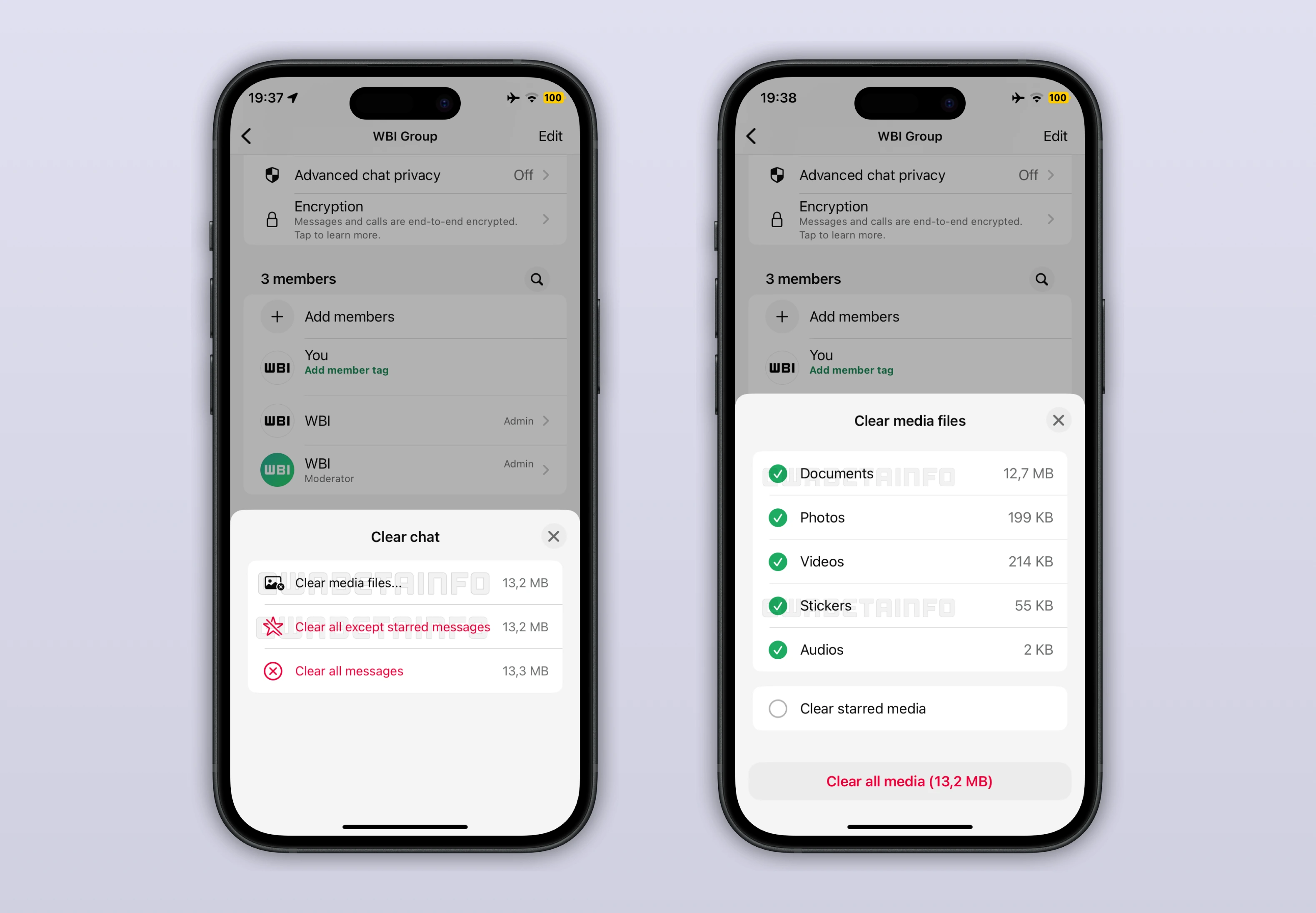
This week, WhatsApp is testing a redesigned clear storage tool on iOS that gives some users more control over how chats are cleaned. The update introduces a detailed clearing screen that separates messages, starred items, and different media types, allowing selective deletion and clearer storage insights while reducing the risk of accidentally removing important content.
| Key points | Details |
|---|---|
| Name of the feature: | Advanced chat clearing tool |
| Feature availability: | Some features announced in this article may be under development and not yet available to all beta testers, or they may be gradually rolling out to users. If you're unable to access a certain feature, you will need to wait for a future update. Keep reading for more information. |
| News of last week: | WhatsApp Launches Customizable Member Tags in Group Chats for Better Organization! |
| Previous article: | WhatsApp for Android 2.25.37.76: what's new? WhatsApp is rolling out a feature that displays a contact info page for group chat members! |
Weekly WhatsApp Beta Updates: New Features and Improvements
This weekly roundup brings together all the latest WhatsApp beta updates from the past week, giving you a single place to catch up on everything you might have missed. Whether you follow our updates closely or only check in occasionally, this summary ensures you stay informed about new features, improvements, and fixes. This week's highlight is the redesigned clear storage tool on iOS, which lets users selectively delete messages, starred items, and different media types while showing estimated storage recovery. Stay in the loop and see what's new in WhatsApp before the next updates are available.
WhatsApp Introduces Peripheral Device List for Automatic Connections
The WhatsApp beta for iOS 25.37.10.71 update allows some beta testers to see a list of peripherals connected to their WhatsApp account. A peripheral is a device that connects without scanning a QR code or entering a verification code, making the process quick and seamless. This setup is especially useful for wearables like the Apple Watch, which can sync messages instantly once installed. The peripheral list appears in the Linked Devices section, alongside other devices already associated with the account.
Each entry displays basic details such as the device name and its last active time, helping users keep track of access. At the moment, the Apple Watch app is the only supported peripheral, so it appears as a single item in the list. Unlike standard linked devices, peripherals cannot be disconnected from WhatsApp settings and must be removed by uninstalling the app from the device itself. Showing peripherals in this list improves visibility, helps users spot unexpected connections, and confirms whether devices like the Apple Watch are actively syncing messages.
WhatsApp Launches Redesigned Clear Chat Interface on iOS
Following the release of the WhatsApp beta for iOS 25.37.10.72 update, some beta testers can efficiently clear their chats with greater precision. Instead of a simple confirmation alert, the action now opens a bottom sheet that clearly explains what content will be removed. Messages, starred messages, and stored media are shown as separate categories so users understand exactly what is affected. The process is structured to prevent accidental deletions by encouraging users to review their choices before continuing.
Starred messages receive special attention, as WhatsApp asks whether they should be deleted or kept during the clearing process. This makes it easier to clean long conversations without losing saved information. Users can also choose to delete specific media types like images, videos, documents, audio, stickers, or voice messages and see an estimate of the storage space that will be freed. The new clearing tool is available from both the chat info screen and the chats list, offering the same detailed options from either entry point.
WhatsApp Tests Contact Info Bottom Sheet From Profile Icons in Groups
With the WhatsApp for Android 2.25.37.76 update, some users can now open an extended contact info section by tapping a profile icon. This section appears as a bottom sheet inside group chats, making it easier for users to perform actions without leaving the group interface. This page shows a clear overview of the group member and allows users to start a direct chat without leaving the group. Voice and video calls can also be initiated instantly from the same screen, reducing extra steps.
All users can access this page to view member details and verify the security code to confirm end to end encryption and contact authenticity. Group admins see additional shortcuts that let them promote a member to admin or remove them from the group directly. These actions no longer require opening the full group info page, making role management faster during active conversations. The page displays the profile photo, name, and eventually the status in one place, improving clarity and recognition. Screenshot protection is applied to this view, ensuring profile photos and contact information remain private.
WhatsApp Tests AI Powered Image Editing for Status Updates
The WhatsApp beta for iOS 25.37.10.73 update lets some beta testers explore a redesigned image editing interface when creating photo based status updates. The new layout introduces AI driven tools placed alongside familiar filters, allowing deeper visual changes without leaving WhatsApp. Users can choose from a range of artistic styles that reinterpret photos with looks such as Anime, Comic Book, Painting, or Video game. These styles rebuild the image using AI rather than applying simple overlays, creating more distinctive results.
A Redo option lets users regenerate the same style multiple times to explore different visual outcomes. Beyond styles, the editor can add or remove elements, enhance details, and reconstruct backgrounds through Meta AI prompts. Users can also transform an image by describing a new scene or mood, turning a simple photo into a more imaginative composition. The editor supports animating still images, adding subtle motion that makes status updates more engaging and expressive.
WhatsApp Releases Animated 2026 Sticker for New Year Chats and Status Updates
Some users can now use an animated 2026 sticker that adds a festive visual touch to conversations at the start of the year. The sticker is part of a New Year themed pack that includes different graphics, greetings, and animations inspired by the transition into 2026. All stickers are built with the Lottie framework, allowing smooth animations that stay lightweight and responsive on various devices. This approach delivers fluid visuals while keeping storage use low and performance stable.
Users with access can send the sticker in private and group chats to make messages feel more playful and expressive. The sticker also works in channels and status updates, giving creators and everyday users more ways to mark the New Year visually. WhatsApp highlights the 2026 sticker in the status Layout section, where a dedicated animated icon helps users quickly find New Year themed layouts. These layouts let users combine photos, videos, and text into story style updates, with the animated sticker tying everything together in a celebratory way.
WhatsApp Tests Direct Channel Invitations From Channel Info Page
With the WhatsApp beta for iOS 25.37.10.74 update, some beta testers can now invite followers directly from the channel information page using a dedicated invitation section. Channel admins can select up to 64 contacts at once from their address book and send them a prepared invitation message. Each invite includes an action button that opens a channel preview and lets recipients follow it with minimal steps.
To deliver these invitations, WhatsApp uses a temporary broadcast list that sends the same message to multiple contacts efficiently. This method avoids spam detection issues that could arise from sending repeated messages in separate chats. Only contacts who have saved the admin's phone number can receive the invitation, keeping the process limited to known connections. For admins, this makes it easier to grow a channel through direct outreach rather than relying only on public links. For recipients, seeing the invite come from a familiar contact adds context and can make the channel feel more relevant and trustworthy.
Stay tuned with us to discover new features and updates about WhatsApp coming your way next week. We will continue tracking all the latest beta releases, improvements, and bug fixes so you never miss a thing. Make sure to check back regularly and stay ahead with the newest ways to enhance your WhatsApp experience.
Stay Connected with WABetaInfo
Following WABetaInfo on X is the best way to stay informed about new features under development and those released to WhatsApp beta for Android, iOS, Web, and Desktop. We love hearing your feedback, so let us know what you think! You can also explore our dedicated page to discover all our services, or join our Discord Server to chat with others, get help and advice, and stay up to date with the latest WABetaInfo announcements.