WhatsApp for Android 2.25.37.76: what's new?
WhatsApp has released a new Android update through the Google Play Store, bringing the version up to 2.25.37.76.
What's new in this update? WhatsApp is rolling out a feature that displays a contact info page for group chat members, and it's available to some users!
| Key Points | Details |
|---|---|
| Name of the feature: | Contact info page |
| Status: | Rolling out |
| Compatibility: | WhatsApp for Android 2.25.37.76 has been designated as a compatible update. |
| Availability info: | This feature is available to some accounts, and it is rolling out to more users over the coming weeks. |
| Thanks: | shw_9876, Sc, FastenM, kingcyrious, and flakoflow, for testing and reporting. |
| Previous news: | WhatsApp beta for iOS 25.37.10.74: what's new? WhatsApp is rolling out a feature that allows admins to share a channel invite with their contacts! |
WhatsApp Expands Profile Icons with Contact Info Page for Group Chats
In the article about the WhatsApp beta for Android 2.23.12.7 update, we announced that a feature to add profile icons to group chats was available. With this functionality, users can quickly identify who is sharing messages without relying on their. It also helps reduce confusion in larger groups where multiple participants may share similar or duplicate names. The feature ensures that even if a member hasn't uploaded a profile photo, their presence is still visually marked with a distinctive default icon. This makes it easier to recognize each participant at a glance, as the profile icons provide a clear visual cue that distinguishes one member from another.
It seems that WhatsApp aims to make profile icons in groups more useful, not only for easily recognizing members. They are also expected to provide quick tools for interacting with participants directly. Following the release of the latest WhatsApp for Android 2.25.37.76 update, which is available on the Google Play Store, we discovered that WhatsApp is rolling out a feature that displays a contact info page for group chat members!
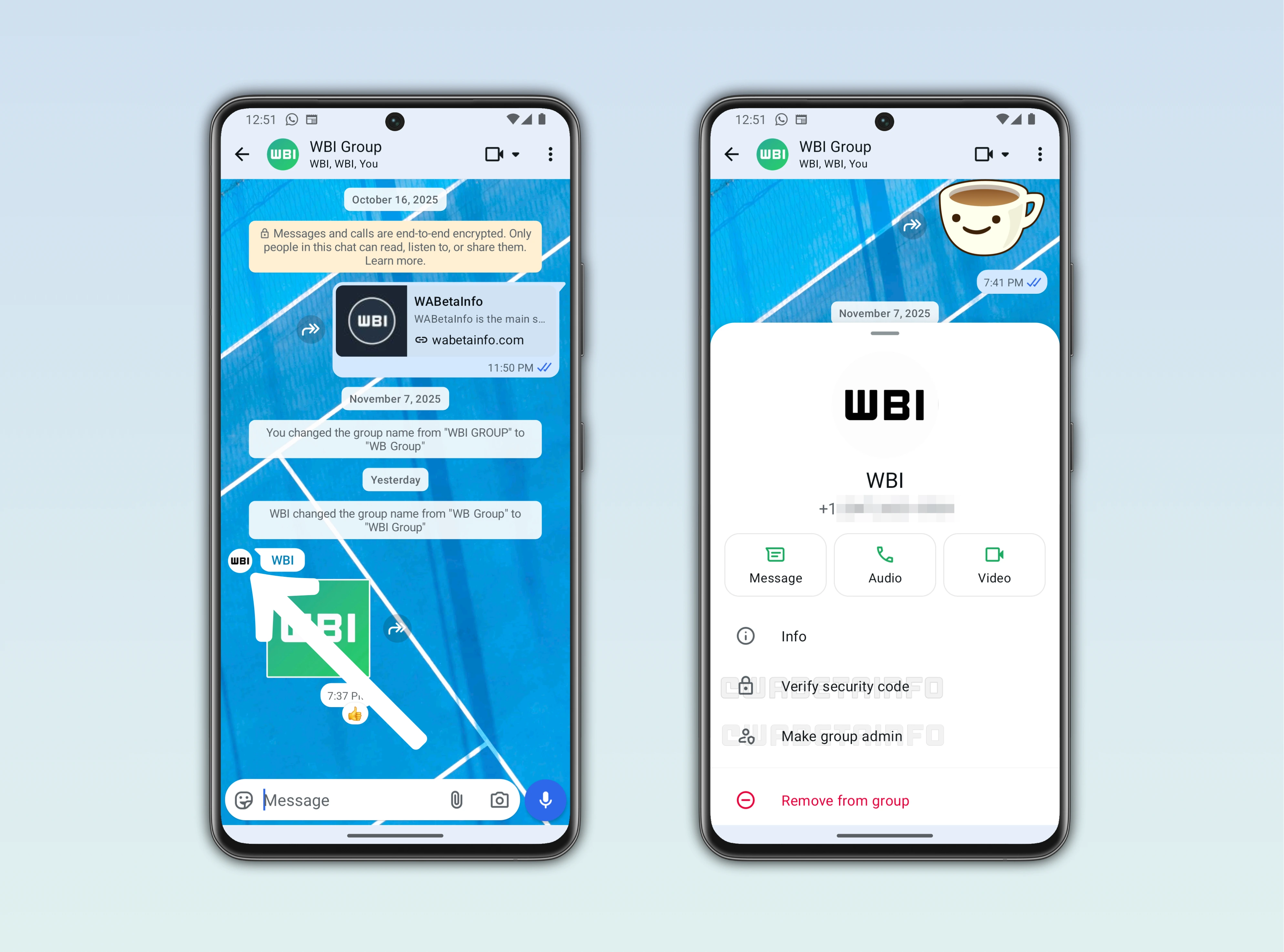
As you can see from the attached screenshot, some users can access an extended section through the profile icon that opens a contact info page in the form of a bottom sheet. The page provides a main overview of the group member, giving users essential information at a glance. From this page, users can quickly start a direct chat with the member without navigating away from the group. They can also make voice and video calls directly from the bottom sheet, saving time and taps.
All users, whether or not they are group admins, can open the contact info page to get a full overview of a member directly from this new section. They can also choose to verify the security code for the contact. Verifying the security code confirms that the conversation is end-to-end encrypted, ensuring that messages remain private between the sender and recipient and cannot be accessed by anyone else. It also guarantees that the contact is legitimate, providing an added layer of security against fraudulent accounts.
Group admins have two additional shortcuts on this page. The first shortcut allows them to promote a member to admin without opening the full group info page. This makes managing group roles faster and more convenient. The second shortcut lets admins remove a member from the group directly from the contact info page. Like the admin promotion, this eliminates the need to search through the group info page to remove someone. These updates make group management more efficient while keeping interactions secure.
Users can see the member's profile picture, name, and eventually their status in one place, which improves recognition and context. Quick access to chat, calls, and video calls also enhances communication within active groups. Admins can make real-time changes to member roles without interrupting the conversation flow. The page design is intuitive, fitting seamlessly into the existing WhatsApp interface. It's worth noting that this new page is protected from screenshots because it contains the profile photo, following an update released earlier this year that blocks screenshots of both profile pictures and the contact info page.
These changes make profile icons a functional tool rather than just a visual indicator. They bridge the gap between identification and interaction since users can now access contact info, start chats, make calls, and manage group roles directly from the profile icon. Group members now have a central hub for all essential interactions, making group chats more organized. By combining visibility, quick actions, and security, WhatsApp ensures that the new profile icon experience is practical for everyday use.
The feature that displays a contact info page for group chat members is currently being rolled out to all users after a limited testing period with select beta testers over the past few weeks. During that time, WhatsApp gathered feedback and fine-tuned the functionality. Now, the testing phase has moved to the stable version of the app. This means all users can gradually access and experience the feature in their regular WhatsApp account.
Stay Connected with WABetaInfo
Following WABetaInfo on X is the best way to stay informed about new features under development and those released to WhatsApp beta for Android, iOS, Web, and Desktop. We love hearing your feedback, so let us know what you think! You can also explore our dedicated page to discover all our services, or join our Discord Server to chat with others, get help and advice, and stay up to date with the latest WABetaInfo announcements.