WhatsApp beta for Mac 24.19.71: what's new?
WhatsApp has just submitted a new update through the TestFlight beta Program, bringing the version up to 24.19.71.
What's new in this update? WhatsApp is rolling out a feature to view and follow channels, and it's available to some beta testers!
| Common questions | Answers |
|---|---|
| Name of the feature? | Channels |
| Status? | Rolling out |
| Compatibility? | WhatsApp beta for Mac 24.19.71 is marked as a compatible update. |
| I have the same version but I don't have this feature, why? | This feature is available to some beta testers, and it's rolling out to more people over the coming days. |
| Thanks: | IgnacioAF, for testing and reporting! |
| Previous news? | WhatsApp beta for Android 2.24.20.12: what's new? WhatsApp is working on a new default chat theme feature with multiple design options! |
CHANNELS
In the article about the WhatsApp beta for Mac 24.11.73 update, we announced that WhatsApp was rolling out a feature to share status updates from the Desktop app. This update extended support to Mac users, as it allowed them to view and share status updates directly from the Catalyst app, a feature that was previously exclusive to WhatsApp for iOS, Android, and Windows. It appears that WhatsApp now intends to offer Mac users an improved experience with the Status tab, which finally includes the ability to engage with channels. Thanks to the latest WhatsApp beta for Mac 24.19.71 update, which is available on the TestFlight app, we discovered that WhatsApp is rolling out a feature to view and follow channels from the Desktop app!
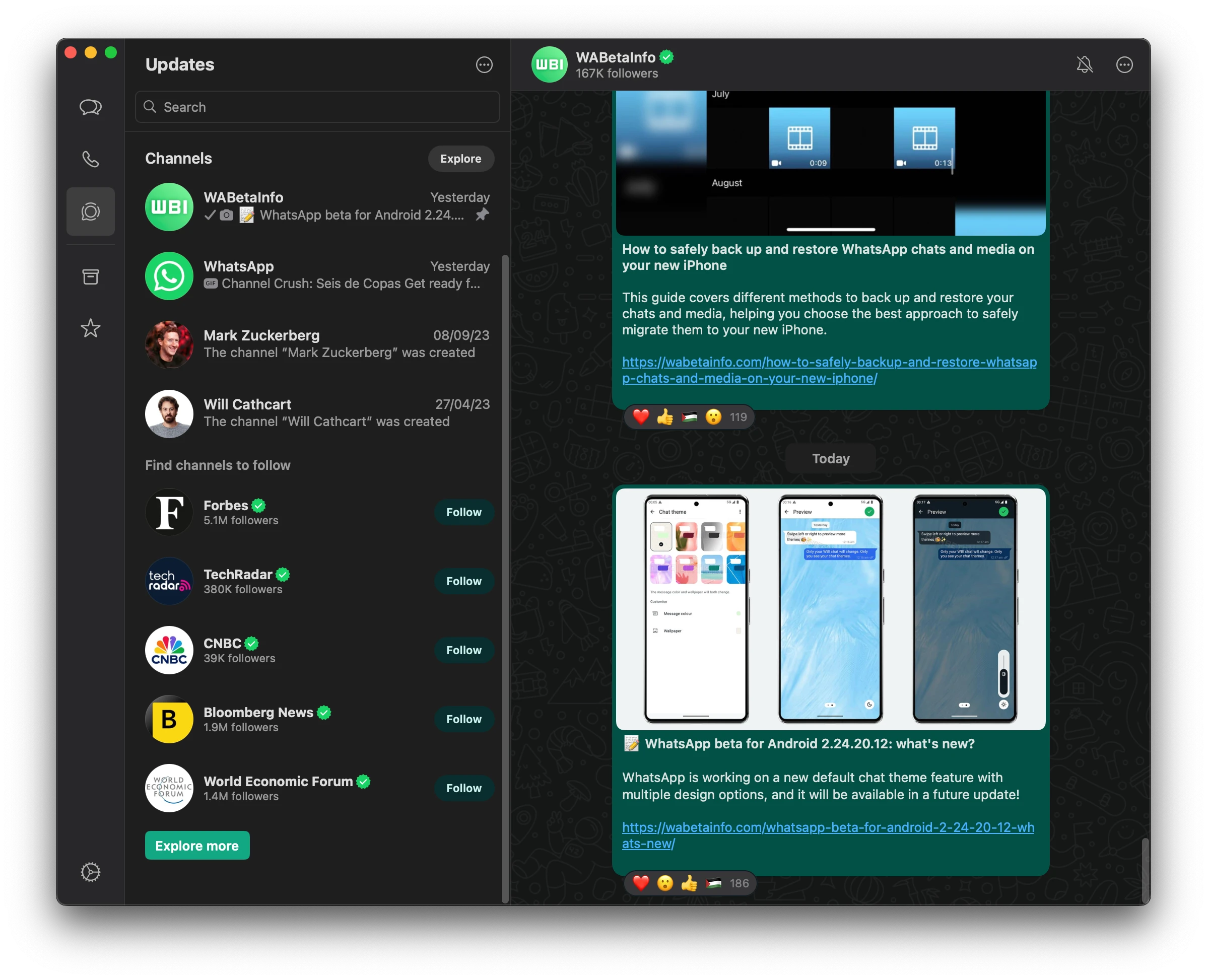
As you can see from the attached screenshot, some beta testers can explore a feature to allow them to view channels directly within the Status tab. Similar to the mobile app, the Status tab has been renamed to Updates, enabling users to access both status updates and channels from the Mac Catalyst app. Previously, users could only view certain channel updates through notifications, as full support for viewing them was not available. The ability to access channels was initially limited to the Mac Electron app, which WhatsApp has announced will be deprecated next month. Consequently, WhatsApp is transitioning these features to the new Mac Catalyst app, ensuring that users retain the ability to follow channels as the Electron app is phased out.
In addition to viewing channels, users can now follow their favorite channels directly from the Mac app. They can explore the channels directory with greater precision, filtering channels based on country and category. This makes it easier for users to discover new content that aligns with their interests, as they can quickly find relevant channels tailored to specific regions or topics. We believe that this also enhances user engagement by allowing users to browse a wide range of channels and find relevant content without needing to switch to the mobile app.
Although this feature is available in the latest Mac Catalyst beta version, it's important to note that channels may not yet be fully synced with the mobile app. This means that channels followed on the mobile app might not immediately appear on the desktop app, so users may need to follow them again. In addition, channel owners might temporarily be unable to share updates within their channels from their mobile device if they follow them from the Catalyst app. Since this is a beta version, encountering such issues is expected as the feature is still being refined. However, we anticipate that these bugs will be addressed in a future update to improve synchronization across different devices.
A feature to view and follow channels from the Desktop app is available to some beta testers who install the latest version of WhatsApp beta for Mac from the TestFlight app, and it's rolling out to more people over the coming days.
Stay up-to-date on WhatsApp news by following WABetaInfo on X where you can also discover other new features for WhatsApp beta for Android, iOS, Web/Desktop, and Windows.
Do you like this news? Please, let us know on X: we love hearing your feedback! If you're curious to see where you can find WABetaInfo, there is a dedicated page where you can discover our services.
In addition, we have set up a Discord Server where you can chat with other people, get help and advice, and stay up to date with the latest announcements from WABetaInfo.