WhatsApp beta for iOS 25.5.10.73: what's new?
WhatsApp has released a new iOS update through the TestFlight beta Program, bringing the version up to 25.5.10.73.
What's new in this update? WhatsApp is working on an enhanced experience to chat and talk with Meta AI, and it will be available in a future update!
| Common questions | Answers |
|---|---|
| Name of the feature? | Chat and talk with Meta AI |
| Status? | Under development |
| Availability? | WhatsApp is currently working on bringing an enhanced experience to chat and talk with Meta AI to a future update of the app. |
| I have the same version but I don't have this feature, why? | This feature is under development so it's not ready for beta testers, but you can read this article to discover a preview. |
| Previous news? | WhatsApp beta for Android 2.25.5.22: what's new? WhatsApp is working on an enhanced experience to chat and talk with Meta AI! |
CHAT AND TALK WITH META AI
In the article about the WhatsApp beta for Android 2.25.1.24 update, we announced that a new feature to chat and talk with Meta AI was under development. This feature aims to introduce a dedicated Meta AI screen that enhances user interaction with the chatbot, providing a more efficient way to engage through voice or text in the future. It appears that WhatsApp now intends to bring the same experience with Meta AI to iOS users in the future, ensuring a consistent experience across both platforms. Thanks to the latest WhatsApp beta for iOS 25.5.10.73 update, which is available on the TestFlight app, we discovered that WhatsApp is working on an enhanced experience to chat and talk with Meta AI!
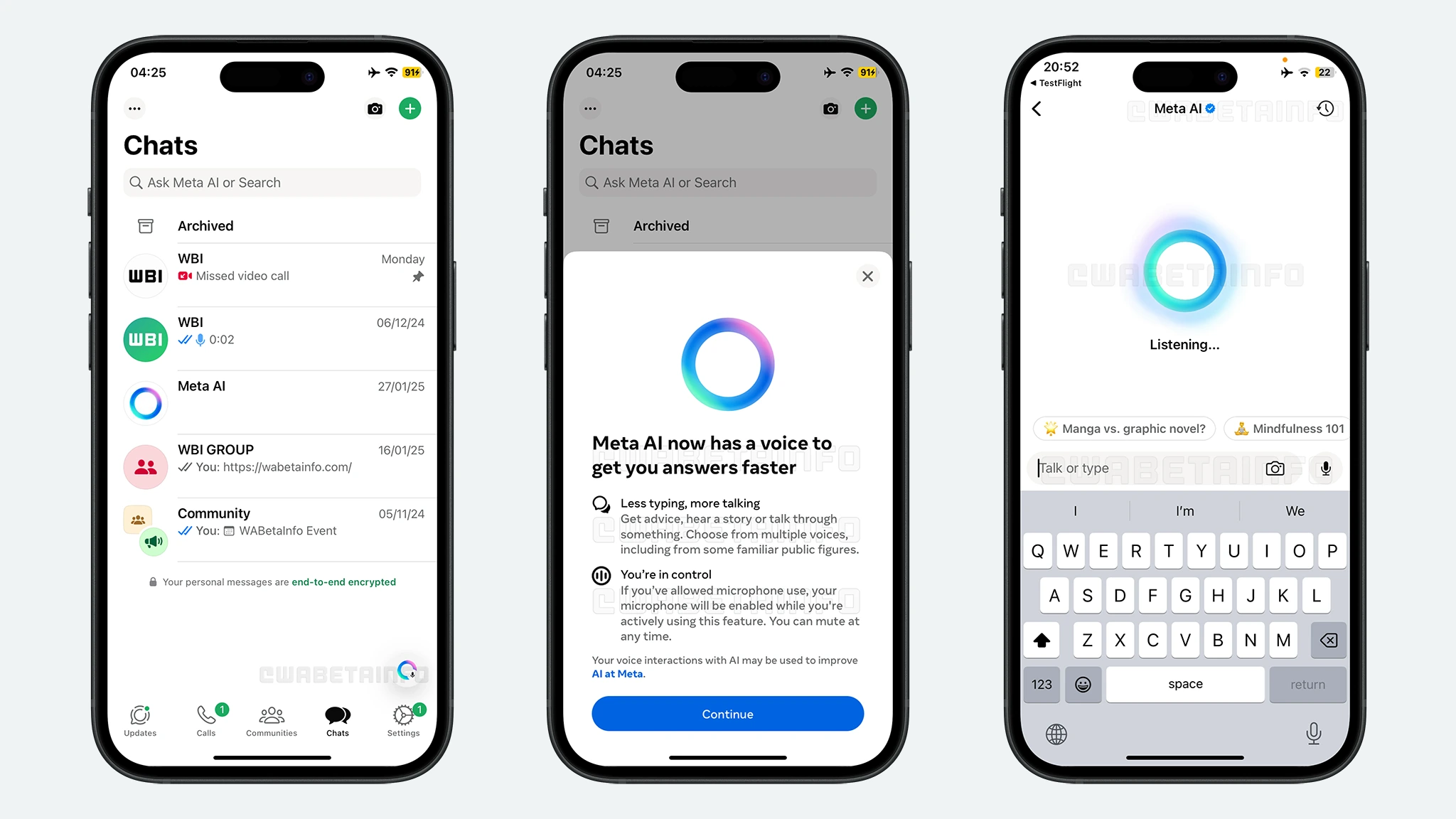
As you can see from the attached screenshot, WhatsApp is exploring the implementation of a feature that introduces a more modern and user-friendly design for the Meta AI interface, scheduled for release in a future update. This dedicated screen will prioritize essential tools for communicating with Meta AI, including a quick-access button for sharing photos with the chatbot, all within a clean and intuitive layout. When users open this screen from the Chats tab, Meta AI will instantly start listening to their voice input, offering an even faster experience than before. This will eliminate the need for users to manually activate the microphone, making interactions with the AI smoother and more natural.
To stop the listening mode, users can simply type their prompt in the text field or tap the microphone button, which will immediately end the voice input. Pressing the microphone button again will restart the listening mode, allowing users to seamlessly switch between voice and text interaction. Additionally, it's important to mention that the listening session will automatically end if the user exits the dedicated Meta AI screen, ensuring that the chatbot does not remain active in the background.
To provide transparency, iOS will display a privacy indicator in the status bar whenever Meta AI is actively listening, consistent with the functionality on Android. Since this indicator is managed directly by iOS and cannot be altered by any app, users will have a reliable confirmation that Meta AI has stopped listening once they leave the screen. This implementation guarantees that users remain in full control of when the chatbot can process their voice input, preventing any unwanted background activity.
This new experience will significantly simplify access to Meta AI, especially for users who prefer voice interactions. Since the default input method within this screen will be voice, users will be able to rely on this feature for quick and effortless communication with the chatbot. In addition, the new interface ensures that the most important tools are always within reach, making interactions with Meta AI feel more natural and intuitive.
An enhanced experience to chat and talk with Meta AI is under development and it will be available in a future update of the app. We will keep you updated on any further developments about this feature until it's officially released.
Stay up-to-date on WhatsApp news by following WABetaInfo on X where you can also discover other new features for WhatsApp beta for Android, iOS, Web/Desktop, and Windows.
Do you like this news? Please, let us know on X: we love hearing your feedback! If you're curious to see where you can find WABetaInfo, there is a dedicated page where you can discover our services.
In addition, we have set up a Discord Server where you can chat with other people, get help and advice, and stay up to date with the latest announcements from WABetaInfo.