WhatsApp beta for iOS 25.4.10.74: what's new?
WhatsApp has released a new iOS update through the TestFlight beta Program, bringing the version up to 25.4.10.74.
What's new in this update? WhatsApp is working on a new widget feature for accessing the Meta AI chatbot, and it will be available in a future update!
| Common questions | Answers |
|---|---|
| Name of the feature? | Meta AI widget |
| Status? | Under development |
| Availability? | WhatsApp is currently working on bringing a new widget feature for accessing the Meta AI chatbot to a future update of the app. |
| I have the same version but I don't have this feature, why? | This feature is under development so it's not ready for beta testers, but you can read this article to discover a preview. |
| Previous news? | WhatsApp beta for Android 2.25.4.20: what's new? WhatsApp is working on a feature to better manage home screen chat notifications! |
META AI WIDGET
In the article about the WhatsApp beta for Android 2.25.1.27 update, we announced that a feature to implement a widget for accessing Meta AI was under development. This widget is designed to provide users with a quick and enhanced way to initiate conversations with Meta AI directly from their Home Screen. This action will directly open a conversation with Meta AI, eliminating the need to search for the chat manually in the app. It appears that WhatsApp now intends to bring the same widget to iOS users in the future, ensuring a consistent experience across both platforms. Thanks to the latest WhatsApp beta for iOS 25.4.10.74 update, which is available on the TestFlight app, we discovered that WhatsApp is working on a new widget feature for accessing the Meta AI chatbot!
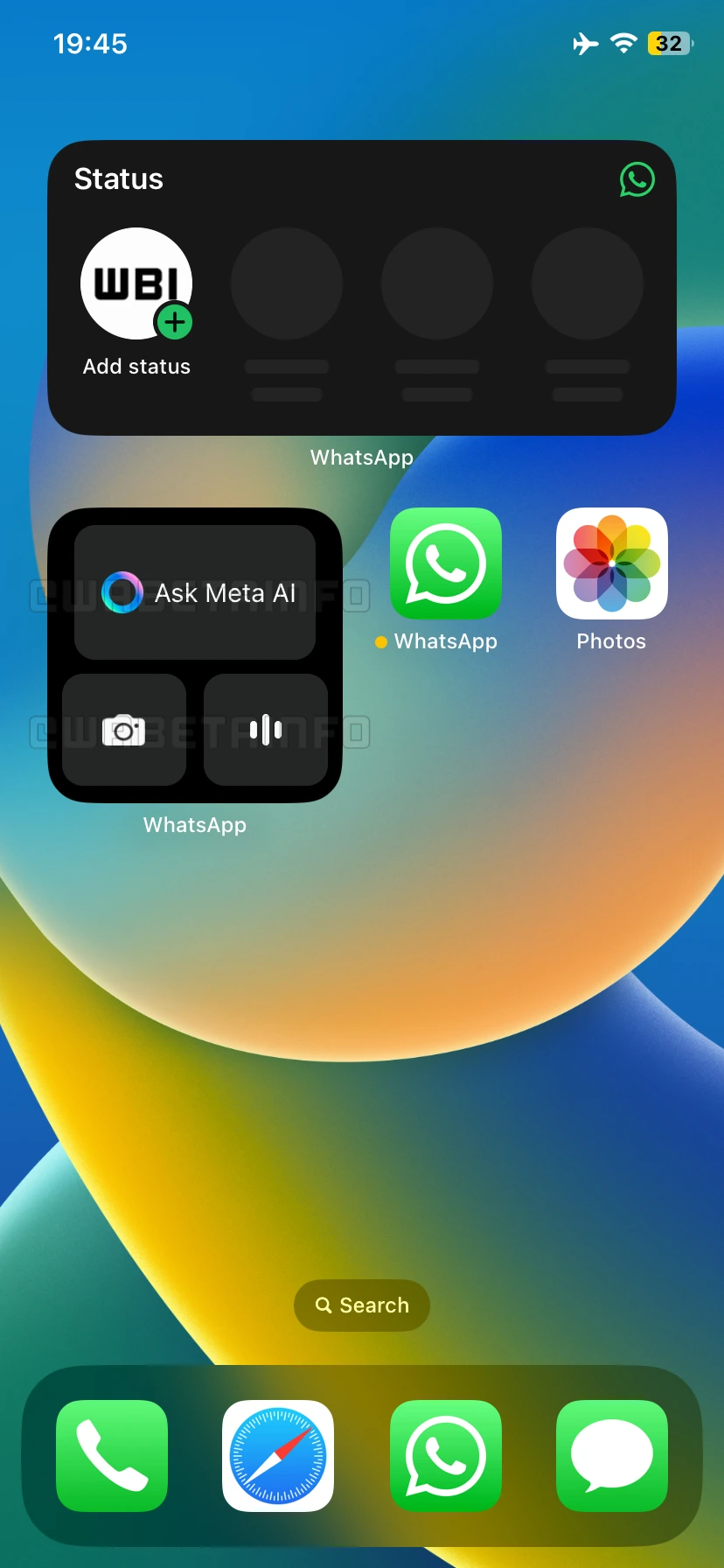
As you can see from the attached screenshot, WhatsApp is exploring the implementation of a dedicated widget exclusively for Meta AI, scheduled for release in a future update of the app. This widget includes three buttons, each acting as a shortcut to a core feature of the chatbot. The first shortcut allows users to ask a question to Meta AI instantly. By tapping this button, WhatsApp will automatically open a chat with Meta AI, ready to receive the user prompt without any additional steps. This feature will enhance interactions with the chatbot, making it easier and faster to get responses from Meta AI.
The second shortcut enables users to send a photo directly to Meta AI. As we know, Meta AI can edit images and provide context about them. For example, the chatbot can analyze a picture, describe what it represents, and explain its details. This feature is particularly useful for users who want quick image edits or need help understanding the content of a photo, as they will be able access it directly from the Home Screen. The last shortcut is for the voice chat mode, allowing users to open the chat with Meta AI and immediately interact with the chatbot using their voice instead of typing. This feature enhances accessibility and convenience, especially for users who prefer hands-free interactions or need a faster way to communicate with Meta AI.
We believe that adding the Meta AI widget to the Home Screen offers a significant advantage over manually opening WhatsApp and searching for the chat. With just one tap, users can access Meta AI instantly, saving time and effort. The widget eliminates unnecessary navigation within the app, as users can instantly access Meta AI with a single tap, avoiding the need to open WhatsApp, search for the chat, and manually start a conversation. It's important to note that the Meta AI widget will be optional. Users who do not wish to use the widget can simply choose not to add it to their Home Screen. This will ensure that the feature is available for those who find it useful while keeping the experience unchanged for those who prefer not to use it in the future.
A new widget feature for accessing the Meta AI chatbot is under development and it will be available in a future update of the app. We will keep you updated on any further developments about this feature until it's officially released.
Stay up-to-date on WhatsApp news by following WABetaInfo on X where you can also discover other new features for WhatsApp beta for Android, iOS, Web/Desktop, and Windows.
Do you like this news? Please, let us know on X: we love hearing your feedback! If you're curious to see where you can find WABetaInfo, there is a dedicated page where you can discover our services.
In addition, we have set up a Discord Server where you can chat with other people, get help and advice, and stay up to date with the latest announcements from WABetaInfo.