WhatsApp beta for Android 2.26.6.5: what's new?
WhatsApp has released a new Android update through the Google Play Beta Program, bringing the version up to 2.26.6.5.
What's new in this update? WhatsApp is working on a dedicated Meta AI tab to centralize all AI-powered features in one place, and it will be available in a future update!
| Key Points | Details |
|---|---|
| Name of the feature: | Meta AI tab |
| Status: | Under development |
| Availability info: | This feature is currently in development and not yet available for beta testing. In the meantime, you can read this article for a sneak peek. |
| Previous news: | WhatsApp beta for iOS 26.5.10.76: what's new? WhatsApp is rolling out a feature that redesigns the settings page with a cover photo! |
WhatsApp is working on a dedicated Meta AI tab as a central hub
In the post about the WhatsApp beta for Android 2.25.1.24 update, we announced a feature to introduce a dedicated tab for AI-powered chats. With this functionality, users would be able to explore a variety of AI tools offered by Meta, as well as those developed by third-party creators. These included AI characters designed for specific interests, productivity assistants, and customer support agents powered by Meta AI. In this interface, WhatsApp also planned to add a section to suggest the most popular AIs.
WhatsApp never released this functionality. Probably, the feature did not meet WhatsApp’s expectations, so it was put on hold pending further development. However, it seems that WhatsApp is now revising the initial idea to offer an even more useful tool. Following the release of the latest WhatsApp beta for Android 2.26.6.5 update, which is available on the Google Play Store, we discovered that WhatsApp is working on a dedicated Meta AI tab to centralize all AI-powered features in one place.
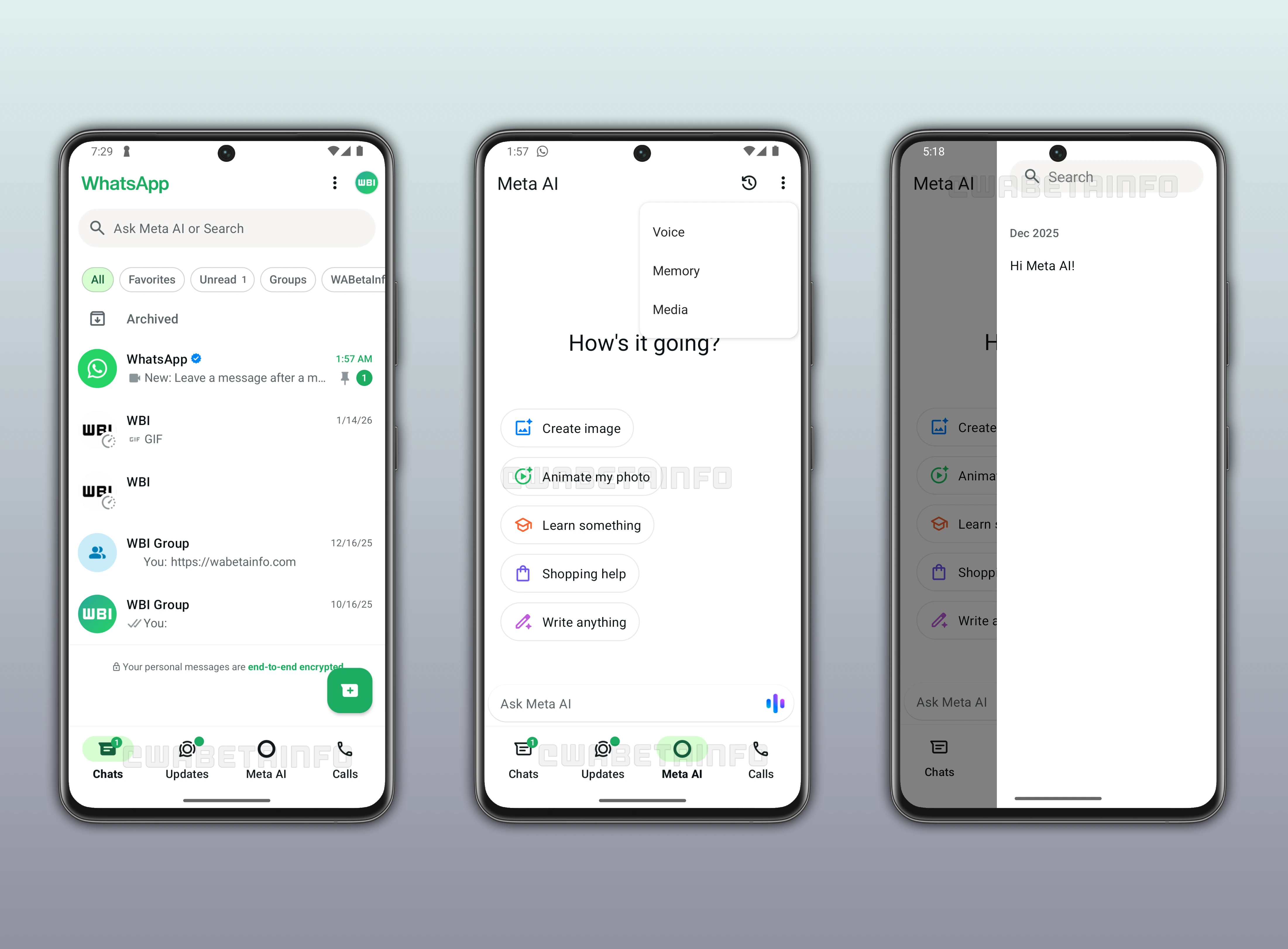
As you can see from the attached screenshot, WhatsApp is exploring the implementation of a new feature that will introduce a dedicated Meta AI tab within the bottom navigation bar, scheduled for release in a future update. The introduction of the Meta AI tab follows the same initial plan as the AI Characters tab. This means WhatsApp still plans to remove the Communities tab, which will be replaced by a new section offering Meta AI tools. It's worth noting that users can already rely on the Chats tab to create and manage communities. As a result, replacing the Communities tab is not expected to negatively impact the user experience.
This update is designed to create a central hub for all Meta AI tools, but its benefits go beyond that. It will also be greatly appreciated by users who do not actively use Meta AI. With the introduction of a dedicated Meta AI tab, WhatsApp plans to remove the floating action button that currently opens the chatbot from the Chats tab. This means that the Chats tab will no longer include the Meta AI shortcut. This finally offers a cleaner and less distracting interface, and it will address many complaints from users who often found the previous entry point intrusive. For now, there are no updates regarding possible changes to the search bar, though adjustments in that area would definitely be very appreciated.
The Meta AI tab will bring together the existing tools already available through the chatbot, organizing them in one place for more convenient access. These include an option to quickly generate images directly within the app. It will also include a shortcut to animate photos using Meta AI. In addition, the tab will provide some suggestions to help users discover different ways to interact with the chatbot. Users will also be able to start a chat at any time by typing a prompt into the "Ask Meta AI" search bar located at the bottom of the screen.
Meta AI also supports voice calls to receive responses in real time, similar to a regular phone conversation. This feature allows the chatbot to operate as a more complete virtual assistant, extending support beyond text-based interactions. The Meta AI tab will include a dedicated button within the search bar to quickly start a call with the chatbot. The same option will also be accessible from the overflow menu. In addition, the overflow menu will provide shortcuts to manage the chatbot memory and view all media shared within conversations with Meta AI.
This tab will also offer the ability to consult individual conversations with Meta AI. When users interact with Meta AI, the chatbot creates a separate conversation, which can be accessed later at any time. This means that users will be able to revisit their previous conversations as they do with ChatGPT and Gemini. Each conversation will have a title and keep its own context, making it easier for users to follow what they discussed with the chatbot in the past. This structure will let users organize and manage their interactions with Meta AI easily.
The dedicated Meta AI tab to centralize all AI-powered features in one place currently is under development, and it is planned for release in a future update. WhatsApp is still refining the layout and organization of the tab. Once testing is complete, the tab will be gradually rolled out to beta testers, giving them the opportunity to explore the centralized hub for Meta AI.
Stay Connected with WABetaInfo
Following WABetaInfo on X is the best way to stay informed about new features under development and those released to WhatsApp beta for Android, iOS, Web, and Desktop. We love hearing your feedback, so let us know what you think! You can also explore our dedicated page to discover all our services, or join our Discord Server to chat with others, get help and advice, and stay up to date with the latest WABetaInfo announcements.