WhatsApp beta for Android 2.25.37.1: what's new?
WhatsApp has released a new Android update through the Google Play Beta Program, bringing the version up to 2.25.37.1.
What's new in this update? WhatsApp is rolling out a feature that lets users save drafts for their status updates, and it's available to some beta testers!
| Key Points | Details |
|---|---|
| Name of the feature: | Save drafts for status updates |
| Status: | Rolling out |
| Compatibility: | WhatsApp beta for Android 2.25.37.1 has been designated as a compatible update. |
| Availability info: | This feature is available to some beta testers, and it is rolling out to more users over the coming weeks. |
| Thanks: | Akan and Dmmui, for testing and reporting. |
| Previous news: | WhatsApp beta for Android 2.25.36.16: what's new? WhatsApp is working on a feature that gives message bubbles a softer design for a more modern chat look! |
WhatsApp Expands Drafts to Status Updates for Beta Testing
In the article about the WhatsApp beta for Android 2.24.20.24 update, we announced that the message draft feature had been added to the chats list. With this functionality, users can instantly spot any conversation with an unfinished message, improving awareness and reducing the chance of forgetting to send important notes. It also streamlines navigation by highlighting drafts directly in the list view, which saves time when managing multiple chats. As a result, the feature provides a more organized messaging experience by keeping pending thoughts visible until the user decides to complete or discard them.
It appears that WhatsApp now plans to expand drafts to other areas of the app, starting with status updates. Today, some beta testers have reported that they can access a new saving tool that allows them to store unfinished status posts for later editing. Following the release of the latest WhatsApp beta for Android 2.25.37.1 update, which is available on the Google Play Store, we discovered that WhatsApp is rolling out a feature that lets users save drafts for their status updates!
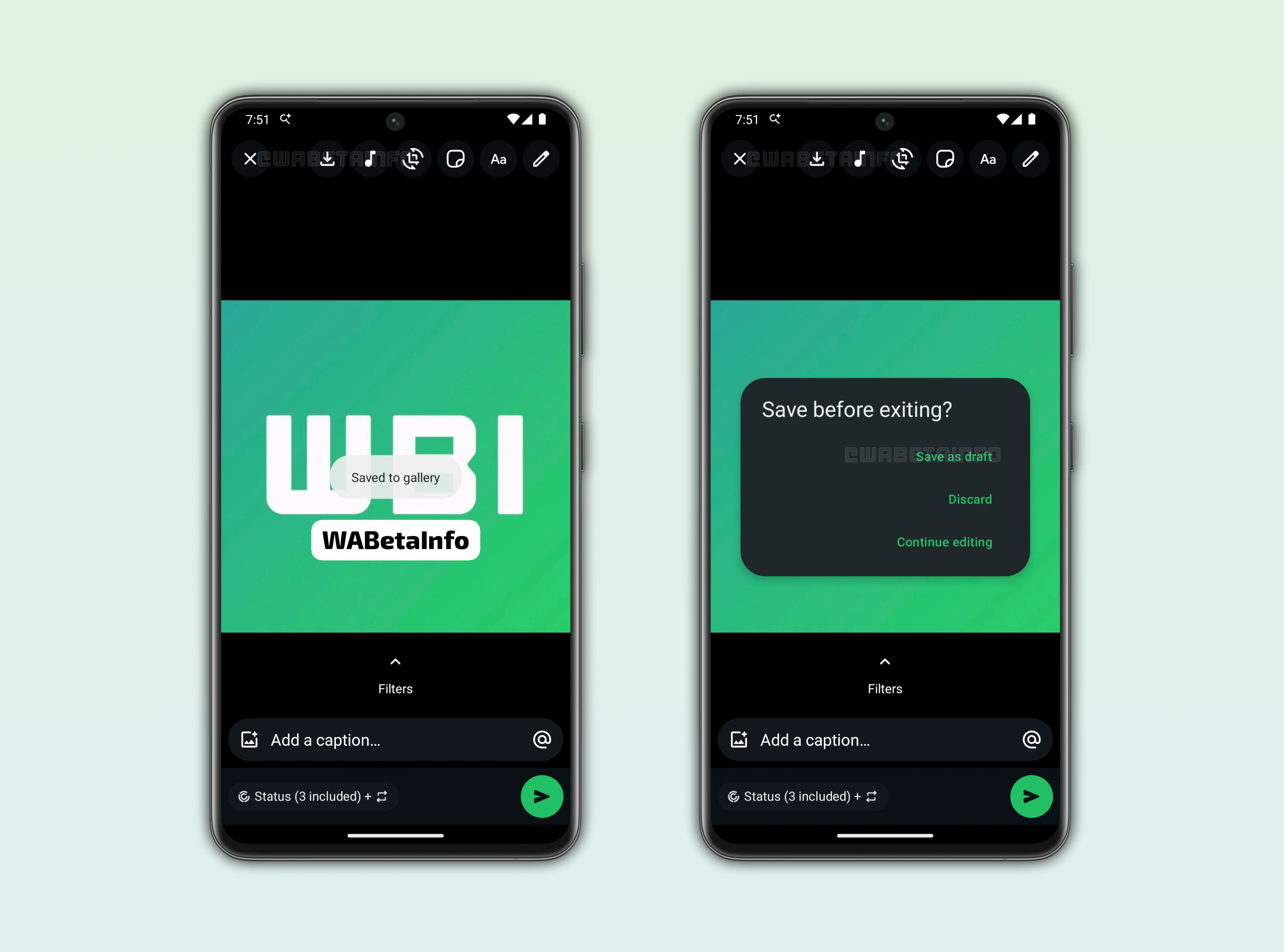
As you can see from the attached screenshot, some beta testers can view a dedicated option inside the status editor that lets them save any progress they have made while preparing an update. When users start creating a status with text, drawings, or stickers, they might encounter situations when they prefer to continue later rather than publish the update immediately. In these situations, the new saving tool proves useful because it preserves every adjustment without forcing users to restart their work from scratch. There are cases where someone begins editing a photo or writing a caption but is suddenly interrupted, making it difficult to finalize the status in that moment.
With this feature, the editor offers a way to stop the process safely while keeping the content accessible whenever the user returns. Many users often prepare visual elements or written notes for a status update without the intention of sharing them right away, and the system now accommodates this routine more comfortably. Previously, anyone who wanted to store a partially edited image had to send it to their own chat, which resulted in clutter and an unnecessary copy of the file in the conversation. The new approach allows the same type of preparation directly in the editor, giving users the ability to keep their work without publishing or sending anything. This addition also helps users who regularly adjust colors, apply drawings, or experiment with stickers, since they no longer need a workaround to preserve their ideas.
The editor now includes a visible save button at the top of the screen, placed among the familiar tools, and this placement makes the action easy to spot even for those encountering it for the first time. By tapping this button, users can secure their status draft in a matter of seconds by saving the item to their gallery and resume editing whenever they choose. In addition to the main button, some users may explore another kind of save option that appears when they try to leave the editor by pressing the back button. This prompt prevents accidental loss of progress by offering a clear choice between discarding the content or saving it as a draft for later editing directly from the gallery sheet. Users who often multitask will appreciate this safeguard as it eliminates the risk of losing work during quick transitions between apps or screens.
The system stores all relevant elements, including overlays, text formatting, and positioning, so the draft reopens exactly as it was left. This behavior creates a more reliable editing environment, especially for those who invest time in detailed adjustments before deciding whether the update is ready to share. The new capability improves the way people create status updates by giving them a comfortable window to plan, refine, and review their content without feeling rushed to publish it. With these enhancements, the status section becomes easier to manage and more flexible, offering a smoother workflow for users who like to prepare their updates thoughtfully.
The feature that lets users save drafts for their status updates is now available to some beta testers who install the latest update of WhatsApp beta for Android from the Google Play Store. During this early stage, WhatsApp is refining the feature to ensure reliable performance across a broad range of devices and setups. This approach gives the team time to resolve potential issues and fine tune the experience before making it available to a larger group of users in the coming weeks.
Stay Connected with WABetaInfo
Following WABetaInfo on X is the best way to stay informed about new features under development and those released to WhatsApp beta for Android, iOS, Web, and Desktop. We love hearing your feedback, so let us know what you think! You can also explore our dedicated page to discover all our services, or join our Discord Server to chat with others, get help and advice, and stay up to date with the latest WABetaInfo announcements.