WhatsApp beta for Android 2.25.3.15: what's new?
WhatsApp is rolling out a new update through the Google Play Beta Program, bringing the version up to 2.25.3.15.
What's new in this update? WhatsApp is rolling out a feature to create new communities from the chats tab, and it's available to some beta testers!
| Common questions | Answers |
|---|---|
| Name of the feature? | Create community |
| Status? | Rolling out |
| Compatibility? | WhatsApp beta for Android 2.25.3.15 has been designated as a compatible update, but some users might experiment with the same feature by installing certain previous updates. |
| I've installed this update but I don't have this feature. Why? | This feature is available to some beta testers, and it is rolling out to more users over the coming days. |
| Thanks: | Kingcyrious, lostliano, and kamillion, for testing and reporting. |
| Previous news? | WhatsApp beta for Android 2.25.3.12: what's new? WhatsApp is working on a feature to edit the album caption! |
CREATE COMMUNITY
In the article about the WhatsApp beta for Android 2.25.1.11 update, we announced that a feature to simplify group chat and community creation was available. This feature allows users to create new communities directly from the floating action button within the Chats tab. By tapping this button, users can seamlessly start a new community without navigating to a separate tab of the app. It appears that WhatsApp continues to explore different entry points to enable community creation without relying on the Communities tab, making the feature more visible and easily accessible to users. Thanks to the latest WhatsApp beta for Android 2.25.3.15 update, which is available on the Google Play Store, we discovered that WhatsApp is rolling out a feature to create new communities from the chats tab!
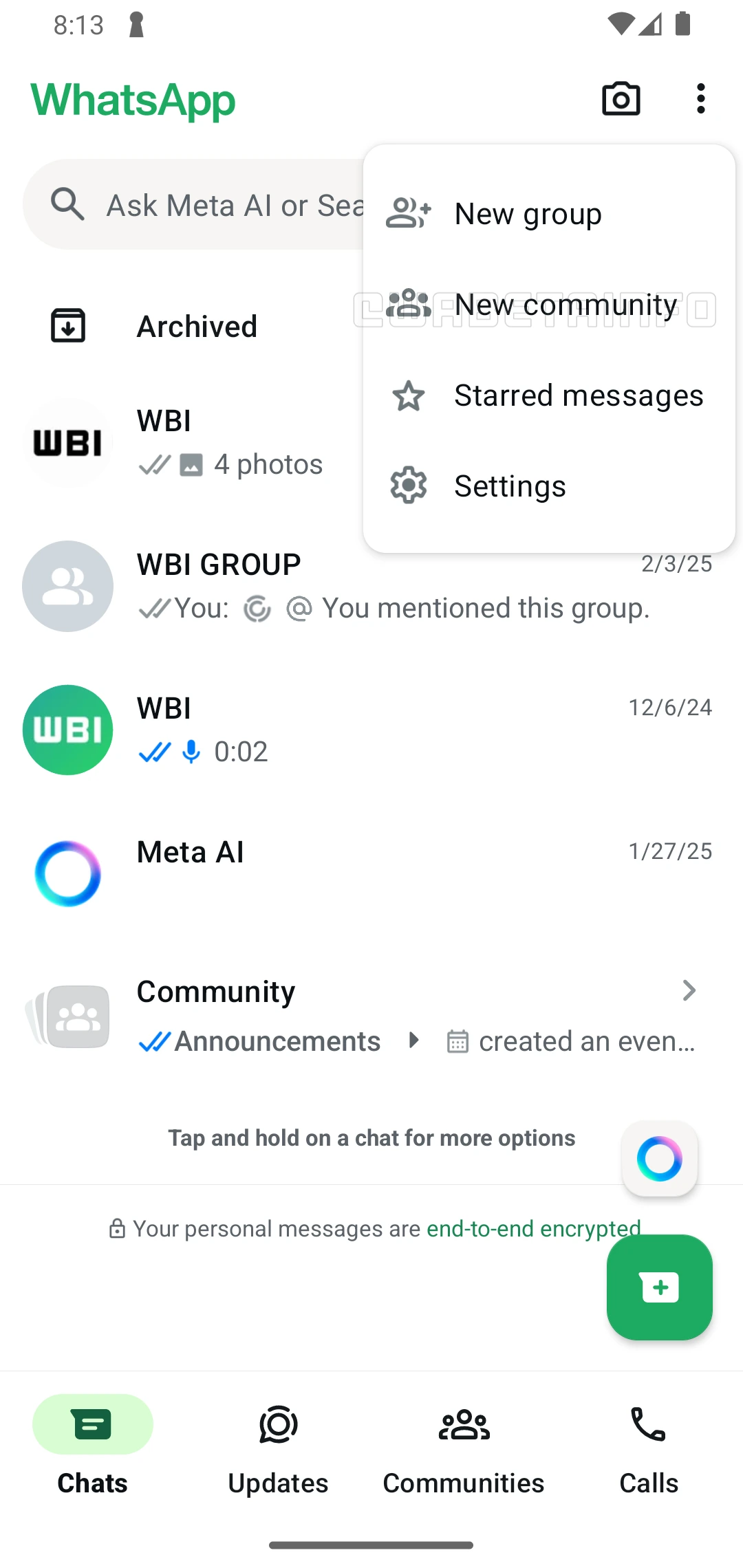
As you can see from the attached screenshot, some beta testers can explore a new feature that allows them to create a new community directly from the chats tab. This feature adds a new shortcut to the overflow menu, allowing users to quickly access the community creation option without needing to use the floating action button. WhatsApp is currently experimenting with multiple alternative entry points for creating new communities, as the company is developing a new tab dedicated to AI-powered chatbots, as reported in the article about the WhatsApp beta for Android 2.25.1.24 update, which is expected to replace the Communities tab in the future.
Since this potential change for the bottom navigation bar in future updates, WhatsApp is prioritizing the introduction of the community creation option in multiple locations throughout the app. By adding multiple entry points, WhatsApp aims to ensure that users can still access this feature easily, even if the Communities tab is eventually removed. The addition of the community creation shortcut in the overflow menu provides an extra layer of accessibility, making it easier for users to find and use the feature without relying on a single tab.
It is important to note that it remains unclear whether WhatsApp will fully transition to the AI-powered chatbots tab or if the Communities tab will continue to exist alongside it. However, these recent changes suggest that WhatsApp is actively working on making community management more intuitive by introducing multiple entry points for creating new communities, reducing reliance on a single tab, and ensuring users can easily access this feature regardless of future changes to the interface.
A feature to create new communities from the chats tab is available to some beta testers who install the latest updates of WhatsApp beta for Android from the Google Play Store, and it is rolling out to even more people over the coming days.
Stay up-to-date on WhatsApp news by following WABetaInfo on X. You can also discover other new features for WhatsApp beta for Android, iOS, Web/Desktop, and Windows.
Do you like this news? Please, let us know on X: we love hearing your feedback! If you're curious to see where you can find WABetaInfo, there is a dedicated page where you can discover our services.
In addition, we have set up a Discord Server where you can chat with other people, get help and advice, and stay up to date with the latest announcements from WABetaInfo.