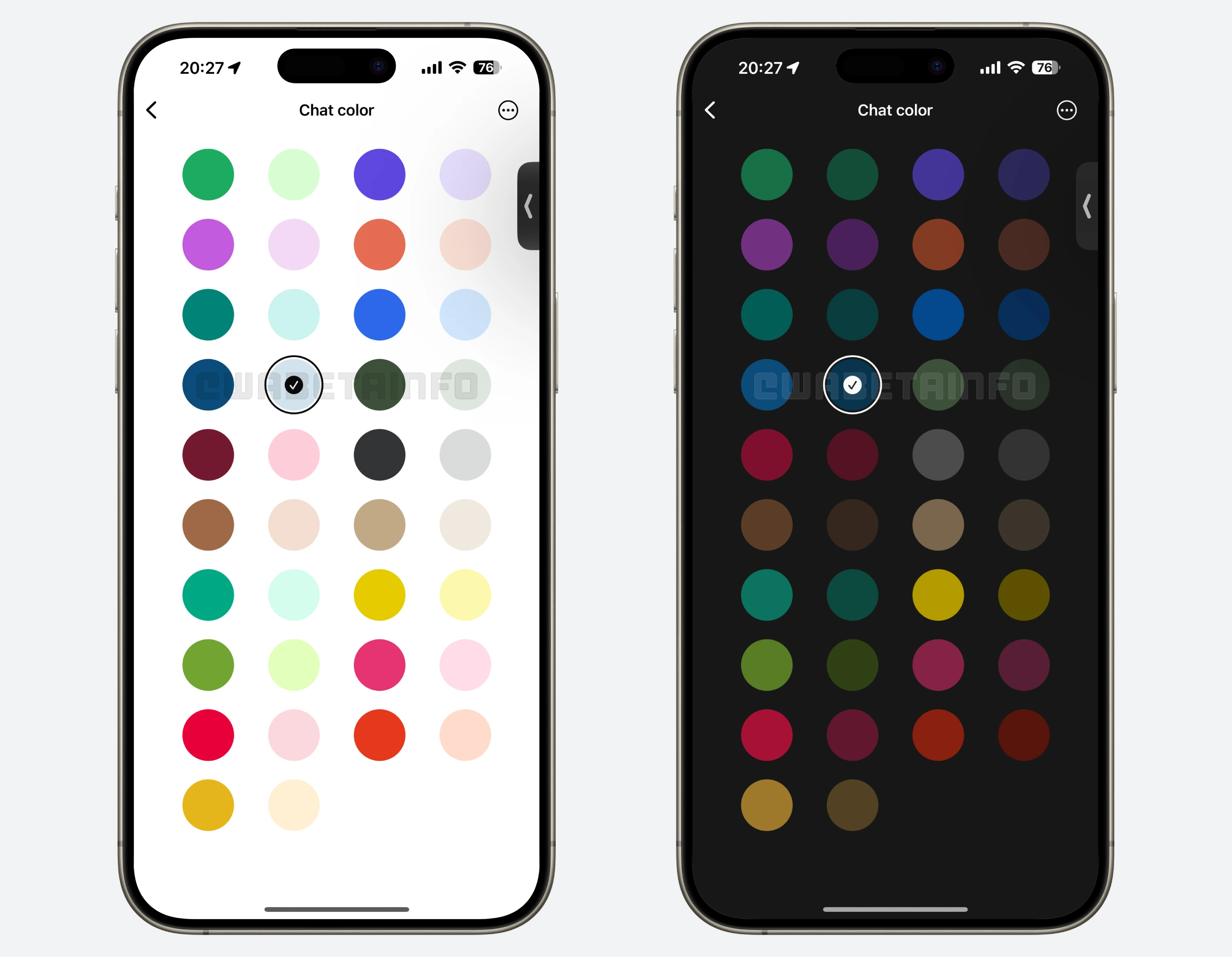
Missed our weekly WhatsApp beta updates? Catch up now with our summary! Among our 11 stories we shared, the best news of the week is about 18 new color options for iOS chat themes!
| Common questions | Answers |
|---|---|
| Story about? | WhatsApp news of the week |
| I've installed the latest update of WhatsApp on Android, iOS, and Desktop, but some features are not unavailable. Why? | Some features announced in this article may be under development and not yet available to all beta testers, or they may be gradually rolling out to users. If you're unable to access a certain feature, you will need to wait for a future update. Keep reading for more information. |
| News of last week? | WhatsApp news of the week: official iPad compatible app available on the App Store! |
| Previous article? | WhatsApp beta for Android 2.25.18.11: what's new? WhatsApp is rolling out a feature to choose the quality for downloaded photos and videos! |
18 COLOR OPTIONS FOR CHAT THEMES
- With the WhatsApp for iOS 25.16.81 update, we announced that WhatsApp is rolling out a new feature that allows users to copy only part of a message. Instead of copying the entire message, users can now tap and hold on a message, then drag their finger to highlight specific words or sections they want to extract. This enhances the process, eliminating the need to paste and manually edit the text elsewhere, while making it faster and more intuitive to share only the relevant information.
- The same update about the partial message selection feature is also under development for the Android app. This tool, discovered with the WhatsApp beta for Android 2.25.18.3 update, will work across all chat types, including individual chats, group chats, and channels. It aims to simplify the process of extracting relevant details without copying the entire message.
- After installing the WhatsApp beta for Android 2.25.18.4 update, some beta testers can create custom AI assistants within WhatsApp using Meta AI Studio, personalizing traits like tone, personality, appearance, and purpose. Users are guided through an intuitive setup process with templates and can choose to keep their AI private or share it via a public link. This feature offers an engaging chatbot experience for entertainment, productivity, learning, or social interaction.
- The feature to create personalized AI chatbots is also available with the WhatsApp beta for iOS 25.17.10.75 update. The in-app creation process guides users through selecting a role, tone, personality, and avatar, with smart templates offered at each step to streamline customization. Once completed, users can choose to keep their AI private or share it via a public link, depending on the assistant's purpose.
- Following the release of the WhatsApp for iOS 25.17.70 update, a select group of users can now explore 18 new chat theme colors, expanding the total available options to 38. These colors can be applied to individual chats or set as a default across all conversations, with full support in both light and dark modes. The update enhances personalization by updating chat bubbles and wallpaper doodles to match the selected color, creating a more expressive and consistent user experience.
- Some users who install the WhatsApp beta for Android 2.25.18.11 update can experiment with two auto-download media quality options: standard and HD. When sending HD media, WhatsApp uploads both standard and HD versions, allowing recipients to auto-download their preferred quality. This feature helps users save data by auto-downloading smaller files while still enabling manual access to HD versions when desired.
- The WhatsApp beta for Android 2.25.18.8 update allows some beta testers to forward messages directly to Meta AI within WhatsApp. This streamlines interactions by eliminating the need to manually copy and paste content into the chatbot. Users can also add optional notes during forwarding to provide context, enabling Meta AI to generate more relevant and helpful responses.
- The feature to forward messages and media directly to Meta AI is also available with the WhatsApp beta for iOS 25.17.10.78 update. This feature makes it easier for users to get quick assistance without copying and pasting content manually. Users can also include an optional note when forwarding, giving the AI valuable context to provide smarter, more accurate responses.
- The WhatsApp beta for Android 2.25.18.9 update lets some beta testers control whether their status updates can be reshared, thanks to a new setting introduced during status creation. This feature allows users to expand their content's reach while maintaining privacy, as reshares remain anonymous and disconnected from the original author. WhatsApp notifies users when their contacts reshare a status but keeps their identity hidden from viewers outside their contact list.
- WhatsApp is also rolling out the same feature to choose whether status updates can be reshared by contacts, as mentioned in the article about the WhatsApp beta for iOS 25.17.10.80 update. A tooltip will appear during status creation to inform users about this option, which they can also manage anytime in privacy settings. When a status is reshared, the original poster is notified, but viewers won't see who created it, and resharing chains remain private to protect user privacy.
- With the WhatsApp beta for Android 2.25.18.5 update, some beta testers can now experience a new feature that adds smooth visual animations when sending media from the drawing editor. The animation shows the image or video detaching from the editor and transitioning into the chat, fading seamlessly into a message bubble.
Stay tuned with us to discover new features and updates about WhatsApp, coming your way next week!
Following WABetaInfo on X is the best way to discover new features under development and released to users on WhatsApp beta for Android, iOS, Web, and Desktop. Keep yourself informed and up-to-date by following us.
Do you like this news? Please, let us know on X: we love hearing your feedback! If you're curious to see where you can find WABetaInfo, there is a dedicated page where you can discover our services. In addition, we have set up a Discord Server where you can chat with other people, get help and advice, and stay up to date with the latest announcements from WABetaInfo.