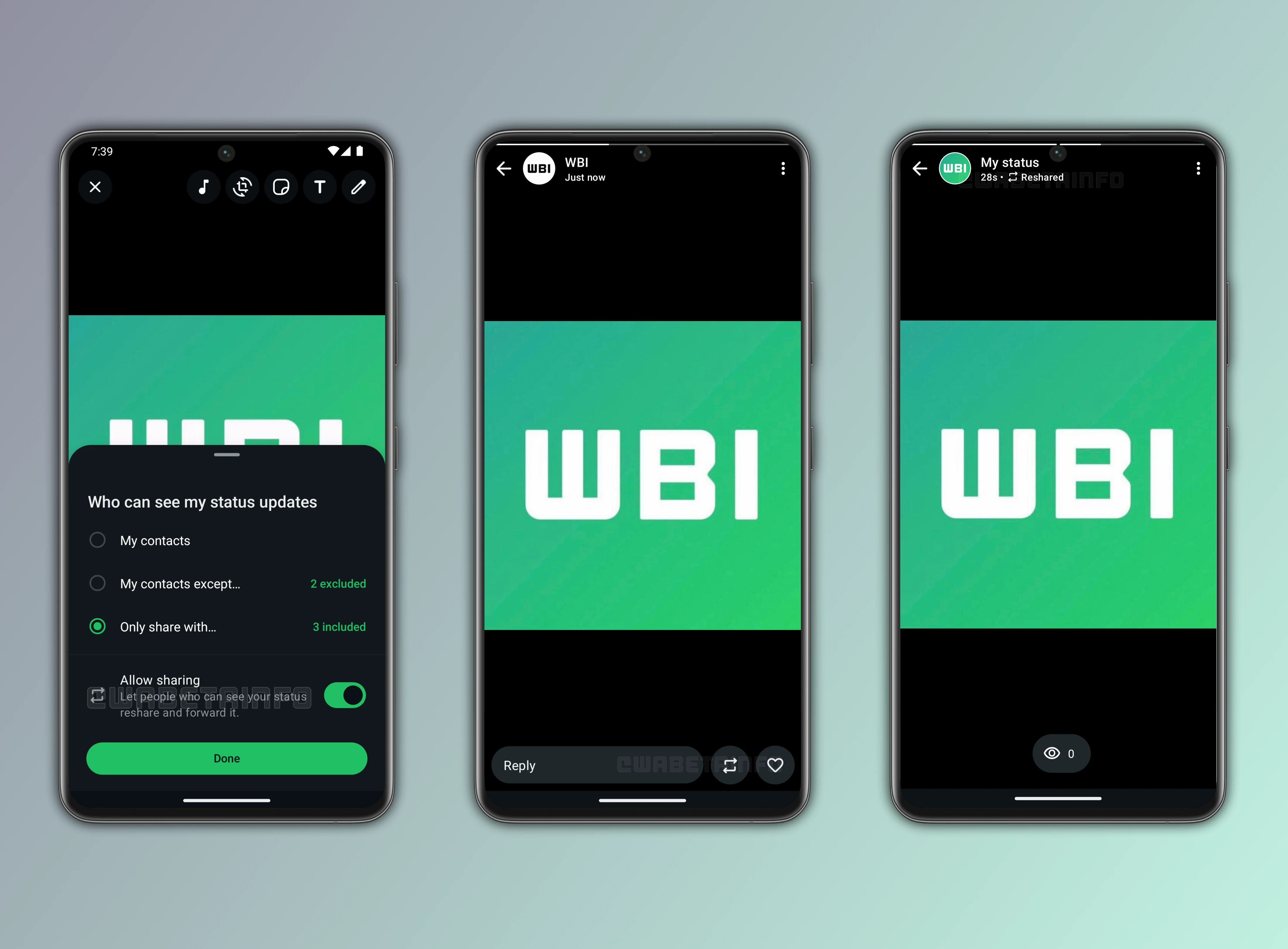
This week, WhatsApp introduced a resharing control for status updates, a new feature that lets users decide whether their updates can be shared by others. This system helps users manage their content's visibility and ensures their privacy preferences are respected.
| Key points | Details |
|---|---|
| Name of the feature: | Reshare status updates |
| Feature availability: | Some features announced in this article may be under development and not yet available to all beta testers, or they may be gradually rolling out to users. If you're unable to access a certain feature, you will need to wait for a future update. Keep reading for more information. |
| News of last week: | WhatsApp for iOS Introduces Message Reminders for Organized Chat Follow-Ups! |
| Previous article: | WhatsApp beta for Android 2.25.27.18: what's new? WhatsApp is rolling out a feature that brings new quick sharing options to status updates! |
RESHARE STATUS UPDATES
This weekly roundup brings together all the latest WhatsApp beta updates from the past week, giving you a single place to catch up on everything you might have missed. Whether you follow our updates closely or only check in occasionally, this summary ensures you stay informed about new features, improvements, and fixes. In this post, we cover all the latest WhatsApp beta updates, with the new option to control resharing of status updates standing out as a notable addition, allowing users to decide whether their updates can be shared by others while keeping privacy and transparency intact. Stay in the loop and see what's new in WhatsApp before the next updates are available.
- The WhatsApp beta for iOS 25.26.10.71 update introduces a new "Ask Meta AI" shortcut that lets users engage with Meta AI directly from a message menu without manually forwarding content. The selected message appears as a quoted reference, requiring users to add context before interacting with the assistant. This design also ensures privacy and control since Meta AI cannot access the message unless the user explicitly adds context and manually sends it. The feature streamlines fact-checking and explanations, encouraging more thoughtful use while making the process faster and more convenient than traditional forwarding.
- WhatsApp is rolling out a new message translation feature, announced by Mark Zuckerberg, to help users communicate seamlessly across different languages. Messages can be translated directly in chats and groups, with Android users also gaining the option to enable automatic translations for entire conversations. Translations happen entirely on-device—via local language packs on Android and Apple's built-in translation API on iOS—ensuring both privacy and end-to-end encryption remain intact. The rollout starts with 6 languages on Android and over 19 on iPhone, though iOS users report not seeing the feature yet.
- With the WhatsApp beta for Android 2.25.27.3 update, WhatsApp is testing a new adaptive interface for starting conversations, which changes depending on how many contacts a user selects. With one contact, a floating action button allows for instant messaging, while multiple selections enable the creation of a broadcast list to send one message to several recipients at once. Users can also start a new group directly from this screen, with WhatsApp detecting if the same participants are already in an existing group to prevent unnecessary duplication.
- Following the release of the WhatsApp beta for Android 2.25.27.5 update, some beta testers reported a new toggle in the status editor that lets them control whether their updates can be reshared by others. The option appears alongside audience settings, making it easier for users to manage without disrupting the usual posting flow. When enabled, contacts who can view the status may share it on their own feed. This will let the status update reach a broader audience while keeping the original author's personal details hidden. Reshared content is clearly labeled, and the feature is disabled by default to prevent unintended sharing.
- In the article about the WhatsApp beta for Android 2.25.27.1 update, we announced that WhatsApp is working on a feature that lets users suppress notifications from everyone mentions in groups. This feature is designed to give more control over mention alerts, as users will be able to choose whether to disable notifications for everyone mentions. The original plan allowed any group member to mention everyone, which was useful for quick reminders but it might also opened the door to misuse and spam. The new option will ensure that muted groups remain fully silent if the user chooses, while still giving those who value group-wide alerts the ability to keep receiving them.
- After installing the WhatsApp beta for Android 2.25.27.4 update, WhatsApp is rolling out a redesigned Calls tab that introduces a more organized and user-friendly layout with four key options at the top. Users can start calls directly from the tab, including group calls with up to 31 people, schedule calls and share events in chats, or use a new shortcut to dial numbers linked to WhatsApp accounts. Favorite contacts remain accessible but are now integrated into this layout, with easier tools to add, remove, or reorder them. The update transforms the Calls tab into a centralized hub, streamlining access to calls, scheduling, favorites, and recent activity in one place.
- The WhatsApp beta for Android 2.25.27.18 update introduces a redesigned layout for the bottom section of the status interface, moving the view count to the left to resemble Instagram Stories. Two new quick-share buttons on the right let users share status updates directly to Facebook or Instagram, improving visibility and engagement. Accessing these options may require linking WhatsApp to Meta's Accounts Center, a hub for managing connected experiences across Meta apps. It's worth noting that connecting a WhatsApp account to Meta's Accounts Center is entirely optional, so users can choose whether or not to enable it. Even if users link their accounts, all their WhatsApp messages and calls stay fully encrypted, meaning no one outside the conversation (including Meta) can read or listen to them.
Stay tuned with us to discover new features and updates about WhatsApp coming your way next week. We will continue tracking all the latest beta releases, improvements, and bug fixes so you never miss a thing. Make sure to check back regularly and stay ahead with the newest ways to enhance your WhatsApp experience.
Following WABetaInfo on X is the best way to stay informed about new features under development and those released to WhatsApp beta for Android, iOS, Web, and Desktop. We love hearing your feedback, so let us know what you think! You can also explore our dedicated page to discover all our services, or join our Discord Server to chat with others, get help and advice, and stay up to date with the latest WABetaInfo announcements.