WhatsApp is rolling out voice and video calling support on WhatsApp Web, allowing users to make and receive calls directly from their browser. This feature enable real-time communication without needing the mobile app or desktop client, making calling more accessible and convenient across different devices.
| Key points | Details |
|---|---|
| Name of the feature: | Voice and video calls on WhatsApp Web |
| Feature availability: | Some features announced in this article may be under development and not yet available to all beta testers, or they may be gradually rolling out to users. If you're unable to access a certain feature, you will need to wait for a future update. Keep reading for more information. |
| News shared last week: | WhatsApp is working on improved status privacy with custom audience lists! |
| Previous article: | WhatsApp beta for Android 2.26.6.9: what's new? WhatsApp is working on a feature to bring status updates to the top app bar! |
Weekly WhatsApp Beta Updates: New Features and Improvements
This new weekly roundup brings together all the latest updates about WhatsApp beta shared this week. As a result, you can finally catch up on everything you might have missed from our past announcements. You can consider this summary as a way to stay informed about new features, improvements, and fixes. This week's highlight focuses on the rollout of voice and video calling on WhatsApp Web, allowing users to make and receive calls directly from their browser. See what else has been announced this week.
WhatsApp is working on a dedicated Meta AI tab as a central hub
In the post about the WhatsApp beta for Android 2.26.6.5 update, we announced that WhatsApp will introduce a dedicated Meta AI tab within the bottom navigation bar. The new tab will replace the communities section, but users can already create and manage communities directly from the Chats tab. This update is designed to create a central AI-powered hub while removing the floating action button to open Meta AI from the Chats tab. The Meta AI tab will bring together the existing tools already available through the chatbot, including a new feature to consult individual conversations with Meta AI.
WhatsApp Web adds voice and video calling
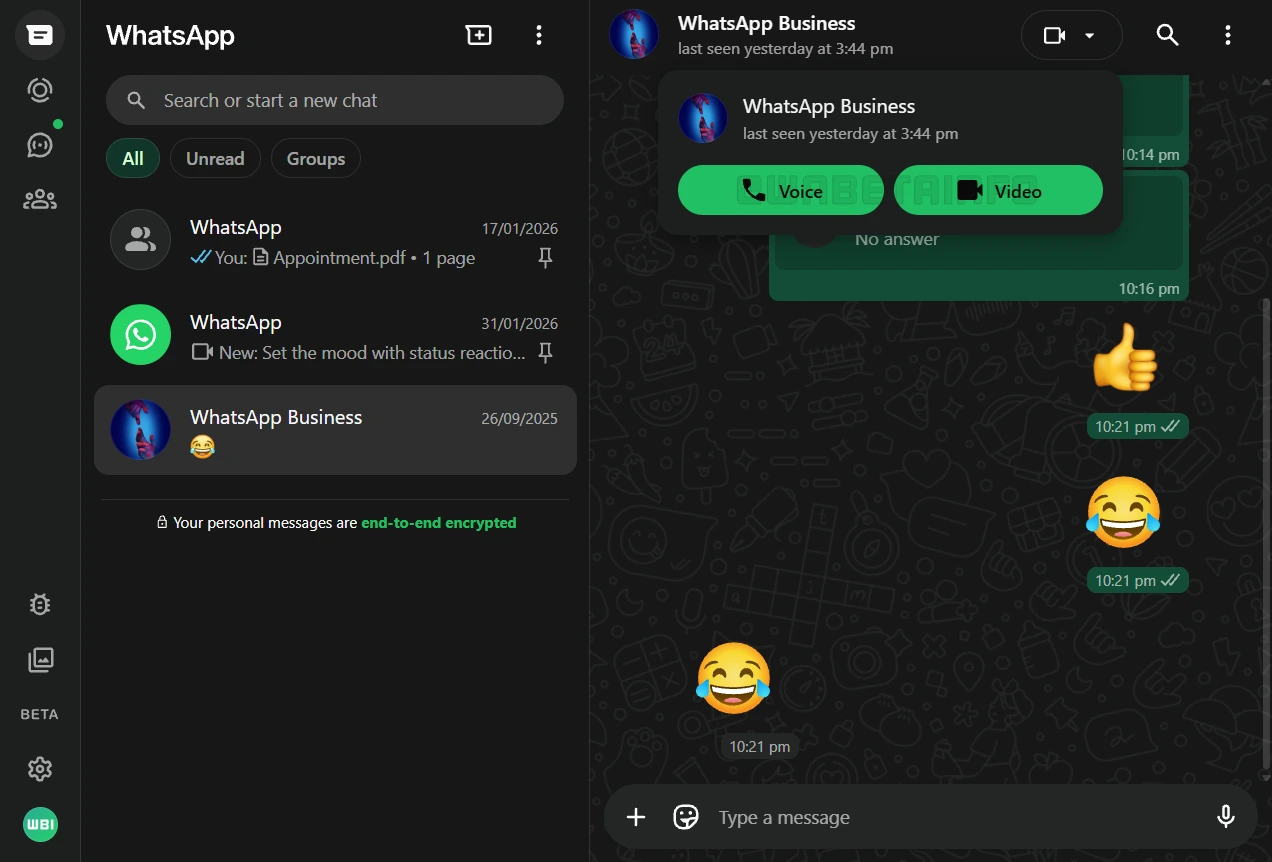
This week, WhatsApp is finally rolling out a feature that allows some users to place calls from the web client. The initial rollout focuses on one-on-one chats, enabling users to make voice and video calls directly from the chat without installing the desktop app. To begin, they just open a chat and select the call button. Calls made from WhatsApp Web are end-to-end encrypted and protected by the Signal protocol. This means only the two participants can hear the conversation, and neither WhatsApp nor Meta can access the content of the call.
Web calls support Screen Share, allowing users to show their screen in real time, similar to the experience offered by desktop apps. Linux users will benefit from calling on WhatsApp Web since a desktop app for Linux is not available. With voice and video calls now supported on WhatsApp Web, they can use the full functionality of WhatsApp without switching to their phone. Additionally, Windows users who don't use the new hybrid desktop app can now make calls directly from the web.
WhatsApp is working on new app themes, icons, and accent colors
For a future update, WhatsApp is exploring 14 new app icons for their new optional premium plan. These also include the classic icon of the app that was refreshed years ago, giving users the option to return to the original design if they prefer. Users will also be able to choose their favorite color from 19 possible options. With this variety, users will be able to customize the appearance of the app to better suit their personal preferences and visual comfort.
WhatsApp is rolling out a profile shortcut to open the app settings on Android
The WhatsApp beta for Android 2.26.6.4 allows some beta testers to access the settings page through two entry points. The first entry point is located in the top app bar. The second entry point is located in the bottom navigation bar as a tab, and it's called "You". Both display a profile icon, making it easier for users to understand that the shortcut opens the app settings. WhatsApp also added a default cover photo to the app settings. In the future, users will be able to customize the cover photo right within their profile settings.
WhatsApp is rolling out a redesigned settings page with cover photos on iOS
With the WhatsApp beta for iOS 26.5.10.76 update, some beta testers can explore a feature that introduces a redesigned interface for the settings page. After installing this update, WhatsApp now displays a default cover photo at the top of the settings tab. This may indicate that WhatsApp is preparing users for the upcoming feature by helping them get familiar with the new layout. Some users may also see their profile picture icon directly in the tab bar. This feature helps users understand which account is currently active.
WhatsApp is working on poll privacy and expiration on Android
WhatsApp is currently working on new tools to enhance the experience with polls. The first new feature will allow the poll creator to manage the visibility of voters. By enabling this option, nobody will be able to see who selected a specific answer. As a result, participants will be able to vote without revealing their identity to others in the group. Users will also be able to choose the exact date when the poll will no longer accept responses. This means that WhatsApp won't let users add a new vote when a poll is expired and it reaches its set end time.
WhatsApp is working on bringing status updates to the top app bar
In the article covering the WhatsApp beta for Android 2.26.6.9 update, we revealed a feature to display status updates directly in the top app bar. The center of the top app bar will display contacts the user interacts with most who have shared a status update. When users scroll down the interface, the entire interface will be revealed. This action will let users choose which update they want to view. It's worth noting that while this feature is currently under development, we may also expect further adjustments, refinements, or even alternative implementations before it is officially released.
Stay tuned with us to discover new features and updates about WhatsApp coming your way next week. We will continue tracking all the latest beta releases, improvements, and bug fixes so you never miss a thing. Make sure to check back regularly and stay ahead with the newest ways to enhance your WhatsApp experience.
Stay Connected with WABetaInfo
Following WABetaInfo on X is the best way to stay informed about new features under development and those released to WhatsApp beta for Android, iOS, Web, and Desktop. We love hearing your feedback, so let us know what you think! You can also explore our dedicated page to discover all our services, or join our Discord Server to chat with others, get help and advice, and stay up to date with the latest WABetaInfo announcements.