This week, WhatsApp is widely rolling out group member tags on iOS, allowing users to display a custom role label next to their name in group chats and participant lists. The update helps members quickly understand responsibilities and roles in busy conversations while keeping the chat layout clean and easy to follow.
| Key points | Details |
|---|---|
| Name of the feature: | Member tag in group chats |
| Feature availability: | Some features announced in this article may be under development and not yet available to all beta testers, or they may be gradually rolling out to users. If you're unable to access a certain feature, you will need to wait for a future update. Keep reading for more information. |
| News of last week: | WhatsApp is Rolling Out Strict Account Security Settings for iOS Beta Testers! |
| Previous article: | WhatsApp beta for iOS 25.36.10.71: what's new? WhatsApp is rolling out a feature that lets channel admins create and share quiz-based updates with their followers! |
Weekly WhatsApp Beta Updates: New Features and Improvements
This weekly roundup brings together all the latest WhatsApp beta updates from the past week, giving you a single place to catch up on everything you might have missed. Whether you follow our updates closely or only check in occasionally, this summary ensures you stay informed about new features, improvements, and fixes. This week's highlight is the introduction of group member tags on iOS, allowing users to display custom role labels next to their names in group chats and participant lists, making responsibilities clearer in busy conversations. Stay in the loop and see what's new in WhatsApp before the next updates are available.
WhatsApp Introduces Smarter Calls, AI Media, and Interactive Status Features
WhatsApp now allows users to record a voice or video message right after a call goes unanswered, sending it directly into the chat instead of relying on voicemail. This keeps missed call communication simple and contained within the conversation, with support for both audio and video formats. During group voice chats, participants can react with emojis in real time without disrupting the discussion, while video calls highlight the active speaker for clearer interaction. The app has also expanded its Meta AI tools, enabling richer image generation and letting users turn any photo into a short animated clip through a simple text prompt. These animated visuals can be shared instantly in chats, adding motion and personality to everyday conversations.
On desktop versions, a redesigned media tab now gathers documents, links, and files in one place, making content easier to find, alongside cleaner link previews that shorten long URLs. Status updates gain new reaction and question stickers that invite direct responses, with replies sent privately and managed through a dedicated activity section protected by end to end encryption. Music lyrics, interactive elements, and question tools now extend to Channels as well, allowing administrators to collect feedback privately while keeping responder identities hidden from other followers.
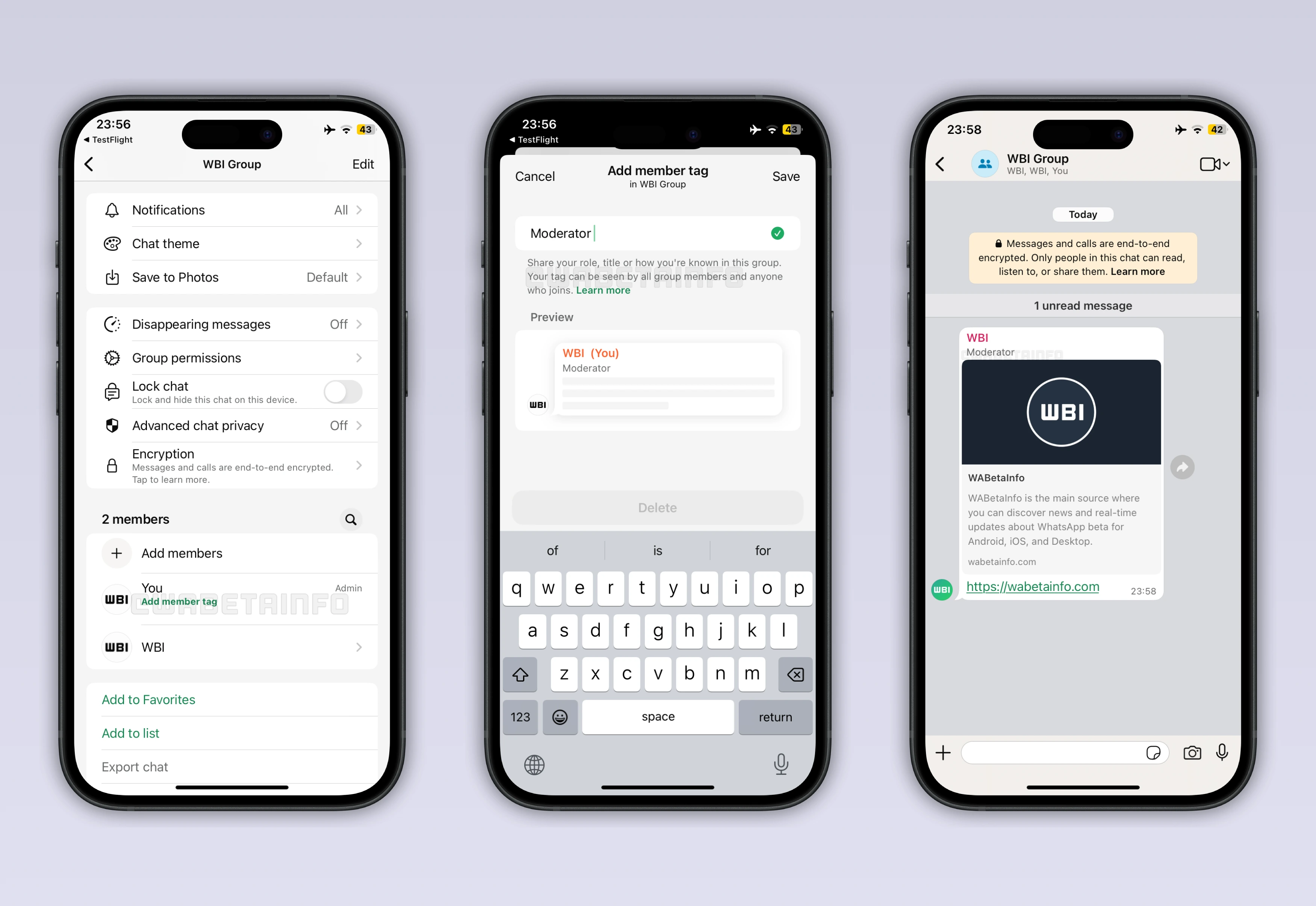
WhatsApp Adds Group Member Role Labels on iOS
Following the release of the WhatsApp for iOS 25.37.74 update, users can now add a custom label inside groups that shows their role next to their name in chats and the participants list. These tags help members quickly see who handles topics, activities, or moderation without repeated questions. Labels can describe work duties, interests, or functional roles, which adds helpful context in busy or topic driven chats. Each tag is managed from the group info screen by tapping the user's name, where a short description can be previewed before saving.
The field supports plain text within a character limit and blocks symbols or links so labels stay clear and easy to read. Once saved, the tag appears instantly for all current and future members of that group. Tags can be changed at any time and are set per group, allowing different roles across work, family, and community chats, and they remain saved even after reinstalling the app. On iOS, these group member tags make large conversations easier to follow while keeping the interface clean and organized.
WhatsApp Tests Animated 2026 Sticker for New Year Celebrations
With the WhatsApp beta for Android 2.26.1.4 update, some beta testers can now explore an animated sticker created to mark the beginning of 2026. The sticker arrives as part of a festive pack released by WhatsApp, which includes multiple New Year themed designs with greetings, symbols, and motion effects. Instead of offering a single option, the pack gives users several celebratory stickers to match different moods and messages. All stickers are built with the Lottie framework, allowing smooth animations that look sharp across devices without heavy resource use. This approach keeps file sizes small while maintaining fluid motion and clear visuals, even on phones with limited storage.
Users with access can already share the 2026 sticker in private chats, group conversations, channels, and status updates for a consistent holiday look. WhatsApp also adds a new 2026 icon inside the Status layout tab, guiding users toward New Year themed designs and sticker placement. These layouts help combine multiple photos or videos into one update, with the animated sticker tying moments together and drawing attention without overpowering the rest of the content.
WhatsApp Lets Channel Admins Invite Contacts Directly
In the article about the WhatsApp beta for Android 2.26.1.8 update, we announced that WhatsApp is rolling out a new feature that allows channel admins to invite people directly from their contact list. The option appears in the channel info panel and lets admins select contacts to receive a chat message with a follow button. This creates a simple way for recipients to open the channel and join it without searching or using external links. The update offers a more personal alternative to discovery tools like shared links or the channel directory.
Smaller or newer channels may benefit the most, as reaching known contacts can bring attention to content that might otherwise be missed. Recipients can clearly see who is recommending the channel, which can make the invitation feel more trustworthy and relevant. Admins are able to reach people who may already be interested in their work or community updates, leading to more active followers. By helping build an initial audience faster, the feature supports earlier interaction and a stronger start for growing channels.
WhatsApp Tests Quiz Feature for More Interactive Channels
The WhatsApp beta for Android 2.26.1.14 update lets some channel admins share quizzes in their channels. Quizzes let admins add a question with multiple answers, optionally attaching images, while selecting one correct option before publishing. Once shared, the quiz appears in the channel using the same layout as a poll, making it easy for followers to interact. When a follower selects the correct answer, a short confetti animation appears, adding a playful response to the interaction.
Admins can view a results summary showing how many times each option was chosen, similar to poll insights. They can also see which of their contacts participated, while non contacts remain anonymous aside from a visible profile photo if allowed. The feature encourages followers to take part actively through light challenges, trivia, or topic based questions. Quiz results also give admins clearer signals about which subjects attract attention, helping shape future channel updates.
WhatsApp Quiz Feature Expands to iOS Beta Users
The same quiz feature is also available to some users who have installed the WhatsApp beta for iOS 26.36.10.71 update, so it now extends beyond Android. Channel admins with access can find the Quiz option inside the channel sharing interface, placed next to familiar tools used to publish updates. Quizzes allow admins to add a question, multiple answer choices, and optional images, using a layout that closely resembles polls. Before sharing, one answer must be marked as correct, making the interaction about knowledge rather than preference.
Once published, the quiz appears instantly in the channel and followers can answer it through the same interface used for polls. Choosing the correct option triggers a short confetti animation, adding a light visual reward to the experience. Admins can later review how many times each answer was selected and see which of their contacts participated, while non contacts remain partially anonymous based on privacy settings. By turning updates into interactive moments and providing clear response data, quizzes help admins understand what captures attention and adjust future content accordingly.
Stay tuned with us to discover new features and updates about WhatsApp coming your way next week. We will continue tracking all the latest beta releases, improvements, and bug fixes so you never miss a thing. Make sure to check back regularly and stay ahead with the newest ways to enhance your WhatsApp experience.
Stay Connected with WABetaInfo
Following WABetaInfo on X is the best way to stay informed about new features under development and those released to WhatsApp beta for Android, iOS, Web, and Desktop. We love hearing your feedback, so let us know what you think! You can also explore our dedicated page to discover all our services, or join our Discord Server to chat with others, get help and advice, and stay up to date with the latest WABetaInfo announcements.