WhatsApp is working on a message spoiler formatting tool on iOS
With the WhatsApp beta for iOS 26.6.10.71 update from TestFlight, WhatsApp is developing a spoiler formatting feature for text messages that hides content in a future update. The feature will require recipients to tap the message to reveal it, making it easier for users to hide sensitive information.
| Key Points | Details |
|---|---|
| Name of the feature: | Spoiler messages |
| Status: | Under development |
| Availability info: | This feature is currently in development and not yet available for beta testing. In the meantime, you can read this article for a sneak peek. |
| Previous news: | WhatsApp beta for Android 2.26.7.10: what's new? WhatsApp is working on a feature that allows users to format messages as spoilers! |
WhatsApp beta for iOS 26.6.10.71: what's new? Spoiler Messages
In the post about the WhatsApp beta for Android 2.26.7.10 update, we announced a feature to mark messages as spoilers. This feature is in development and it will let users choose a new formatting tool for their messages. Messages sent as spoilers won't be automatically displayed in the conversation. Instead, users will have to interact with them to reveal the content. This option will make it easier for users to hide the content of their messages if they contain sensitive information.
This feature is currently under development for the Android app. At the same time, WhatsApp is working to introduce the same functionality on iOS to maintain a consistent experience across both platforms. Following the release of the latest WhatsApp beta for iOS 26.6.10.71 update, which is available on the TestFlight app, we discovered that WhatsApp is working on a feature that allows users to format messages as spoilers.
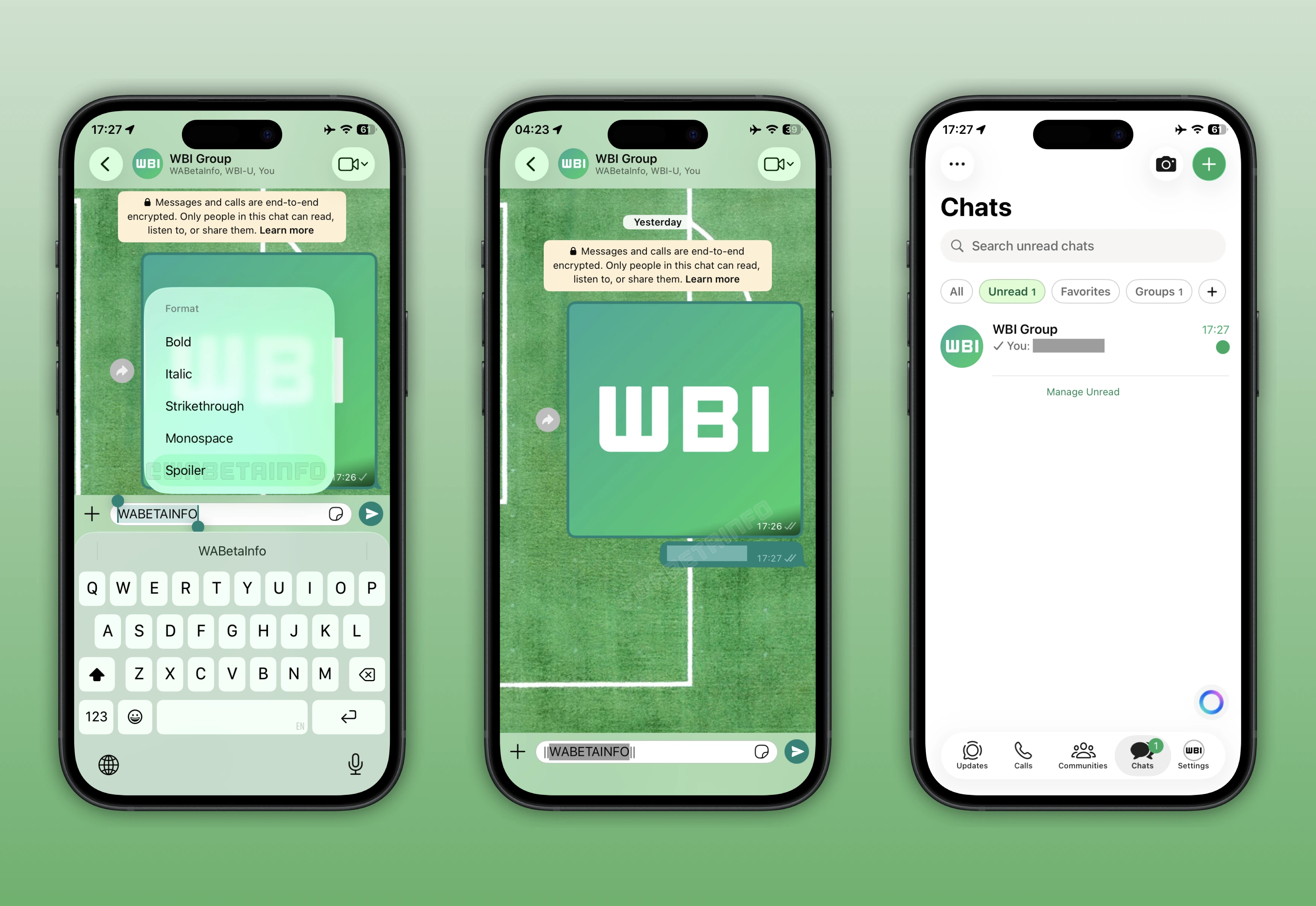
As you can see from the attached screenshot, WhatsApp is exploring a feature that will let users choose a spoiler formatting option for their messages, scheduled for release in a future update. When the sender marks a message as a spoiler, its content is hidden by default within the conversation. This means the recipient will have to interact with it to view the text. To reveal the content, users will simply need to tap the message bubble to remove the spoiler formatting.
Currently, WhatsApp is developing the spoiler formatting tool exclusively for text messages. There is no information on whether it will be made compatible with other message types, such as images. However, it's very likely that WhatsApp will expand support for spoilers in a future update. This would ensure users can send images and videos as spoilers without having to send them in "view once" mode. However, this remains purely speculative for now.
Sometimes messages contain information that not everyone wants to read immediately, especially in group chats. For example, learning how a movie ends before watching it can be frustrating. Such incidents often happen in group chats and they can cause disappointment, especially when there are events where spoilers are easy to reveal. In this regard, users may often prefer not to open their groups until they feel prepared to see the latest messages. In some cases, users share sensitive information using view-once photos to prevent spoilers from being revealed. While this effectively hides the content, the messages disappear from the conversation after being viewed.
With message spoilers, users will be able to hide certain parts of their messages and keep them in the conversation. After highlighting the message, users will be able to choose the "Spoiler" option right within the context menu. The spoiler option automatically adds two pipes before and after the message. This means that users will also be able to quickly format their messages as spoilers by simply entering double pipes.
For example, to mark the word "WABetaInfo" as a spoiler in the sentence "WABetaInfo is the leading source for real-time updates about WhatsApp", you will just have to enter "||WABetaInfo|| is the leading source for real-time updates about WhatsApp" into the chat bar. Note that it will also be possible to format the entire message as a spoiler if all the text in the message is selected before applying the spoiler option.
Messages will continue to be marked as spoilers even after the user has viewed them. This means that if a user receives a spoiler message and views it, they will have to interact with it again if they restart the app. This preserves the sender's intent to keep the content concealed by default, but it also helps users prevent accidental exposure when reopening the conversation.
Note that some beta testers may already see the Spoiler option available in the context menu of the text formatting tools. However, this is a bug as the feature is still under development. Applying a spoiler to a message currently has no effect. We will have to wait for a future update for the feature to be fully developed and rolled out to the public. An upcoming update will address this bug and it may be released soon.
The feature that allows users to format messages as spoilers is under development, and it's expected to be available in a future update. WhatsApp is currently refining how the system identifies spoiler messages. Once testing is complete, the feature will be rolled out to select beta testers, who can provide initial feedback and reports based on their experience.
Stay Connected with WABetaInfo
Following WABetaInfo on X is the best way to stay informed about new features under development and those released to WhatsApp beta for Android, iOS, Web, and Desktop. We love hearing your feedback, so let us know what you think! You can also explore our dedicated page to discover all our services, or join our Discord Server to chat with others, get help and advice, and stay up to date with the latest WABetaInfo announcements.