WhatsApp is working on a feature to manage notifications for voice and video calls on the Web
WhatsApp is developing call and notification management features for the web client that will allow users to make and receive voice and video calls directly from their browser. This update aims to improve convenience and user control by letting users manage call alerts on WhatsApp Web while keeping communications secure and private.
| Key Points | Details |
|---|---|
| Name of the feature: | Manage notifications for voice and video calls |
| Status: | Under development |
| Availability info: | This feature is currently in development and not yet available for beta testing. In the meantime, you can read this article for a sneak peek. |
| Thanks: | Sc, for collaborating, testing, and reporting. |
| Previous news: | WhatsApp is Rolling Out Advanced Clear Storage Tool With Selective Chat Cleanup Options on iOS! |
WhatsApp Web Prepares to Introduce Voice and Video Calling with Notification Controls
In a previous article shared exactly 8 months ago, we announced that WhatsApp is currently working on bringing voice and video calling capabilities to the web client. This update will allow users to start and receive calls directly from their browser without installing the desktop application. The feature is designed to support both one to one and group calls, aligning WhatsApp Web with the core functionality available on mobile and desktop platforms. Calls are expected to integrate seamlessly into the existing chat interface, making it easier for users to switch from messaging to calling within the same conversation. Once released, this improvement will represent a major step toward a fully featured and platform independent WhatsApp Web experience.
Although still in development, WhatsApp is actively refining the calling functionality to ensure stability, performance, and reliability across supported browsers. This optimization process aims to deliver an optimal user experience from the very early stages of the future rollout. Following recent updates to the WhatsApp Web beta, we discovered that WhatsApp is actively developing a feature that lets users manage notifications for voice and video calls directly from the web client.
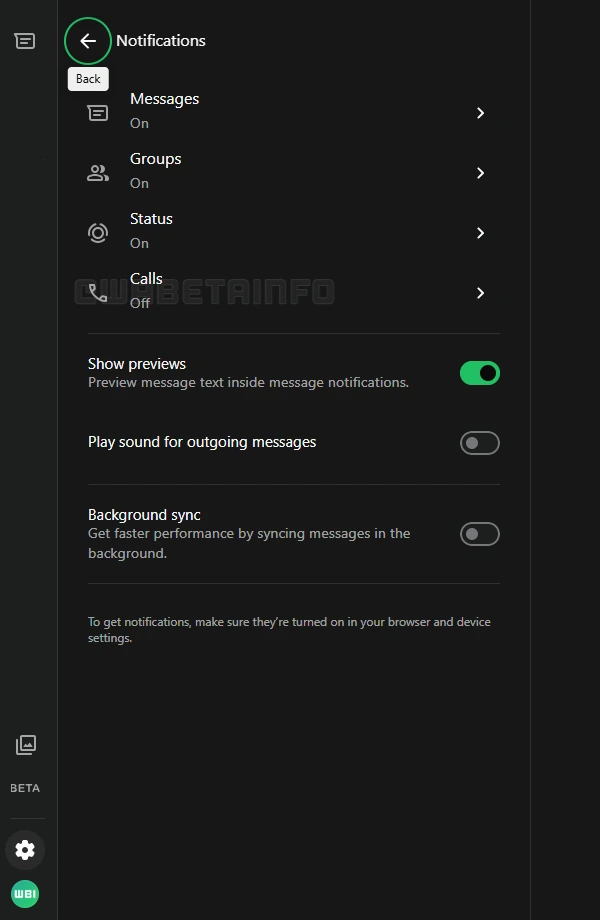
As you can see from the attached screenshot, WhatsApp is exploring the implementation of a feature that will allow users to choose whether call notifications should be enabled or disabled, scheduled for release in a future update. In the settings panel of WhatsApp Web, users can already explore several notification options that help shape how the web client behaves during daily use. These options currently include notifications for individual chats, group conversations, and status updates from contacts. With the introduction of calling on WhatsApp Web, this area of the settings is expected to expand further, as the upcoming addition will introduce notification controls specifically related to voice and video calls.
Once the calling update becomes available on WhatsApp Web, notifications for calls will be enabled by default for all users. This means that incoming voice or video calls will trigger alerts directly within the browser, even when the conversation is not open. Users will be able to notice calls more easily while multitasking or working in other tabs. Enabling notifications ensures that calls are not missed when WhatsApp Web is used as the primary communication interface. This behavior mirrors what users are already familiar with on other platforms, creating continuity across their devices.
At the same time, WhatsApp plans to give users full control over this new notification option. From the settings panel, users will be able to disable call notifications or turn them back on whenever they want, depending on their personal needs. Some users may prefer to silence call alerts on the web client for personal reasons. Others might only rely on WhatsApp Web for messaging and prefer calls to be handled elsewhere. This flexibility allows each user to tailor the experience without changing how calls themselves work.
Disabling call notifications on WhatsApp Web has a clear and specific effect on how incoming calls are handled. When notifications are turned off, the browser will no longer alert the user about incoming voice or video calls. This can be useful for users who want their phone to remain the main device for handling calls. In such cases, the mobile device will continue to signal incoming calls while the web client stays silent.
It is important to clarify that call notification settings on WhatsApp Web will be completely separate from those on mobile devices. Changes made in the web client will not affect call notification preferences on iPhone or Android. Likewise, adjusting notification settings on a smartphone does not modify how WhatsApp Web behaves. Each platform maintains its own independent configuration, allowing users to manage notifications in a more precise way. This separation ensures that users can adapt their setup across devices without unintended side effects.
Calls made through WhatsApp Web will remain protected by the same end‑to‑end encryption that secures all WhatsApp communications on other platforms. End‑to‑end encryption means that only the participants in a call can decrypt and access the contents of that call, and not WhatsApp or any intermediate server. The security model is based on the Signal protocol, which WhatsApp uses to ensure that messages and calls are encrypted throughout transmission. Even when a call originates from a browser, the encrypted data is delivered in a way that prevents external parties from listening in or accessing the content.
Both the call notification feature and the calling functionality itself are still under active development and planned for release in a future update. WhatsApp has not yet shared an official timeline for when these features will become available to all users. Even so, development is moving forward, with regular progress taking place behind the scenes. Once ready, these updates will allow all WhatsApp Web users to place and receive voice and video calls directly from their browser.
Stay Connected with WABetaInfo
Following WABetaInfo on X is the best way to stay informed about new features under development and those released to WhatsApp beta for Android, iOS, Web, and Desktop. We love hearing your feedback, so let us know what you think! You can also explore our dedicated page to discover all our services, or join our Discord Server to chat with others, get help and advice, and stay up to date with the latest WABetaInfo announcements.