WhatsApp is widely rolling out a new profile tab on iOS
WhatsApp is refreshing the interface of the iOS app with a new profile tab. The update improves the look of profiles and makes it easier for users to recognize and manage their accounts.
| Key Points | Details |
|---|---|
| Name of the feature: | Profile tab |
| Status: | Rolling out |
| Compatibility: | WhatsApp for iOS 26.10.73 has been designated as a compatible update. |
| Availability info: | Although WhatsApp has announced this feature, some users may receive it over the coming weeks, as mentioned in the official changelog on the App Store. |
| Previous news: | WhatsApp beta is testing a new log out feature on Android! |
WhatsApp launches a profile tab to help you control your identity
In the post about the WhatsApp beta for iOS 26.5.10.76 update, we announced a feature that redesigns the settings page with a cover photo. Cover photos are large images displayed at the top of business profiles. Soon, all users will be able to add a cover photo to their profile. As a result, this feature will no longer be limited to WhatsApp Business accounts. In the meantime, WhatsApp has also added a dedicated entry point for the profile, making it easier to recognize which account is active.
Today, WhatsApp is testing the same changes with a larger number of users. Specifically, the official changelog on the App Store notes that WhatsApp is finally introducing a profile tab. Following the release of the latest WhatsApp for iOS 26.10.73 update, which is available on the App Store, we discovered that WhatsApp is widely rolling out a feature that brings a profile tab to the main interface.
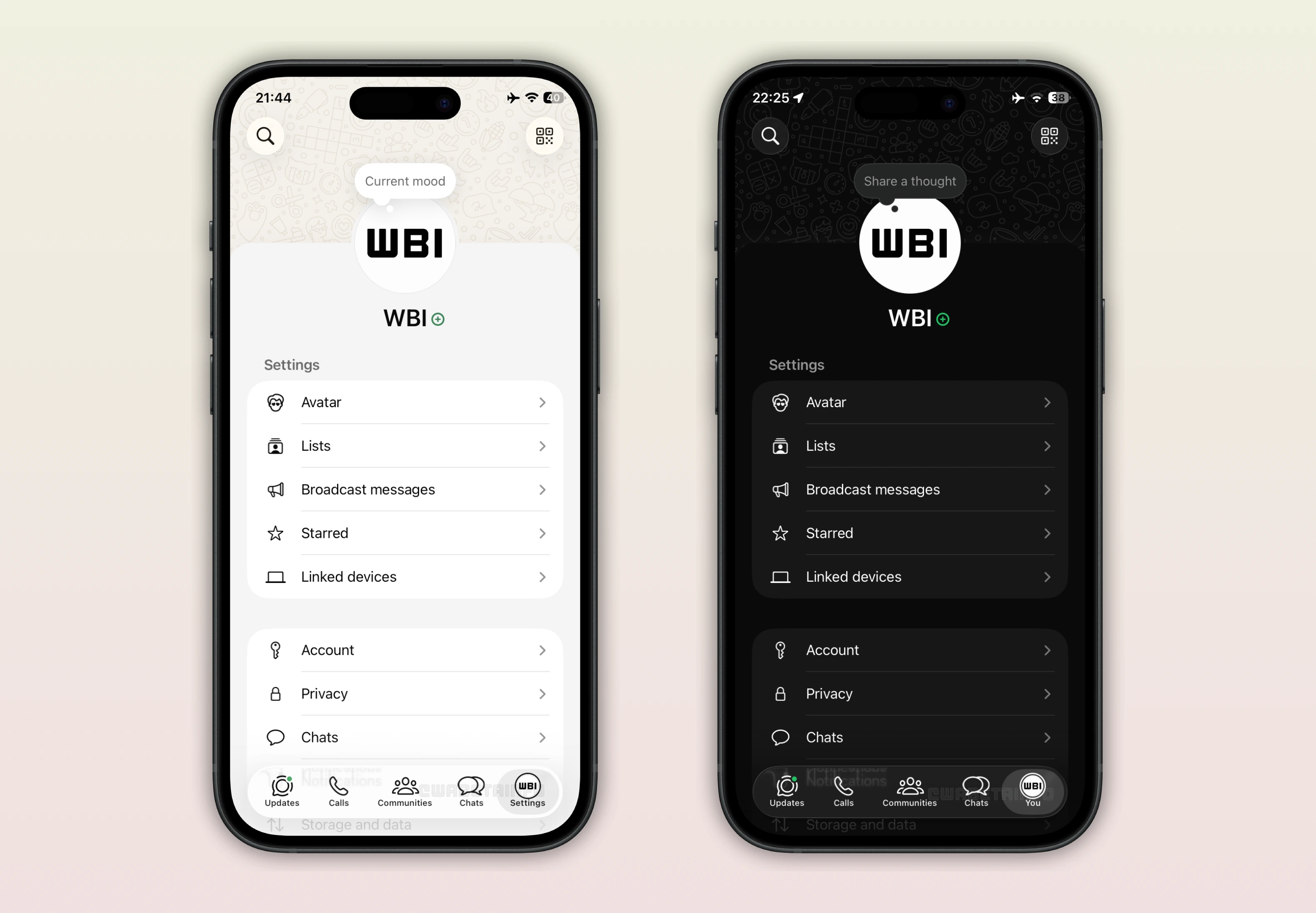
As you can see from the attached image, some users may notice a new profile tab after installing the latest update from the App Store. The profile tab is basically the old settings tab, but with some additions. This new tab displays the profile icon. The icon makes it easier for users to immediately recognize which account is currently in use. Since WhatsApp is also testing multi-account support with some users, it is now possible to quickly identify the active account. Through the profile icon displayed in the tab, users can easily distinguish their accounts at a glance. The profile icon also helps users understand that they can tap the tab to view the account list.
With this update, the settings tab has been renamed to "You". This change is already available for most users. However, some users may still see the tab labeled as "Settings". It is expected that all users will receive the update that renames the tab to "You" soon, as reported in the official changelog on the App Store. The new name makes it easier for users to associate the tab with the new profile experience.
Although this update is not yet widely available, WhatsApp has also refreshed the profile page by adding a default cover photo at the top of the screen. The cover photo provides a large header that personalizes the profile. Currently, only a limited number of users have access to this feature. For those who can use it, the cover photo enhances the overall look of the profile and makes it easier to recognize. Currently, users cannot change their cover photo. This means that users will have to wait for a future update to replace the default cover photo with a personal image.
The feature that brings a profile tab to the main interface is available to users who install the latest WhatsApp for iOS updates from the App Store. This feature was announced in the official changelog, making it generally available to most users. However, some users may still not see the new profile tab. In these cases, it will appear once the feature is fully enabled for their account.
Stay Connected with WABetaInfo
Following WABetaInfo on X is the best way to stay informed about new features under development and those released to WhatsApp beta for Android, iOS, Web, and Desktop. We love hearing your feedback, so let us know what you think! You can also explore our dedicated page to discover all our services, or join our Discord Server to chat with others, get help and advice, and stay up to date with the latest WABetaInfo announcements.