This week, WhatsApp is rolling out a multi-account feature on iOS that lets users add up to two accounts within the same app. The update makes it easier to manage separate personal and work profiles, keeping chat history, settings, and notifications fully independent for each account.
| Key points | Details |
|---|---|
| Name of the feature: | Multi-Account |
| Feature availability: | Some features announced in this article may be under development and not yet available to all beta testers, or they may be gradually rolling out to users. If you're unable to access a certain feature, you will need to wait for a future update. Keep reading for more information. |
| News of last week: | WhatsApp Is Developing a New Username Lookup Feature to Help Identify Unknown Phone Numbers! |
| Previous article: | WhatsApp beta for Android 2.25.35.6: what's new? WhatsApp is rolling out a feature that allows users to display a custom tag in group chats! |
Weekly WhatsApp Beta Updates: New Features and Improvements
This weekly roundup brings together all the latest WhatsApp beta updates from the past week, giving you a single place to catch up on everything you might have missed. Whether you follow our updates closely or only check in occasionally, this summary ensures you stay informed about new features, improvements, and fixes. This week's highlight is the rollout of a new multi-account feature on iOS, which allows users to add up to two accounts within the same app for easier management of personal and work profiles while keeping chats, settings, and notifications separate. Stay in the loop and see what's new in WhatsApp before the next updates are available.
WhatsApp Introduces Advanced Activity Notification Controls for Channel Owners
The WhatsApp beta for iOS 25.34.10.71 update provides some channel admins with a dedicated notification management section that lets them customize alerts for follower and admin activity. They can enable or disable each category and adjust the tone of alerts for a personalized experience. Follower activity notifications help admins track new followers, reactions, and engagement trends that highlight audience interest. These insights support better content planning and strengthen the connection between admins and their followers.
Admin activity notifications keep channel owners updated on actions taken by other admins, which improves coordination and content consistency. A smart notification system adjusts alerts based on channel size to avoid overwhelming admins and to surface only meaningful engagement signals. All advanced activity notifications remain exclusive to channel owners and co-admins, while followers only receive standard update alerts. Admins can disable any notification type at any time through the channel info screen if they prefer a quieter experience.
WhatsApp Adds Privacy Controls for Pixel VIPs Integration on Google Pixel Devices
Pixel VIPs is a widget that helps users prioritize up to eight important contacts by showing recent interactions, shared locations, and personal notes in one place. It highlights these contacts visually and integrates with services like Maps to keep communication organized and easy to access. With the WhatsApp beta for Android 2.2535.2 update, WhatsApp now offers an option for beta testers to disable the widget's access to WhatsApp data for stronger privacy. This setting allows the Pixel VIPs widget to continue functioning for other contacts while keeping WhatsApp messages and calls hidden.
To turn off the integration, users can navigate through WhatsApp settings and block Pixel VIPs from accessing any messaging information. Once disabled, the widget will no longer show messages, calls, or media that come from WhatsApp. Users may choose this option if they prefer not to display message history or sensitive conversations outside the app. The feature ensures complete control over visibility while allowing Pixel VIPs to remain useful for non WhatsApp related updates.
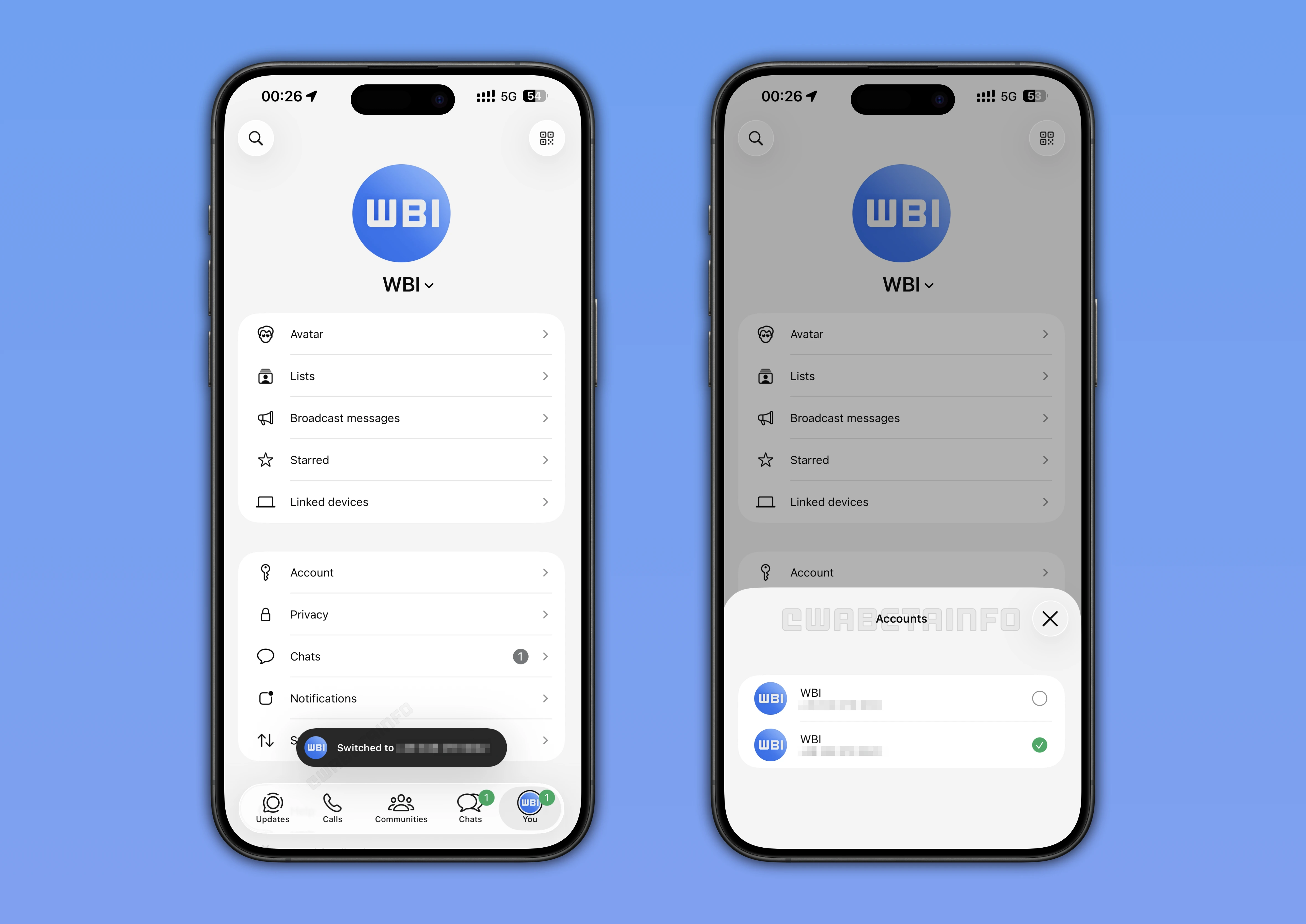
WhatsApp Launches Multi-Account Support for Select iOS Users
In the article about the WhatsApp beta for iOS 25.34.10.72 update, we announced that some users can finally add up to two accounts in one app through the settings page. Users can add a completely new number, connect an existing WhatsApp account, or link a companion account by scanning a QR code for automatic syncing. Each account keeps its own chat history, backups, notifications, privacy preferences, and media settings, ensuring that configurations never interfere with one another. Notifications are optimized so users always see which account received a message, helping reduce confusion when managing multiple profiles.
Switching accounts is quick through the Account List, a long press on the Settings tab, or a double tap gesture that cycles to the next profile. App Lock remains fully supported, prompting Face ID, Touch ID, or a passcode when switching to a protected account for stronger security. Removing an account is simple through the Account section, and previously used numbers are remembered to streamline signing back in with the Add Account option. The feature is gradually rolling out to both beta testers and stable users, ensuring a smooth transition before wider availability.
WhatsApp Adds Advanced Activity Notification Controls for Channel Admins on Android
WhatsApp now offers a dedicated notification management section for channel admins, letting them enable or disable alerts for follower interactions and admin actions. The functionality is available to some channel admins who install the WhatsApp beta for Android 2.25.35.3 update, and it also lets them customize the tone and style of alerts to match their workflow and stay updated on follower growth, reactions, and high engagement moments. Follower activity notifications help track community behavior in real time and highlight which posts generate strong audience interest. Admin activity notifications provide detailed updates about posts and reactions from co admins, improving coordination and transparency across the team.
These alerts help owners identify collaboration patterns, maintain a consistent posting rhythm, and avoid overlapping content. Smart notification logic limits alerts for large channels by sending updates only when reactions reach notable thresholds. Only channel admins can view these detailed insights, keeping advanced engagement data restricted to those managing the channel. Admins can disable any alert type from the channel info page whenever they want, ensuring control over the volume of notifications they receive.
WhatsApp is Working On a Beta Switch Feature to Let Stable Users Try Beta Updates
WhatsApp is developing a system that lets stable users switch to the beta version directly inside the app with automatic updates applied in the background. The beta delivered through this switch will be identical to the version used by existing testers, ensuring the same features, fixes, and build numbers. This option will not appear for users who manually move back to the stable version since availability depends on private criteria set by WhatsApp. The switch system works similarly to the WhatsApp Web beta model, offering early access to new features while collecting user feedback efficiently.
Some stable users will see the option in Android settings in the future, though access will be far more limited than the widely available Web beta. The restricted rollout helps WhatsApp control testing conditions, reduce large scale bugs, and ensure a stable experience for selected participants. This feature also expands beta access beyond the Play Store limit of ten thousand testers, allowing more users to join without relying on external downloads. Selected users will benefit from verified automatic beta updates, staying aligned with official testers while keeping the overall program tightly controlled.
WhatsApp Introduces a Dynamic About System With Auto Expiring Statuses
WhatsApp now shows each contact's About directly in one to one chats, placing it below the profile picture for faster access. The redesigned About supports custom text and short term activity updates, giving users a clearer way to share availability or mood. Expiration timers let users choose how long their status stays visible, preventing outdated information from lingering on profiles. Presets range from brief durations to one month, with the option to adjust or remove the status at any time before it expires.
The new About appears both inside conversations and in the chat info screen, making updates easy to notice without navigating away. Emoji integration helps clarify the meaning of each status, allowing quick visual cues for activities like travel or meetings. Automatic expiration ensures profiles stay accurate while reducing the need for manual updates from the user. This system replaces the old static About with a more flexible, expressive, and timely way to communicate personal updates.
WhatsApp Introduces Group Member Tags for Clearer Roles and Better Organization
The WhatsApp beta for Android 2.25.35.6 update lets some group members add personalized tags that highlight their role or expertise within each group. These tags can describe responsibilities like Project Manager, Moderator, Coach, or any role that helps others understand a member's contribution. Users can create or update their tag from the chat info screen, and tags can be up to 30 characters long without special symbols. New and existing members can easily view these tags, allowing everyone to understand group dynamics quickly.
Tags appear inside message bubbles and in the participants list, giving clear visibility of each person's role during conversations. Members can edit their tag at any time to correct mistakes or reflect changes in responsibilities. Each tag is specific to a single group, allowing users to define different roles across different chats. By clarifying roles and responsibilities, tags improve organization, help direct questions efficiently, and make group interactions smoother.
Stay tuned with us to discover new features and updates about WhatsApp coming your way next week. We will continue tracking all the latest beta releases, improvements, and bug fixes so you never miss a thing. Make sure to check back regularly and stay ahead with the newest ways to enhance your WhatsApp experience.
Stay Connected with WABetaInfo
Following WABetaInfo on X is the best way to stay informed about new features under development and those released to WhatsApp beta for Android, iOS, Web, and Desktop. We love hearing your feedback, so let us know what you think! You can also explore our dedicated page to discover all our services, or join our Discord Server to chat with others, get help and advice, and stay up to date with the latest WABetaInfo announcements.