WhatsApp is rolling out Meta AI tab to centralize AI-powered tools
WhatsApp is rolling out a dedicated Meta AI tab to bring all its AI-powered features into a single, easy-to-access hub. This update allows users to easily explore, interact with, and manage Meta AI tools in a centralized tab.
| Key Points | Details |
|---|---|
| Name of the feature: | Meta AI tab |
| Status: | Rolling out |
| Compatibility: | WhatsApp beta for iOS 26.12.10.70 has been designated as a compatible update, but some users may get the same feature by installing certain previous updates. |
| Availability info: | This feature is available to some beta testers, and it is rolling out to more users over the coming weeks. |
| Thanks: | Akan and vctgomes, for testing and reporting. |
| Previous news: | WhatsApp announces multiple accounts, cross-platform transfer, and new chat tools! |
WhatsApp launches Meta AI tab for centralized access to all AI-powered features on iOS
In the post about the WhatsApp beta for Android 2.26.10.5 update, we announced a feature to centralize AI-powered tools in one place. This feature allows Android beta testers to explore and interact with Meta AI through a dedicated tab. It brings together all AI-powered tools and conversations in one centralized hub. The tab makes it easier for users to quickly access AI features, manage ongoing interactions, and discover new ways to use Meta AI within WhatsApp.
Now, WhatsApp is introducing the same feature to a select group of iOS users. The feature finally aligns the experience across Android and iOS and it allows more users to access the same functionality. Following the release of the latest WhatsApp beta for iOS 26.12.10.70 update, which is available on the TestFlight app, we discovered that WhatsApp is rolling out a dedicated Meta AI tab to centralize all AI-powered features in one place.
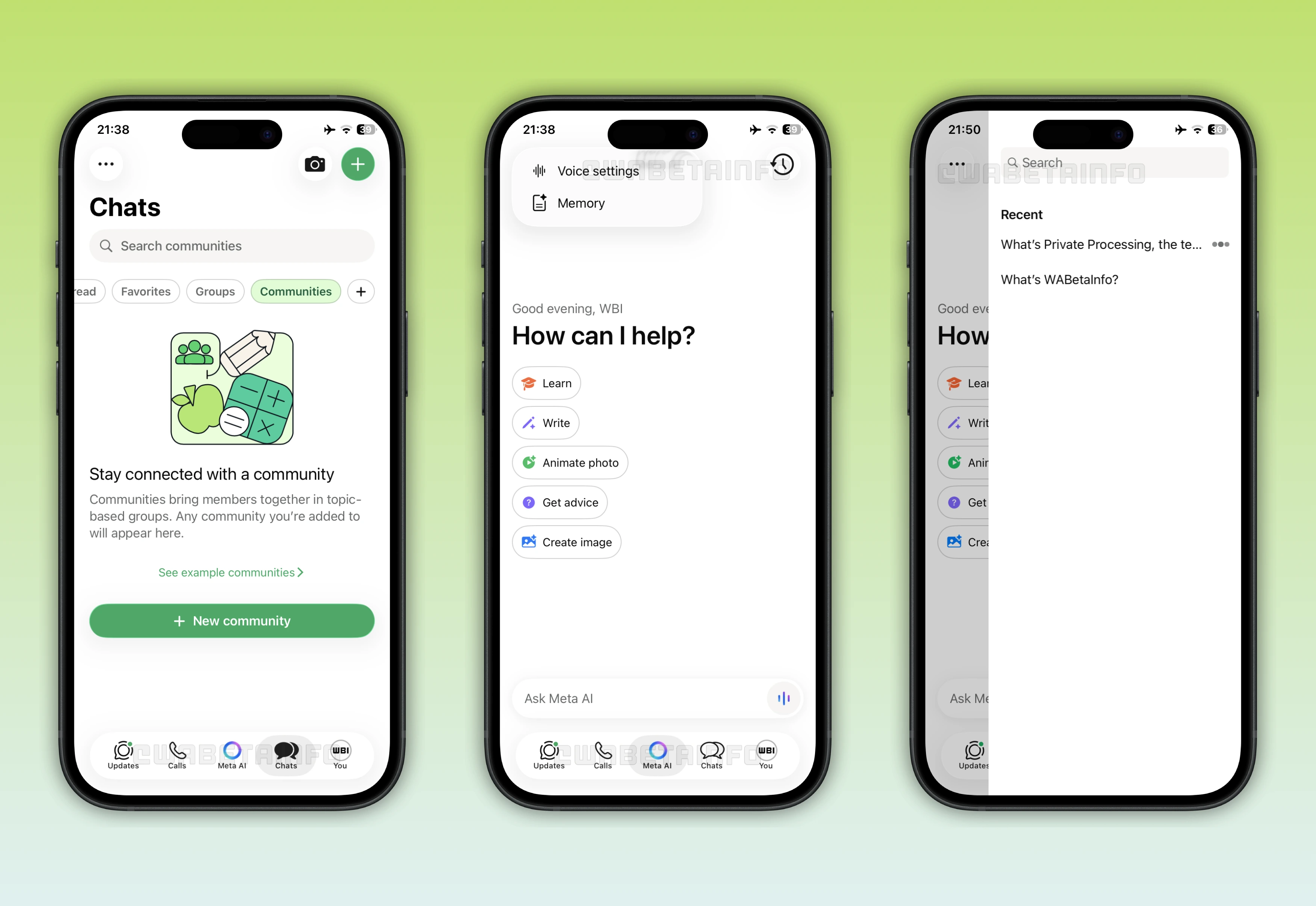
As you can see from the attached image, some beta testers can explore a feature designed to provide quick and centralized access to all Meta AI interactions and tools. The feature adds a new Meta AI entry point to the tab bar. To accomodate the tab, WhatsApp removed the communities tab. However, users can still access their communities from the Chats tab. Here, community groups are listed within the chat list and users can easily locate them through a dedicated filter. Users can create communities right from the creation menu at the top left of the screen.
In the Meta AI tab, users can explore several AI-powered tools aimed at enhancing productivity and creativity. These tools include a conversational assistant that can answer questions, provide explanations, and help with general tasks. Users can also learn anything they want by asking Meta AI questions directly. This section also offers suggestions on how to get the most out of its features. Since Meta AI has its own tab now, WhatsApp has officially removed the entry point to open a conversation with the chatbot directly from the chat list.
Another tool highlighted in this section focuses on image generation. This feature allows users to create visuals from simple text prompts. It also includes options to animate images, bringing static visuals to life with motion effects. These animations can be used for social media posts, creative projects, or other personal purposes.
At the top left of this section, users can quickly access voice settings and memory options. The voice settings allow users to choose between different AI voices. This option makes interacting with Meta AI more personalized and easier to follow. The memory feature lets users manage what Meta AI remembers from past conversations, such as preferences or specific details shared with Meta AI. Users can view, update, or delete specific memories to keep their AI interactions relevant and organized. These controls give users a convenient way to customize their experience and maintain better control over how Meta AI responds and stores information.
WhatsApp is also rolling out another separate feature that makes managing conversations with Meta AI more efficiently. This feature allows users to consult the chat history of Meta AI directly within the app. Meta AI organizes these conversations into separate threads, similar to how ChatGPT structures sessions. Each thread has its own name, which users can rename to make it easier to identify the topic or purpose of the conversation.
Despite being separated into threads, Meta AI can still use information stored in its memory across all chats if this option is enabled. This means users benefit from continuity and context even when starting a new thread. The memory feature keeps interactions organized to ensure the chatbot can provide consistent and informed responses. Users can quickly revisit past discussions, review suggestions, or pick up a project where they left off. It's worth noting that, since this is a separate feature, not all users who can access the Meta AI tab will necessarily have access to the new chat history management tool.
The dedicated Meta AI tab to centralize all AI-powered features in one place is available to some beta testers who install the latest WhatsApp beta for iOS update from TestFlight. Note that some users who install the latest WhatsApp update from the App Store may also explore the same feature. This means that WhatsApp aims to receive feedback from a larger audience beyond beta testers.
Stay Connected with WABetaInfo
Following WABetaInfo on X is the best way to stay informed about new features under development and those released to WhatsApp beta for Android, iOS, Web, and Desktop. We love hearing your feedback, so let us know what you think! You can also explore our dedicated page to discover all our services, or join our Discord Server to chat with others, get help and advice, and stay up to date with the latest WABetaInfo announcements.