The latest updates introduce a new media hub to WhatsApp for Mac and Web, giving users a centralized place to browse recent photos, videos, links, and documents shared across chats. Released to some users on both platforms simultaneously, the feature delivers a consistent experience for managing shared content across devices.
| Key Points | Details |
|---|---|
| Name of the feature: | Media Hub |
| Status: | Rolling out |
| Compatibility: | The latest versions of WhatsApp for Mac and Web are designated as compatible updates. |
| Availability info: | This feature is available to some users, and it is rolling out to more users over the coming weeks. |
| Thanks: | Sc, lostliano and Federico Trevisani, for testing and reporting. |
| Previous news: | WhatsApp Launches Third-Party Chats Integration in the European Region! |
WhatsApp Starts Testing New Features to Simplify Recent Media Search
In May 2025, we announced that WhatsApp was working on a feature to let users browse their recent media files. The new functionality would have offered a dedicated media hub to make it easier for users to view and manage all shared content across their chats in one centralized location. Accessible through a new entry point in the sidebar of the web client, this hub would allow users to browse all images, videos, GIFs, documents, and links shared in their conversations without needing to open each individual chat.
It appears that WhatsApp is finally testing the new media hub feature with a limited number of users to continue optimizing the experience before a wider rollout. The feature is currently available to some users on the web client, but not exclusively. In an effort to make the WhatsApp ecosystem more consistent across different platforms, WhatsApp is also introducing the same functionality on the Mac app.
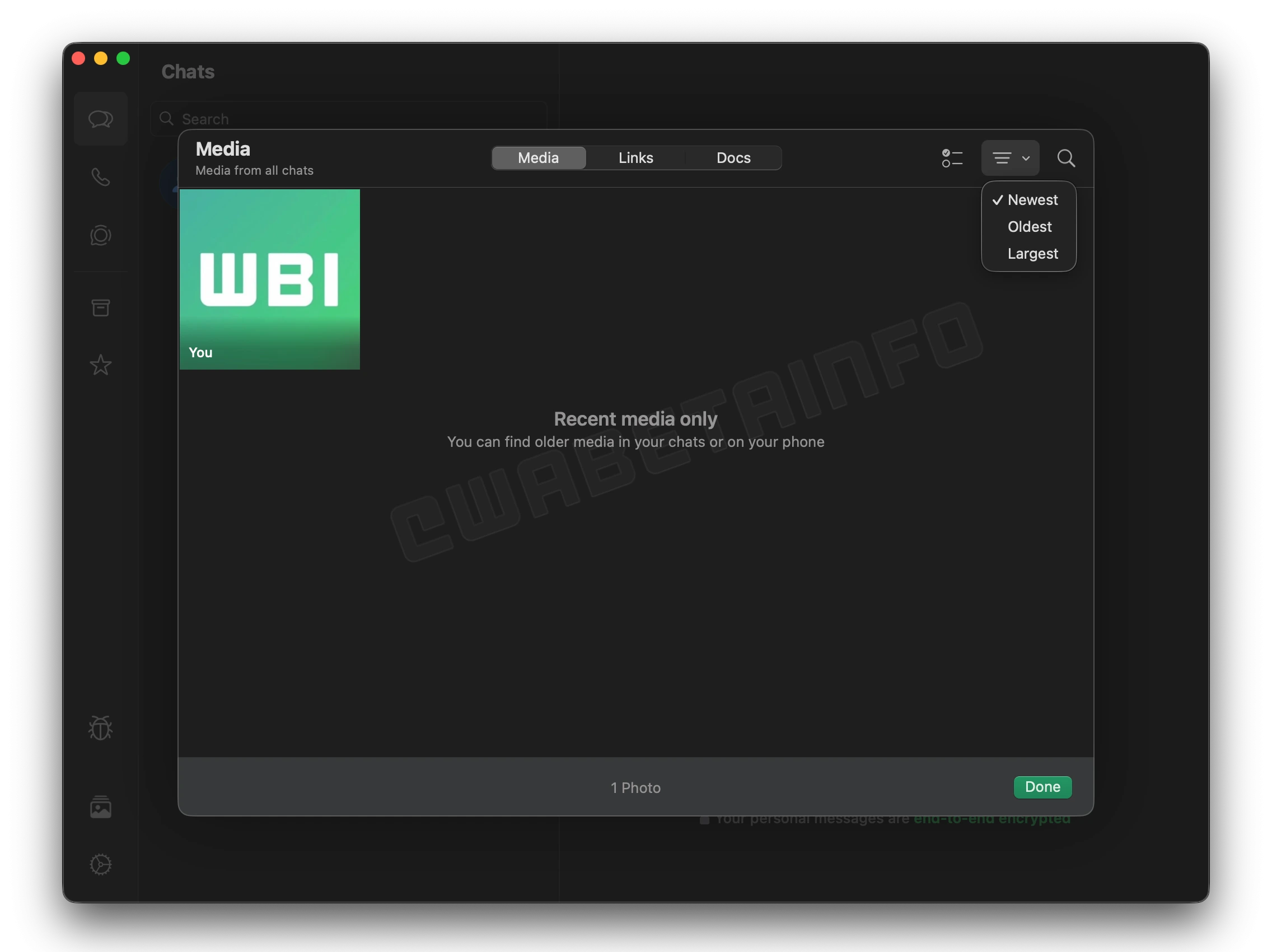
A New Centralized Media Hub on WhatsApp for Mac and Web
With the latest updates, WhatsApp is introducing a new centralized media hub designed to simplify how users access shared content. This feature gathers all recent media files shared across chats in one convenient place. Located directly in the sidebar, a dedicated button allows users to open the hub instantly. The new hub is currently available on both WhatsApp for Mac and the Web client, offering a unified experience across devices.
Exploring the Media Hub Interface and Its Capabilities
The media hub interface provides a clean and organized view of all recent media shared in your chats. However, this feature is not limited to display images and videos, as users can also browse through all links and documents shared across their conversations. This makes it easier to find important files without scrolling through multiple chats. It's important to note that the hub only displays recent media content, focusing on providing quick and streamlined access to the most relevant and up-to-date files.
Within this screen, WhatsApp recommends opening specific chats to explore older media or checking them directly on the mobile app. This clearly indicates that the hub is meant for quick access to recent files rather than long-term history. The layout is intuitive and prioritizes speed and accessibility, ensuring users can browse their latest shared content with minimal effort and maximum efficiency. As a result, the new interface provides a faster and more organized way to browse recent content.
Search Media by Sender or Caption
Users can easily locate specific media files using the built-in search functionality. The search feature supports filtering by sender, allowing quick retrieval of content shared by a particular contact. Additionally, users can search by caption to find media items based on keywords included in their descriptions. This makes finding recent files faster and more precise, especially in busy or media-heavy chats.
The feature is particularly useful when users remember the caption of an image or video but can't recall exactly where it was shared. At the same time, it also helps when they remember who sent the file but not in which conversation it appeared. This situation often occurs when users participate in multiple group chats with the same people. With this new search option, WhatsApp makes it easier to retrieve specific files without endless scrolling or guesswork.
Select Multiple Items for Bulk Actions
he media hub also supports multi-select functionality, giving users more control over their shared content. By selecting multiple items at once, users can perform bulk operations efficiently. Actions include deleting, forwarding, or marking selected files as starred for future reference. This feature makes managing large amounts of shared media more convenient, as it saves time and eliminates the need to handle each file individually.
It's especially useful for users who want to quickly clear up storage by deleting multiple files at once. It simplifies sharing moments or documents with others, as users can forward several items in a single action instead of doing it repeatedly. The ability to star multiple media files at once also helps users organize important content for easier access later.
Sort Media by Date Shared
WhatsApp's media hub allows users to organize media files chronologically. It is possible to sort items by newest first to quickly access recent content or switch to oldest first for a chronological overview. This sorting flexibility helps users find specific files without scrolling endlessly. This makes it simple for users to keep track of when content was shared.
The option to view media in order of sharing date is particularly useful for users who frequently share files in active group chats. By default, content is always displayed in chronological order, but users can easily reverse the sorting to view the most recent items first. This flexibility helps them quickly navigate between older and newer media, depending on what they're looking for. Users can also use this feature to revisit older moments, like images from past events, without having to scroll through the entire interface.
Sort Media by File Size
In addition to sorting by date, the media hub lets users organize their recent files by size. This feature highlights the largest media files first, making it easier to identify storage-heavy items. It's particularly useful for users looking to manage space efficiently. By reviewing large files quickly, users can decide which ones to delete or download for safekeeping.
This new sorting option is especially helpful when storage space is running low, allowing users to free up capacity without going through each chat manually. While users can already rely on the Manage Storage option available in the app's settings, the media hub offers a faster way to view and sort the heaviest files. It's worth noting that it's particularly useful for those who only want to focus on recent media, giving them a quick and convenient way to manage storage in a more targeted manner.
Gradual Rollout of Media Hub on WhatsApp for Mac and Web
The new media hub feature is currently being rolled out gradually to a limited group of users on WhatsApp for Mac and the Web client. While having the beta version of the app increases the chances of access, some users with the stable release may also receive the feature. Over time, WhatsApp will expand availability to more users as testing continues. In the coming weeks, an increasing number of users will gain access to the new Media Hub feature.
Stay Connected with WABetaInfo
Following WABetaInfo on X is the best way to stay informed about new features under development and those released to WhatsApp beta for Android, iOS, Web, and Desktop. We love hearing your feedback, so let us know what you think! You can also explore our dedicated page to discover all our services, or join our Discord Server to chat with others, get help and advice, and stay up to date with the latest WABetaInfo announcements.