With guest chats, users can create invite links to start conversations with people who do not have a WhatsApp account. This feature lets guests join a chat through a secure web link without needing to install the app.
| Key Points | Details |
|---|---|
| Name of the feature: | Guest chats |
| Status: | Rolling out |
| Compatibility: | The latest versions of WhatsApp beta for Android and iOS are designated as compatible updates. |
| Thanks: | shw_9876, for testing and reporting. |
| Previous news: | WhatsApp launches Meta AI tab to select Android users! |
WhatsApp is introducing guest chats on Android, iOS, and Web
In the post about the WhatsApp beta for Android 2.25.22.13 update, we announced guest chats, a new feature under development. This functionality will allow users to communicate with people who don't have an account on WhatsApp. Guest chats are similar to third-party chats, but they do not require users to download a separate application. Guest chats are designed to provide non-users with a seamless introduction to the platform, and it may potentially encourage them to sign up for WhatsApp.
It appears that WhatsApp is testing guest chats with a limited number of Android and iOS beta users. Over the past few days, some users have been testing guest chats for the first time, making it easier to interact with people without an account. Guest chats change the way people connect on WhatsApp by allowing conversations with others outside the traditional community. This could make it simpler to reach new contacts who have not yet joined WhatsApp.
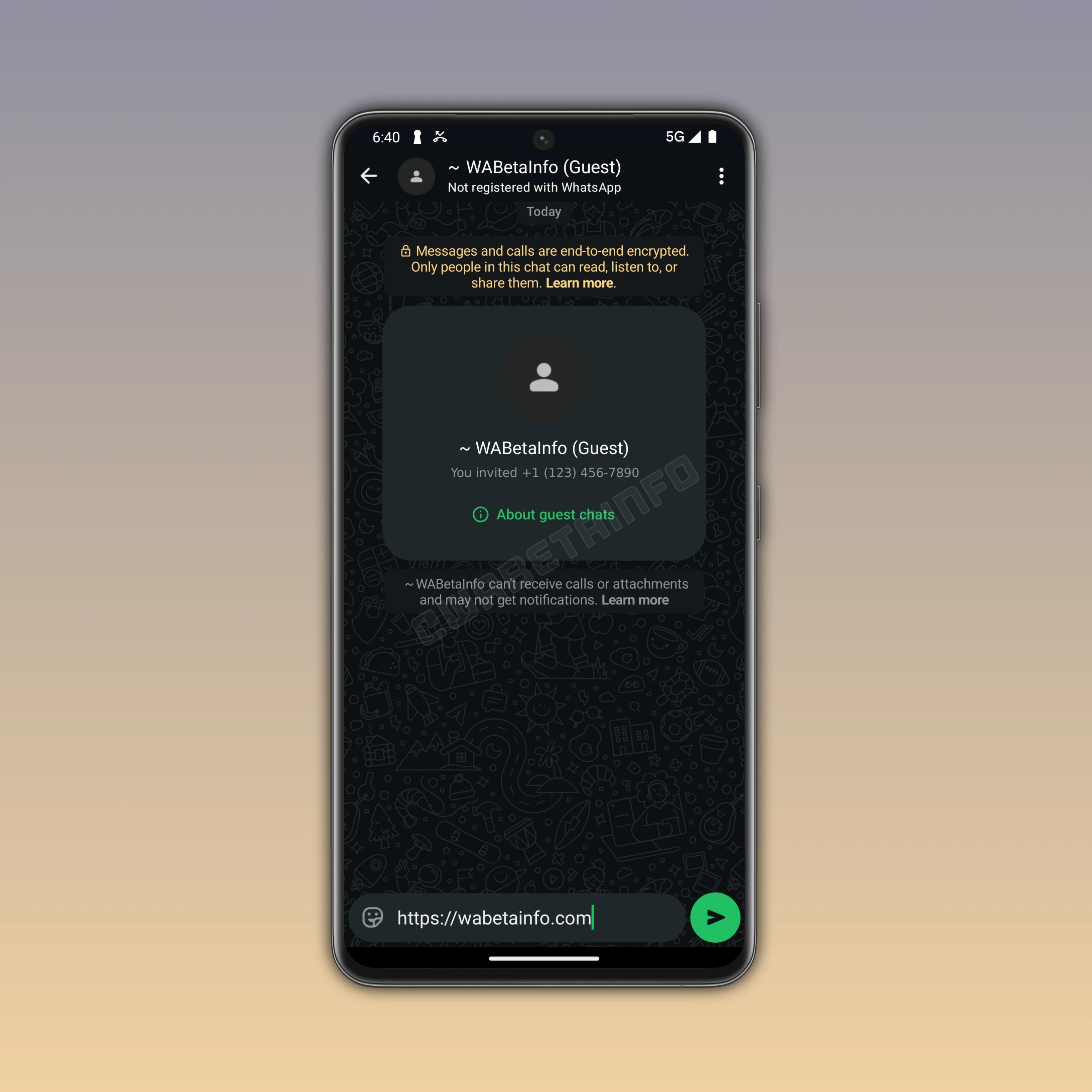
WhatsApp is now rolling out the feature that lets some users invite others in a particular conversation called guest chat. This conversation can be joined by people who do not have a WhatsApp account by opening a secure link in their browser. The link is generated by the inviter right within the section "Invite a friend" or at the bottom of the contacts list. Here, users can invite someone by sharing the generated link via SMS. However, it may also be possible to copy the link before sending it via SMS. This would allow users to share the chat invite through email or other messaging apps.
When the recipient receives the chat invite, they can open the link in their browser to join the conversation as a guest. The link can be opened on either a desktop or a mobile device. Once the recipient opens the chat invite link, they can choose to either download WhatsApp or continue as a guest. By tapping on the second option, the browser will open a conversation on WhatsApp Web.
Once users continue as a guest, WhatsApp Web generates a unique identifier that's used to create the encryption key. This means that guest chats are secured by end-to-end encryption. WhatsApp cannot see the content of the messages, and only the participants in the conversation can read them. Users can verify if their messages shared in guest chats are end-to-end encrypted by scanning the QR code or manually comparing the security code. By continuing as a guest, the user agrees to WhatsApp's Terms of Service. At the moment, the guest can see the phone number of the person who sent the chat invite.
After generating the encryption key, WhatsApp will ask the user to enter their name. It can be a pseudonym, but it is recommended to use a name that the other participant can easily recognize to avoid confusion. It's important to note that guests are not verified by WhatsApp. There is no guarantee that the person who opens the chat invite link is actually the intended recipient. For example, if the link is sent via email and the mail account is compromised, someone else could join the chat instead. The intended recipient may also have changed their phone number, which could allow someone else to access the guest chat. Users should keep this risk in mind when sharing guest chat links and verify that they are communicating with the intended person.
At this point, the guest can start a conversation with you on WhatsApp. The user with a WhatsApp account creates and shares the chat invite link, but the guest is the one who actually initiates the conversation. WhatsApp makes it clear when the user opens a guest chat by displaying the keyword "Guest" in the top app bar. This label also appears within the chat interface, and the app highlights that the account is not registered with WhatsApp. With this information visible, the account holder can easily recognize when a guest has responded to their invitation. This allows both participants to start messaging seamlessly and securely.
Guest chats offer limited features since they are designed for temporary access and do not require a full WhatsApp account. Specifically, guest chats do not support group chats and media sharing features, including stickers and voice messages. Additionally, other attachments, such as photos, videos, documents, and GIFs, are not available. Voice and video calls are also not supported, as guest access is intended only for basic, temporary messaging.
Guest chats automatically expires after 10 days of inactivity. If the chat is expired, the inviter will have to create a new chat invite link if they want to continue the conversation with the same guest. In addition, guests may not receive notifications for new messages, so they need to check the chat manually. So both the inviter and the guest should be aware that messages could be missed if the chat is left inactive.
Users should always have control over their active chats. This is the reason why WhatsApp has also introduced a feature to block guests. To block a guest, the process is the same as blocking a regular WhatsApp account. You just have to open the guest chat, then tap the guest name at the top of the screen. In the guest chat info screen, you have to select the option "Block" and confirm. Once blocked, the guest will no longer be able to send messages in that conversation. Note that only guests you shared the invite link with can contact you. Guests invited by others cannot contact you.
Guest chats make it easier for users to reach out to people without a WhatsApp account. They can help introduce new users to WhatsApp without requiring them to create an account. After receiving an invite, guests can start chatting with friends or contacts who already have the app by using the familiar interface on WhatsApp Web. Over time, this experience may encourage guests to sign up for a full account.
Although guest chats rely on the WhatsApp Web platform, they are not compatible with Code Verify. Code Verify is a browser extension that provides an additional layer of security for end-to-end encryption on the web client. It helps users ensure that the code running in their browser has not been tampered with, as it gives them more confidence in the integrity of their messages. However, there are some limitations on iOS and mobile browsers that prevent Code Verify from being used in guest chats.
The feature that allows users to create guest chats is available to some users who install the latest WhatsApp updates. WhatsApp is currently testing this functionality with a limited number of users. WhatsApp has not yet announced when guest chats will be released to everyone. As a result, other users will need to wait before they can create a chat invite link for a guest.
Stay Connected with WABetaInfo
Following WABetaInfo on X is the best way to stay informed about new features under development and those released to WhatsApp beta for Android, iOS, Web, and Desktop. We love hearing your feedback, so let us know what you think! You can also explore our dedicated page to discover all our services, or join our Discord Server to chat with others, get help and advice, and stay up to date with the latest WABetaInfo announcements.