WhatsApp is Rolling Out Chat Theme Update on Mac with 38 Color Options for Full Customization
The latest updates bring chat theme customization to WhatsApp for Mac, allowing users to personalize their conversations with preset themes and custom colors. The feature mirrors the options available on mobile, giving Mac users a more cohesive chatting experience across different devices.
| Key Points | Details |
|---|---|
| Name of the feature: | Chat Themes |
| Status: | Rolling out |
| Compatibility: | The latest versions of WhatsApp for Mac are designated as compatible updates. |
| Availability info: | This feature is available to some users, and it is rolling out to more users over the coming weeks. |
| Thanks: | IgnacioAF, for testing and reporting. |
| Previous news: | Official WhatsApp for Apple Watch App Launches in Beta for iOS Testers on TestFlight! |
WhatsApp Expands Chat Themes to Mac, Completing the Apple Ecosystem
In the article about the WhatsApp beta for iOS 25.23.10.81 update, we announced that a feature that allows users to choose a chat theme on the business app was available. This functionality lets users personalize the look of their chats by selecting from preset themes or manually choosing from 38 different colors, each paired with coordinated wallpapers. Just like in WhatsApp Messenger, these themes automatically adjust the message bubble and background colors to create a consistent visual style. Users can also upload their own images as wallpapers, apply themes globally or to individual chats, and even combine solid colors with subtle design elements.
After expanding chat themes to the WhatsApp Business app, WhatsApp is now moving forward with bringing the same feature to the Mac app. This marks another step toward unifying the customization experience across all WhatsApp platforms. With chat themes now arriving on macOS, users can enjoy a personalized interface on desktop just as they do on mobile. As a result, chat themes are now available across the entire Apple ecosystem, ensuring a seamless and cohesive user experience.
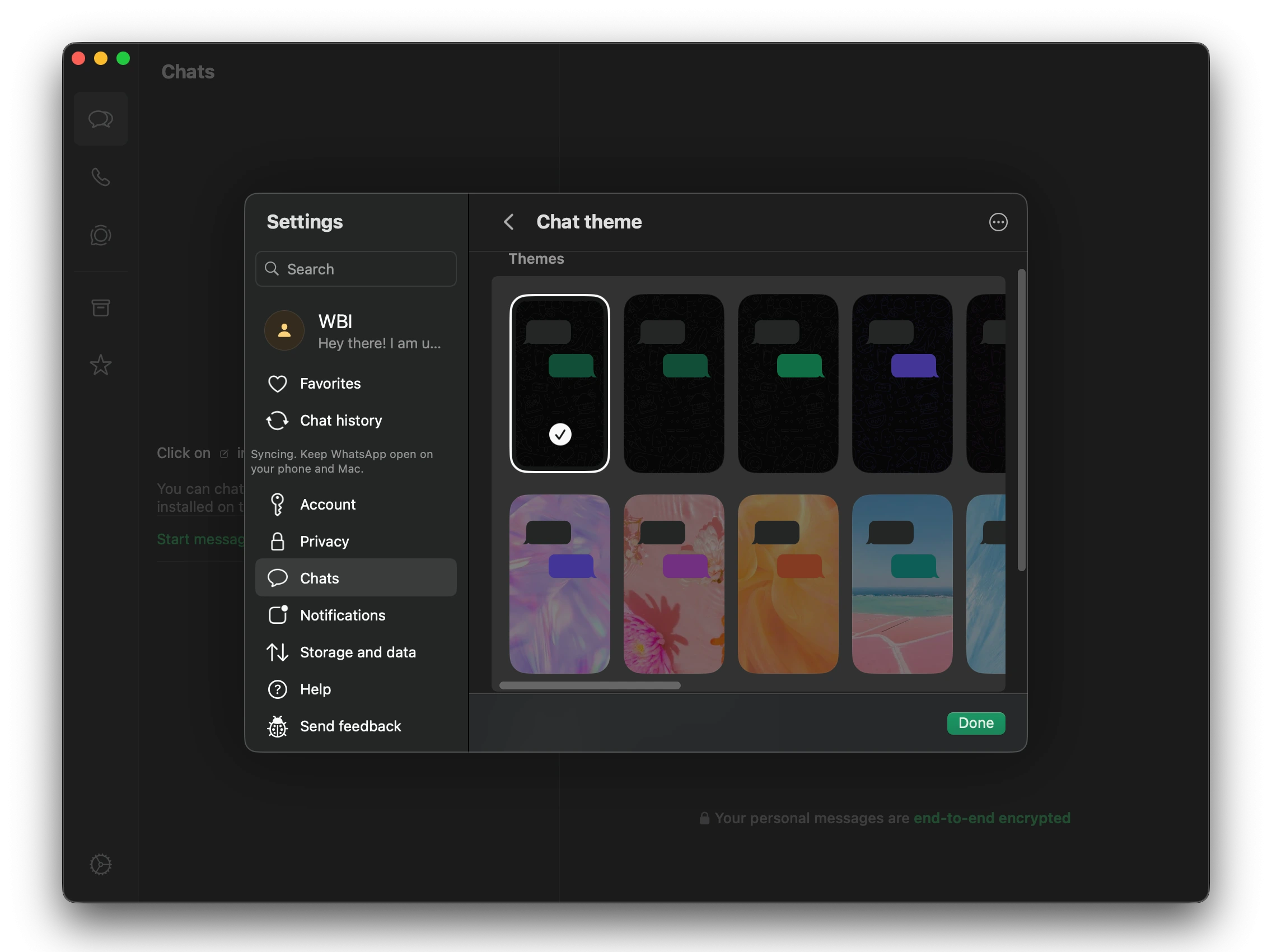
WhatsApp Brings Chat Theme Customization to the Mac App
With the latest updates, some users are finally gaining access to the new feature that lets them choose a default theme for their chats. This feature allows users to personalize the appearance of their conversations in a simple and intuitive way. The new option is located within Settings > Chats, where users can explore the available customization tools. From there, they can easily select the theme that best matches their personal taste or mood.
WhatsApp for macOS Offers 22 Default Chat Themes with Harmonious Color Combinations
WhatsApp currently offers 22 default chat themes, including the original default one. Each theme is a carefully designed combination of a wallpaper selected by WhatsApp and a matching chat color for the message bubbles. These combinations are not random since they are created using a harmonic color pairing approach to ensure visual balance and comfort. This means that the chosen wallpaper and bubble color complement each other perfectly, avoiding excessive contrast or visual strain.
WhatsApp's design team selected these pairings to create an elegant and consistent look across chats. WhatsApp aimed to enhance readability while adding a touch of personality to the app's interface. Each theme maintains a distinct character, allowing users to express themselves through subtle color and style choices. With these 22 preset options, users can quickly switch between moods or themes without needing to adjust each visual element manually.
Users Can Customize Chat Colors Beyond Default Themes
In addition to the preset themes, WhatsApp also lets users manually customize their chat colors. This means users are not limited to the predefined themes and can fine-tune their interface. There are 38 color options available, offering a wide palette for complete personalization. Once a color is selected, users can further adjust the background's brightness to achieve their ideal visual balance.
Apply Different Chat Themes to Individual Conversations
WhatsApp also gives users the flexibility to override the default chat theme with a unique one for specific chats. This ensures that while a global theme is applied by default, individual conversations can still have their own look and feel. By opening the chat info screen, users can access the same customization tools available in the app's main settings. From there, they can apply a personalized theme to that particular conversation, allowing each chat to stand out visually.
This feature is especially useful for distinguishing personal and work-related conversations. Users can assign specific colors or wallpapers to friends, family, or clients for easier recognition. The per-chat customization provides a sense of order and individuality within the messaging experience. As a result, it transforms the chat interface into a flexible space where personalization meets functionality.
Chat Themes Are Not Synced with iPhone Settings
It's important to note that chat themes on Mac are not synchronized with those on iPhone. This means users can set different themes on each device depending on their preferences. For example, someone might prefer a dark blue theme on Mac for a calming desktop experience, while keeping a bright theme on iPhone for better visibility outdoors. This separation gives users more freedom to customize each platform independently.
Why Customizing Chat Themes on Mac Is Useful
Customizing chat themes on Mac offers several practical benefits for both personal and professional users. It allows users to create a more comfortable and visually appealing chat environment suited to longer desktop sessions. For professionals, themed chats can help distinguish client conversations from personal ones, improving organization and workflow efficiency. The feature also enhances focus by letting users choose colors that reduce eye strain, especially in low-light conditions.
Gradual Rollout of Chat Themes on WhatsApp for Mac
The option to choose chat themes is currently rolling out gradually to WhatsApp for Mac. Beta users are more likely to gain early access to this feature compared to those using stable versions. However, the rollout is ongoing, and more users are expected to see the option appear in the coming weeks. As the update expands, everyone using WhatsApp on Mac will soon be able to personalize their chats with new themes.
Stay Connected with WABetaInfo
Following WABetaInfo on X is the best way to stay informed about new features under development and those released to WhatsApp beta for Android, iOS, Web, and Desktop. We love hearing your feedback, so let us know what you think! You can also explore our dedicated page to discover all our services, or join our Discord Server to chat with others, get help and advice, and stay up to date with the latest WABetaInfo announcements.