WhatsApp is Rolling Out a Smarter About Feature with Auto Expiring Status Updates
WhatsApp announced an upgraded About feature designed to make status sharing more timely, expressive, and useful. The update introduces auto expiring About messages, emoji supported status notes, clearer in chat visibility, flexible timers up to one month, and improved placement that makes updates easier to notice.
| Key Points | Details |
|---|---|
| Story about: | New About |
| Status: | Rolling out |
| Compatibility: | The latest versions of WhatsApp for Android and iOS are designated as compatible updates. |
| Previous news: | WhatsApp beta for Android 2.25.35.5: what's new? WhatsApp is working on a feature that allows a limited group of users to access the beta version! |
WhatsApp Officially Launches Disappearing Statuses in Chats
In the article about the WhatsApp beta for iOS 25.23.10.78 update, we announced that a feature that lets users personalize their status with disappearing settings was available. This update allows users to set timers for their about, ensuring it automatically disappears after a chosen duration, from a few hours up to one month. The disappearing status appears directly in chats and in the chat info screen for clearer context. Beta testers can also add emojis to their temporary status, making updates more expressive.
Full control is retained, so statuses can be edited or deleted at any time, and privacy settings determine who can view them. Expired statuses are stored privately in a personal archive for later reference, keeping profiles organized while preserving a record of past updates. This new approach ensures that users’ profiles remain current, relevant, and easier for contacts to interpret at a glance.
WhatsApp is now officially announcing the disappearing status feature on their blog, presenting a new way for users to share updates. Starting this week, users can set temporary statuses that automatically expire, appearing directly in chats and in the chat info screen. This update gives users more control and flexibility over their About section while keeping their profiles organized and up to date.
WhatsApp Introduces a More Dynamic About Experience
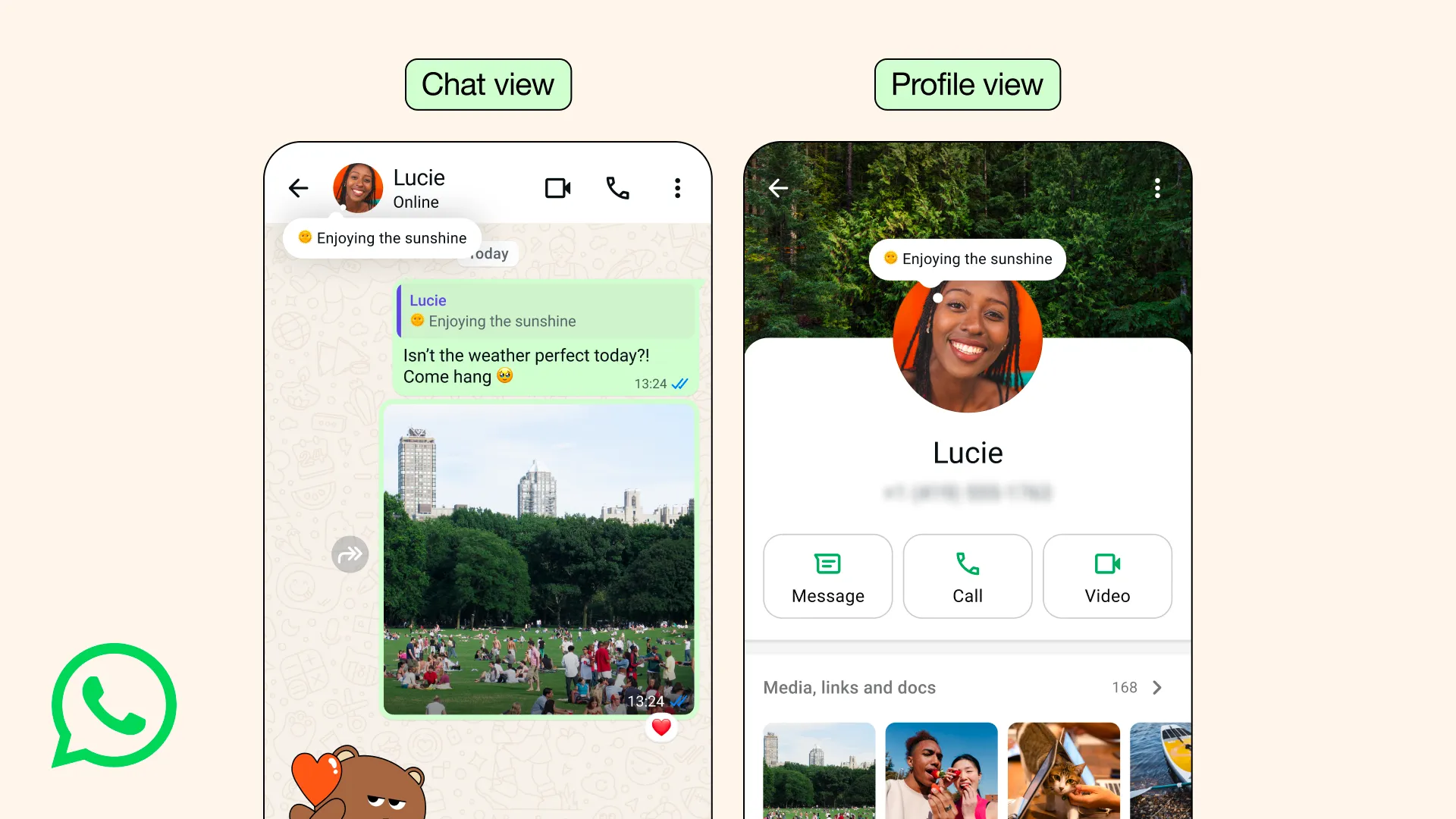
With the latest updates, WhatsApp has redesigned its About section to create a more engaging and immediately visible way to share updates with contacts. The updated About now appears directly in one-to-one chats, positioned in a small bubble under the contact's profile picture for easy access. It is also clearly visible inside the chat info screen, ensuring users can check a contact's current status without navigating away from the conversation. This layout allows people to quickly grasp what a contact is doing or their availability in real time.
By integrating the About into chats, WhatsApp reduces the need to open the chat info screen, saving time and improving usability. The feature supports a range of text updates including short-term activity alerts, but it also allows users to personalize their status by writing custom messages that reflect their current activity or mood. Users retain full control over their About, allowing them to update or remove it at any time and manage visibility through their privacy settings.
A Detailed Look at Timers and Auto Expiring Status Options
The new About supports flexible expiration timers that remove outdated information automatically. Users can choose short term presets or extend the duration up to one month depending on their needs. This ensures that temporary situations like meetings, travel, or breaks are displayed only for as long as they matter. The app clearly shows the remaining time in settings, making it easier for users to monitor, adjust, or cancel their status before it expires.
Users can update, edit, or remove their About at any time before the timer expires, giving full control over what contacts see. Once the selected duration ends, the status automatically disappears, eliminating the need for manual deletion. This prevents outdated or irrelevant information from remaining on profiles, keeping contacts informed with current updates. Over time, it helps maintain a cleaner, more accurate profile that better reflects the user's availability and activities.
Where the New About Appears Inside the App
The updated About is now visible directly in conversations, making it easier for contacts to see real-time context. It appears at the top of chats and also inside the chat info screen. When active, the About is shown in a small bubble below the contact's profile picture. This bubble contains the information shared by the contact, giving a quick overview without needing to open their profile.
The design ensures that updates are immediately noticeable during conversations. Users no longer have to navigate to the profile page to check someone's current status, as the information now appears in a small bubble beneath the contact's profile picture. This layout is particularly helpful for short-term updates, like being in a meeting or traveling. As a result, it provides a cleaner, more intuitive way to stay informed about contacts’ current activities.
Emoji Integration and Preset Durations for Expressive Updates
From the app settings, users can attach an emoji to each About entry to make their message clearer and more expressive. A coffee cup can indicate a short break while a suitcase can indicate travel. The addition of emojis makes these quick updates easier to understand at a glance. Timers include several presets such as one day and one week, making it simpler for users to quickly select a suitable duration for temporary updates.
These options allow users to tailor their About to both short-term activities, like meetings or breaks, and longer events, such as trips or ongoing projects. Each status automatically expires when the chosen duration ends, removing the need for manual updates. This ensures that contacts always see relevant and timely information without outdated details cluttering the profile. By keeping the About up to date, the feature enhances clarity and helps maintain a more organized representation while improving communication efficiency.
How the New About Improves on the Previous Static Version
Previously, the About section displayed static information that remained on profiles indefinitely unless users remembered to update it manually, which often caused outdated or irrelevant details staying for long periods. Many users found this approach limiting, as it required constant attention to ensure their profile accurately reflected their current status or availability. The redesigned About feature addresses this by allowing users to set disappearing statuses that automatically expire after a chosen duration, from a few hours up to one month. This ensures that updates remain timely and relevant, reducing confusion for contacts who view the profile.
As mentioned above, it is possible to add an emoji to the ephemeral about, making it more expressive and easier for contacts to understand their current activity or mood. All updates appear directly in chats and in the chat info screen, providing immediate visibility without needing to visit the profile page. Full control is retained, allowing users to edit, update, or delete statuses at any time before expiration. The new About combines flexibility, convenience, and privacy, creating a more dynamic and accurate way to communicate on WhatsApp.
The New About Feature Is Rolling Out on Android and iOS
WhatsApp is gradually rolling out the redesigned About feature across both Android and iOS devices, allowing users to share more timely and relevant updates with their contacts. As the rollout expands, more people will gain access to the option this week, which can be found under Settings by tapping Set About. The update introduces disappearing statuses and quick-view bubbles in chats, giving a clearer picture of a contact's current activity without opening their profile. This change provides a more dynamic, convenient, and expressive way to communicate availability and short-term updates.
Stay Connected with WABetaInfo
Following WABetaInfo on X is the best way to stay informed about new features under development and those released to WhatsApp beta for Android, iOS, Web, and Desktop. We love hearing your feedback, so let us know what you think! You can also explore our dedicated page to discover all our services, or join our Discord Server to chat with others, get help and advice, and stay up to date with the latest WABetaInfo announcements.