WhatsApp is developing secondary accounts that allow parents to manage a linked account for younger users. These accounts limit messaging and calling to contacts by default, let parents review privacy settings, and share activity updates without exposing message content.
| Key points | Details |
|---|---|
| Name of the feature: | Primary controls for parents |
| Feature availability: | Some features announced in this article may be under development and not yet available to all beta testers, or they may be gradually rolling out to users. If you're unable to access a certain feature, you will need to wait for a future update. Keep reading for more information. |
| News of last week: | WhatsApp Introduces Custom Text Stickers and Faster Sticker Searches on Android! |
| Previous article: | WhatsApp beta for iOS 26.1.10.71: what's new? WhatsApp is working on a feature that introduces cover photos for personal profiles! |
Weekly WhatsApp Beta Updates: New Features and Improvements
This weekly roundup brings together all the latest WhatsApp beta updates from the past week, giving you a single place to catch up on everything you might have missed. Whether you follow our updates closely or only check in occasionally, this summary ensures you stay informed about new features, improvements, and fixes. This week's highlight is the new secondary accounts feature for a future update, allowing parents to oversee linked accounts for younger users, set messaging and calling limits, and monitor privacy settings while keeping conversations secure. Stay in the loop and see what's new in WhatsApp before the next updates are available.
WhatsApp Shorter Disappearing Message Timers Explained
WhatsApp is testing shorter disappearing message timers for a future update, aimed at making shared information fade when it stops being useful. The update is meant for cases like temporary access details, quick reminders, and instructions that should not stay visible. Shorter choices fix a long-standing gap that pushed users toward longer durations even for brief exchanges.
A new 1 hour option supports sharing sensitive items like one time codes or temporary passwords with less risk. Because the countdown starts at delivery, users will see clear warnings so they understand the implications before turning it on. A 12 hour option fits daily routines and same day coordination such as work shifts, deliveries, and plans. This window allows replies without pressure while keeping chats tidy, especially in active group conversations. The timer picker will stay familiar and sit beside existing options, reflecting a broader push toward better control of message lifespan and privacy.
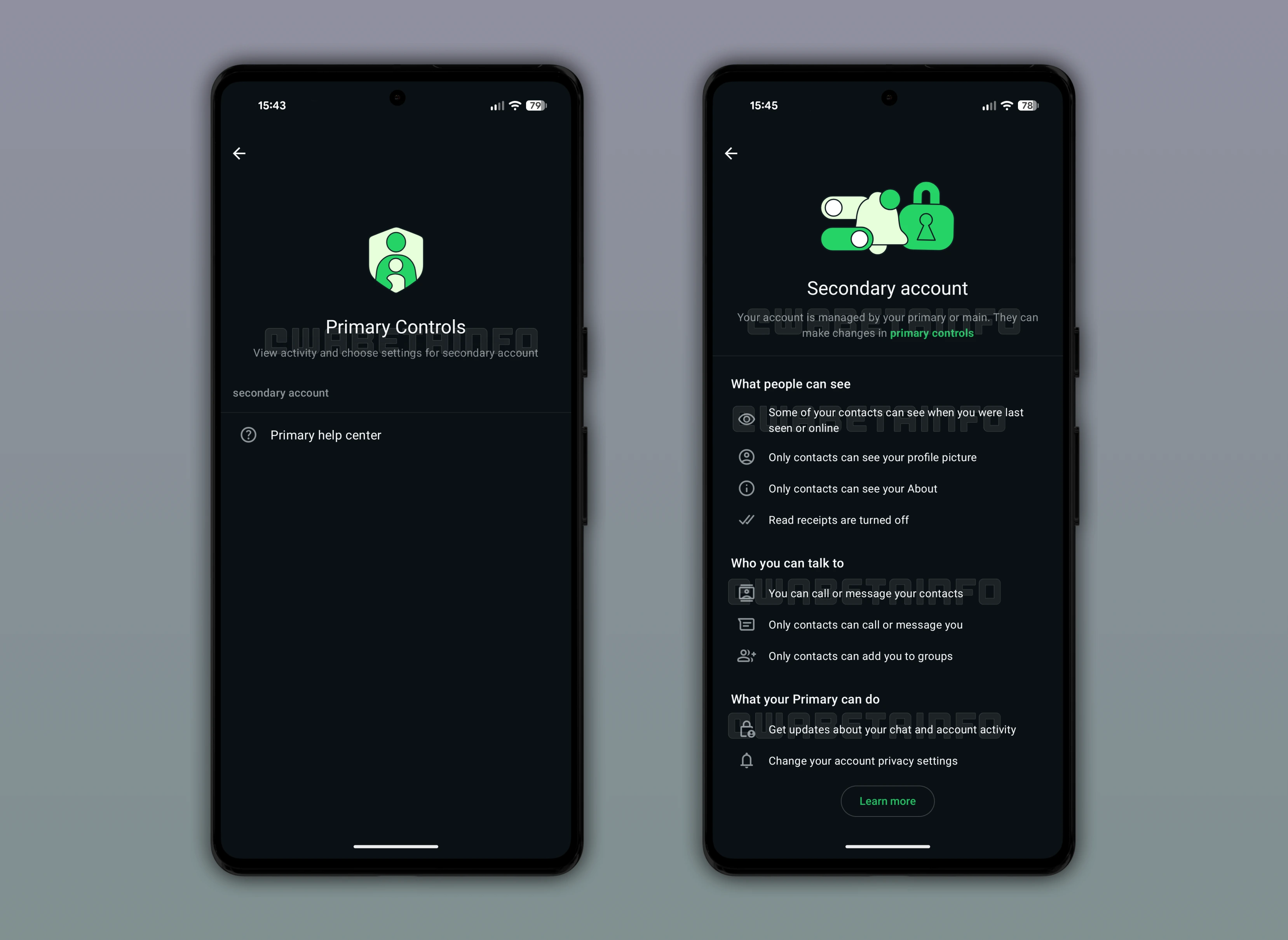
WhatsApp Secondary Accounts for Parental Supervision
WhatsApp is working on a new feature that would let parents manage a linked secondary account for younger users. These accounts would come with limited capabilities, including restrictions on certain profile and interaction features. The child's account would be connected to a parent’s profile through a dedicated link while keeping messages and calls private. This setup is meant to support supervision without giving parents direct access to personal conversations.
After linking accounts, parents would be able to review and adjust key privacy settings that children often overlook. Secondary accounts would restrict messages and calls to contacts only by default, reducing exposure to unknown users. This addresses a current gap where users cannot easily limit communication to contacts, which is especially relevant for minors. Some activity related to account usage may be shared with parents, but message content will remain protected by end to end encryption.
WhatsApp Beta Feature for Sharing Recent Group Chat History
With the WhatsApp beta for Android 2.26.1.28 update, WhatsApp is testing a new group option that allows recent chat history to be shared with newly added members. It solves a common issue where newcomers join without context and need others to explain what is happening. Only recent messages are included, with a limit of 100 messages from activity within the last 14 days. This keeps the shared content relevant while avoiding older conversations that no longer matter.
When adding a new member, users can see how many messages are available and decide whether to share them or reduce the number. Shared messages appear in a different color, and everyone in the group receives a notification with timestamps. The feature is turned off by default and shows confirmation prompts during the first three uses to avoid accidental sharing. All shared messages remain protected with end to end encryption and are secured specifically for the new members.
WhatsApp Announces Custom Tags, Stickers, and Event Reminders
WhatsApp announced in its official blog that users can now display custom tags in group chats to indicate their role or purpose. These tags are self-assigned, unique to each group, and appear in both message bubbles and the participants list. The feature allows a single user to have different tags across multiple groups without needing admin approval. The blog also introduced text stickers that turn typed words into dynamic visuals, making messages more expressive.
Users can save these stickers directly to their collection for quick reuse within chats. Event management is enhanced with custom reminders, letting participants receive notifications ahead of time. All event details remain within the group chat, reducing reliance on external apps or repeated follow-ups. These updates aim to improve clarity, creativity, and organization in groups while maintaining end-to-end encryption.
WhatsApp is Working on Username-Based Chats on Android
WhatsApp is planning a feature that lets users start conversations using usernames instead of phone numbers. Phone numbers will remain hidden unless both users have each other saved in their address books, protecting personal information. Usernames will appear as the main title in chats and in the chat info screen, helping identify contacts without confusion. The system still maintains end-to-end encryption for messages, calls, and shared media, keeping content fully secure.
Chats will be linked to a random internal identifier and the chosen username, minimizing exposure of sensitive data. This approach is useful for group discussions, temporary conversations, and first interactions with people or businesses. Businesses will also be able to adopt usernames, with system updates required by June 2026. The feature is expected to roll out this year as an optional update, though testing and refinements are still underway.
WhatsApp is Developing Username-Based Chats on iOS
The same feature is also under development on WhatsApp beta for iOS, allowing conversations to be started and managed using usernames instead of phone numbers. Phone numbers will remain hidden unless both participants have each other saved in their contacts, reducing exposure of personal information. Usernames will serve as the primary identifier, displayed at the top of chats and in the chat info screen for clear recognition. If a contact is saved, additional details like the phone number will appear in a secondary position, maintaining context.
Chats will work like standard WhatsApp conversations, supporting messages, calls, media, and voice notes with end-to-end encryption intact. An internal system links conversations to usernames and hidden technical identifiers, keeping sensitive data invisible while simplifying interactions. The feature will be optional for personal and business accounts, with businesses expected to update systems this year. Gradual rollout will likely begin with reserving usernames, signaling that the feature is approaching public availability.
Cover Photos Will be Available in the Future
WhatsApp is developing a feature that will let users add a cover photo to their personal profile in a future update. The cover image will appear above existing profile details, following a clean layout similar to WhatsApp Business profiles. This will give standard accounts the same customization options that businesses already have, allowing visual expression. Users can select images from their library, reposition them, or replace them at any time through the profile editing interface.
Cover photos will be visible in both contact views and personal account settings, ensuring consistent accessibility. The feature allows users to convey mood, interests, or style while keeping the profile photo focused on identification. It complements the upcoming username feature, helping contacts quickly recognize users at a glance. As a result, cover photos are expected to make profiles more distinctive and visually engaging within the app.
Stay tuned with us to discover new features and updates about WhatsApp coming your way next week. We will continue tracking all the latest beta releases, improvements, and bug fixes so you never miss a thing. Make sure to check back regularly and stay ahead with the newest ways to enhance your WhatsApp experience.
Stay Connected with WABetaInfo
Following WABetaInfo on X is the best way to stay informed about new features under development and those released to WhatsApp beta for Android, iOS, Web, and Desktop. We love hearing your feedback, so let us know what you think! You can also explore our dedicated page to discover all our services, or join our Discord Server to chat with others, get help and advice, and stay up to date with the latest WABetaInfo announcements.