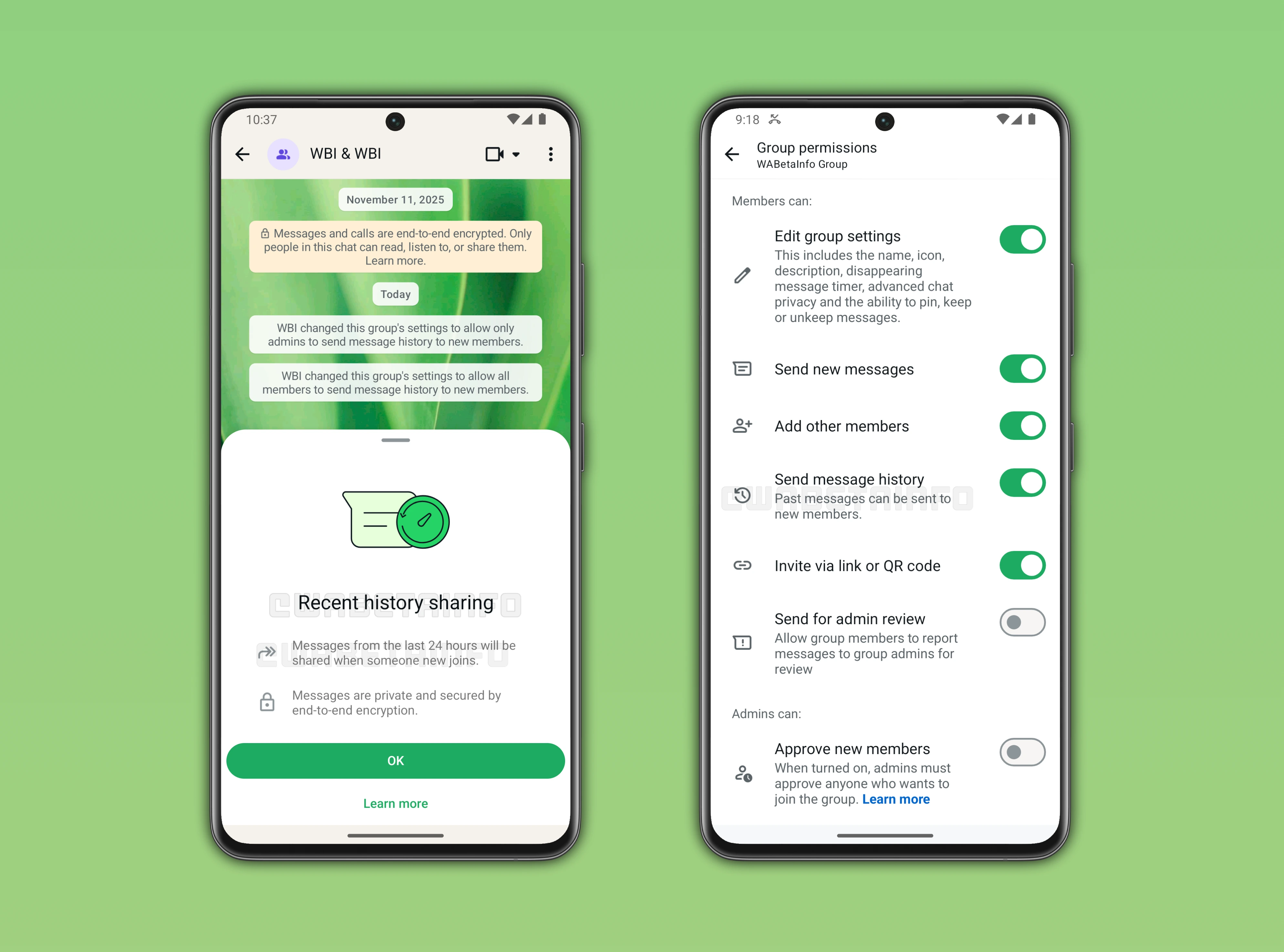
This week, WhatsApp is testing recent history sharing on the Android app, letting new group members see messages from the last 24 hours for context. The update will ensure new group participants can catch up instantly while keeping chats secure and encrypted.
| Key points | Details |
|---|---|
| Name of the feature: | Recent history sharing for group chats |
| Feature availability: | Some features announced in this article may be under development and not yet available to all beta testers, or they may be gradually rolling out to users. If you're unable to access a certain feature, you will need to wait for a future update. Keep reading for more information. |
| News of last week: | WhatsApp Enhances Reaction Experience with Status Sticker and Celebratory Emojis! |
| Previous article: | WhatsApp beta for Android 2.25.36.15: what's new? WhatsApp is rolling out a feature that lets users apply strict security settings to their accounts! |
Weekly WhatsApp Beta Updates: New Features and Improvements
This weekly roundup brings together all the latest WhatsApp beta updates from the past week, giving you a single place to catch up on everything you might have missed. Whether you follow our updates closely or only check in occasionally, this summary ensures you stay informed about new features, improvements, and fixes. This week's highlight is about the recent history sharing feature, which will let new group members instantly see messages from the last 24 hours, helping them catch up on ongoing conversations securely. Stay in the loop and see what's new in WhatsApp before the next updates are available.
India's New Rules Could Change How WhatsApp Works Across Devices
WhatsApp lets people use one account across several devices while keeping conversations synced, but new Indian regulations could complicate this setup. The rules introduce continuous SIM validation that ties an account to an active SIM, which may cause issues for users who switch numbers often, travel with a secondary phone or rely mostly on Wi Fi. The government says this requirement helps reduce fraud, yet it also creates everyday edge cases that were not a problem before. Companies have ninety days to adjust their systems so the changes work smoothly.
The regulations also force web and desktop sessions to log out after six hours, which means users will need to rescan a QR code more often. This could interrupt people who keep WhatsApp Web open all day for work. Businesses that use Meta Verified with many linked devices may see delays because staff will need to reconnect more frequently. It is still uncertain how these rules will apply to different device types, and users in India are waiting for WhatsApp to explain the final rollout.
WhatsApp Prepares a Feature That Lets New Group Members See Recent Messages
In the article about the WhatsApp beta for Android 2.25.36.11, we announce that WhatsApp is working on a feature that lets new members view recent group messages. With this functionality, new group participants will be able to understand the conversation as soon as they join. The system works by having an existing participant securely re-encrypt and share the latest messages while keeping end to end encryption intact. Admins will control this option in the group permissions screen, and new members will not need to take any extra steps.
The feature currently covers the past 24 hours of chat activity, although the exact window may change before release. To avoid excessive data usage in very active groups, WhatsApp may cap history sharing at a maximum of one thousand messages. People joining through invite links will benefit from the same access, ensuring consistent context for every newcomer. This addition helps prevent confusion in fast moving groups where important decisions or updates can be missed by late arrivals. By giving new members immediate context, WhatsApp aims to make group conversations smoother, clearer and more inclusive.
WhatsApp's New About Feature Brings Faster and Clearer Status Updates
WhatsApp has redesigned the About section so users can share thoughts and short-term updates in a clearer and more interactive way. The new design places a small status bubble directly inside one to one chats, making it easy to notice someone’s availability without opening extra screens. It also appears in the chat info view, helping users check a contact's current status quickly. People can post temporary updates, customize messages and control everything through privacy settings.
Flexible timers let statuses expire automatically after periods ranging from a few hours to a month. The app shows how much time remains before an update disappears, helping users keep information relevant. In chats, the bubble gives an instant sense of what someone is doing, supported by emojis that make updates more expressive. The redesigned About replaces the old static version with a more dynamic system that keeps profiles always up to date.
WhatsApp's Unified Call Hub Simplifies Calls and Adds Voice and Video Notes
The new Unified Call Hub brings all call-related features into a single, easy-to-use interface on iOS, letting users start one-to-one or group calls with up to 31 participants. The hub makes contacts searchable, shows recent calls, and suggests frequent contacts to speed up calling. Users can schedule calls in advance, with notifications sent automatically, and reschedule or cancel without leaving the hub. The keypad feature allows direct dialing to any WhatsApp-linked number, even if it isn't saved in contacts, and verified business accounts are clearly marked.
Favorites are displayed prominently for quick access, enabling voice or video calls, messages, or easy reordering of contacts. Beyond these features, WhatsApp now lets users leave a voice message after a missed call, which is delivered directly in the chat with a notification. A new video note feature mirrors this for missed video calls, allowing short personal recordings to be sent instantly. As a result, the hub centralizes calling, scheduling, and messaging features to make communication faster, more flexible, and more personal.
WhatsApp Introduces Meta AI Powered Image Editing for Status Updates
WhatsApp is rolling out an AI powered image editing feature for status updates, currently available to select beta users on Android. The new tool, labeled "Effects" in the interface, allows users to apply a variety of creative styles such as 3D, Anime, Cartoon, Watercolor, and more. Users can generate different variations of a style until they find the perfect look for their image. Beyond style changes, the tool enables adding or removing elements, refining backgrounds, and enhancing details with AI assistance.
Users can also completely reimagine a photo by transforming the scene based on a short prompt. Another option lets users animate images, turning static photos into short moving visuals for more engaging status updates. These capabilities give users a flexible way to make their updates feel personal, polished, and expressive. By integrating Meta AI, WhatsApp encourages experimentation with creative visuals without the need to rely on third-party apps.
WhatsApp Rolls Out Optional Strict Security Mode for Enhanced Protection
Following the release of the WhatsApp beta for Android 2.25.36.15 update, we announced that some beta testers can enable a new strict security mode. This functionality bundles the app's strongest privacy and security measures into a single toggle. This feature automatically blocks media from unknown senders, silences calls from strangers, restricts group invitations, and enforces two-step verification. It also limits visibility of personal details, masks IP addresses, and alerts users to any changes in end-to-end encryption codes, giving an extra layer of protection against cyber attacks.
Key settings are locked to ensure all protections work together, but users can disable the mode if they choose. This option is designed for those who feel at higher risk of targeted attacks or need maximum security, while keeping advanced safeguards simple to use. Most users will not need to enable it, as WhatsApp's standard protections already provide strong privacy and security for everyday use. The feature is controlled from the primary device, letting account owners review all applied protections under Settings > Privacy > Advanced > Strict Account Settings.
Stay tuned with us to discover new features and updates about WhatsApp coming your way next week. We will continue tracking all the latest beta releases, improvements, and bug fixes so you never miss a thing. Make sure to check back regularly and stay ahead with the newest ways to enhance your WhatsApp experience.
Stay Connected with WABetaInfo
Following WABetaInfo on X is the best way to stay informed about new features under development and those released to WhatsApp beta for Android, iOS, Web, and Desktop. We love hearing your feedback, so let us know what you think! You can also explore our dedicated page to discover all our services, or join our Discord Server to chat with others, get help and advice, and stay up to date with the latest WABetaInfo announcements.