This week, WhatsApp is developing a new username lookup feature that lets users identify unknown phone numbers by displaying the associated username and limited profile details. The update will make it easier to recognize unfamiliar contacts, offering clearer identification and reducing uncertainty when interacting with new numbers.
| Key points | Details |
|---|---|
| Name of the feature: | Username Lookup for Unknown Phone Numbers |
| Feature availability: | Some features announced in this article may be under development and not yet available to all beta testers, or they may be gradually rolling out to users. If you're unable to access a certain feature, you will need to wait for a future update. Keep reading for more information. |
| News of last week: | WhatsApp Launches Third-Party Chats Integration in the European Region! |
| Previous article: | WhatsApp beta for Android 2.25.34.11: what's new? WhatsApp is rolling out a feature that suggests stickers as users type their messages! |
Weekly WhatsApp Beta Updates: New Features and Improvements
This weekly roundup brings together all the latest WhatsApp beta updates from the past week, giving you a single place to catch up on everything you might have missed. Whether you follow our updates closely or only check in occasionally, this summary ensures you stay informed about new features, improvements, and fixes. This week's highlight is about the development of a new username lookup feature, which will help users identify unknown phone numbers by displaying the associated username for clearer and safer contact recognition. Stay in the loop and see what's new in WhatsApp before the next updates are available.
WhatsApp's New Username Reservation System Helps Users Secure Their Identity Early
WhatsApp is working a feature that will let users and businesses reserve their preferred usernames before the full system officially launches. This early reservation process ensures a fair rollout and gives brands the chance to protect their identity across Meta platforms. To reserve a username, people will enter the handle they already use on Instagram or Facebook, then verify ownership through Meta’s Accounts Center. Once verified, WhatsApp locks that username to the account so no one else can claim it, even if they gain access to the feature earlier.
The system appears limited to handles already used on Meta platforms. This means that new usernames may only become available after the global launch. Users without a matching Instagram or Facebook handle may have to wait for the full release to create new names. WhatsApp plans to roll out usernames gradually, testing the feature with select users before expanding it worldwide. The complete system is expected to launch before Meta's 2026 compliance deadline, providing a unified identity experience across the platform.
WhatsApp's Upcoming Username Lookup Will Make Identifying Unknown Numbers Much Easier
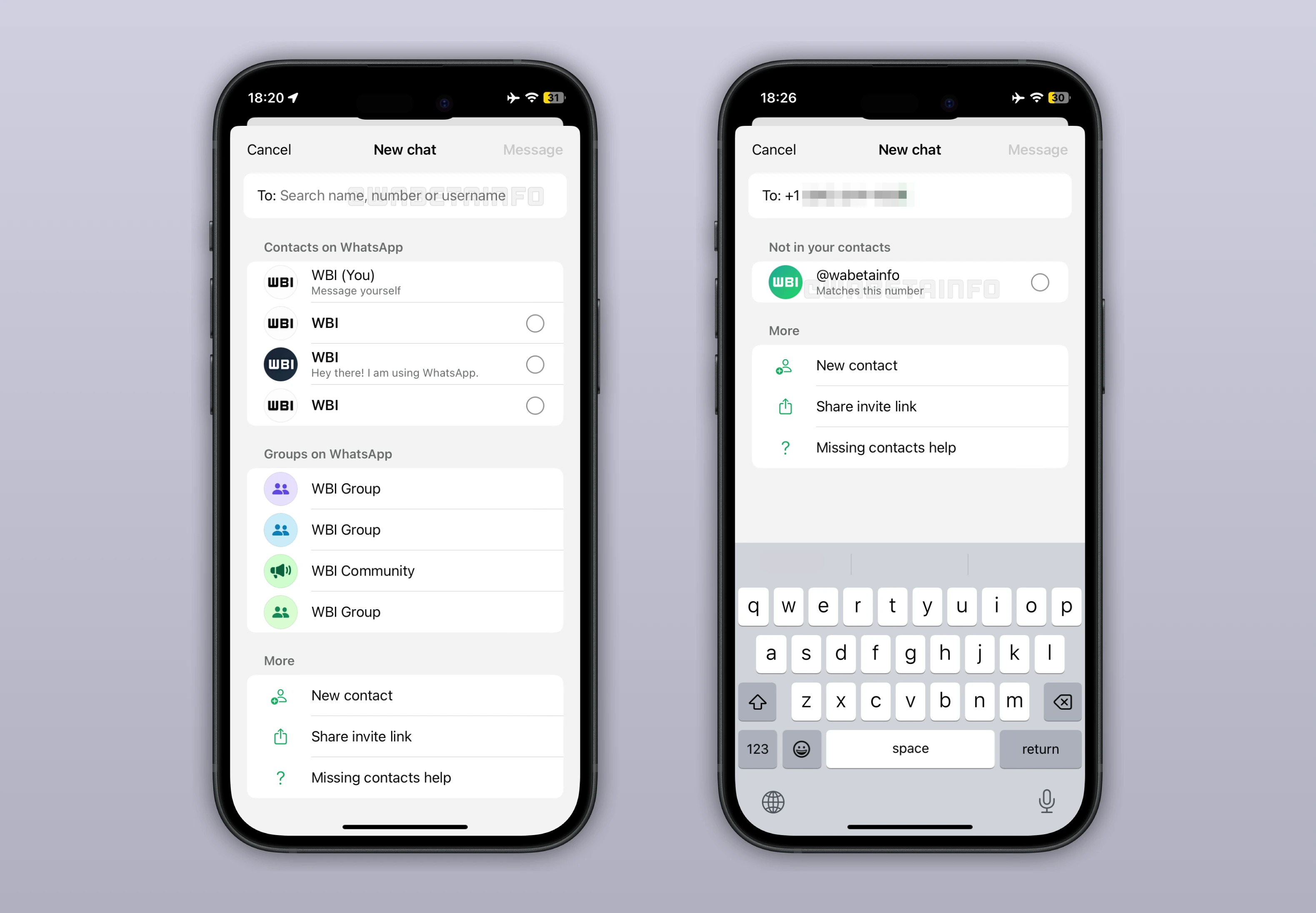
With the WhatsApp beta for iOS 25.34.10.70 update, WhatsApp is developing a feature that will show usernames when users search for unknown phone numbers. This approach will make it easier to identify unfamiliar accounts. When a searched number matches an active account, WhatsApp will display the associated username along with limited profile details allowed by privacy settings. While unknown numbers will remain visible in chat info, usernames searched directly will keep the user's phone number hidden for privacy. This represents an enhanced shift from the current system, where only the number and possibly a profile photo appear.
With usernames, users will have more context when dealing with unfamiliar contacts, reducing confusion or hesitation when receiving unexpected messages. Displaying usernames during searches helps users quickly recognize who might be behind a number, improving trust and clarity across conversations. Businesses and users alike will benefit as WhatsApp gradually transitions to this more transparent system. According to WhatsApp, the full rollout of usernames is expected in 2026, following required compatibility updates for business accounts.
WhatsApp's New Chat-Clearing Tools Give Users More Control Over Their Conversations
The WhatsApp beta for Android 2.25.34.5 update introduces a more advanced chat-clearing system that gives users deeper control over what gets deleted. Instead of a simple confirmation alert, a new bottom sheet now asks whether starred messages should also be removed, helping prevent the loss of important saved content. Users can choose to delete all messages, only media, or keep media while clearing text—making the cleanup process far more flexible. Before confirming, WhatsApp shows how much storage will be freed, giving users a clear idea of the impact of their choices.
Media deletion is now fully customizable, letting users select specific categories like videos, stickers, documents, or audio files to remove. This granular approach helps people target the items that take up the most space without touching the rest of their chat history. The “Clear Chat” option has also been added to the chat info screen, aligning the experience across platforms and making the feature easier to find. Overall, these improvements make managing conversations faster, safer, and more intuitive for all users.
WhatsApp's New Media Hub Makes Managing Shared Files Faster and More Convenient
WhatsApp has introduced a new centralized media hub on Mac and Web that gathers recent shared content into one easy-to-access location. The hub sits in the sidebar and gives users instant access to recently shared images, videos, documents, and links. Its clean interface focuses on quick retrieval, offering organized previews instead of making users dig through multiple chats. Since it only displays recent content, WhatsApp recommends opening individual chats or using the mobile app to browse older files.
A built-in search tool lets users find media by sender or caption, making retrieval much easier in busy chats. The hub also supports multi-select, enabling bulk actions like deleting, forwarding, or starring several items at once. Users can sort media either by date or file size, giving them flexible ways to locate recent items or clear up storage quicker. As a result, the new hub creates a smoother, faster, and more efficient way to browse and manage shared media across devices.
WhatsApp's New Shake-to-Report Shortcut Makes Bug Reporting Instant and User-Friendly
After installing the WhatsApp beta for Android 2.25.34.6 update, some beta testers can now report bugs and send feedback simply by shaking their phone. This motion instantly brings up a bottom sheet asking if they want to continue with the report, eliminating the need to dig through settings. If they proceed, WhatsApp automatically captures a temporary screenshot to help illustrate the issue more clearly. Users can then fill out the bug report form with details about what happened and choose whether to keep or remove the screenshot.
The app also avoids taking screenshots in sensitive sections, such as profile photo views, ensuring user privacy. For those who find the shake action unnecessary, WhatsApp lets them disable it easily from the reporting settings. This new shortcut encourages quicker, more accurate feedback since users can report problems the moment they occur. This feature streamlines communication between users and developers, helping WhatsApp improve stability and respond to issues more effectively.
WhatsApp's New Sticker Suggestions Make Chats Faster, Smarter, and More Fun
Following the release of the WhatsApp beta for Android 2.25.34.11 update, some beta testers can now manage a feature that lets them get suggestions for stickers as they type a message. These suggestions rely on emoji associations assigned during sticker creation, which help match typed emojis to relevant static or animated stickers. Third-party sticker apps often support multiple emoji associations per sticker, improving the accuracy of these suggestions. Stickers made with WhatsApp's built-in sticker creator, however, don’t include emoji associations and therefore won’t appear in the suggestion bar.
Official sticker packs from the WhatsApp store fully support this feature, ensuring broad compatibility for most users. The system helps people rediscover stickers they already own and cuts down on scrolling through large sticker libraries. Users who prefer a simpler chat experience can disable sticker suggestions anytime from Settings > Chats. While WhatsApp's editor doesn't yet support emoji-linked stickers, future updates may expand these creation tools as the app continues evolving.
Stay tuned with us to discover new features and updates about WhatsApp coming your way next week. We will continue tracking all the latest beta releases, improvements, and bug fixes so you never miss a thing. Make sure to check back regularly and stay ahead with the newest ways to enhance your WhatsApp experience.
Stay Connected with WABetaInfo
Following WABetaInfo on X is the best way to stay informed about new features under development and those released to WhatsApp beta for Android, iOS, Web, and Desktop. We love hearing your feedback, so let us know what you think! You can also explore our dedicated page to discover all our services, or join our Discord Server to chat with others, get help and advice, and stay up to date with the latest WABetaInfo announcements.