WhatsApp Introduces Custom Text Stickers and Faster Sticker Searches on Android
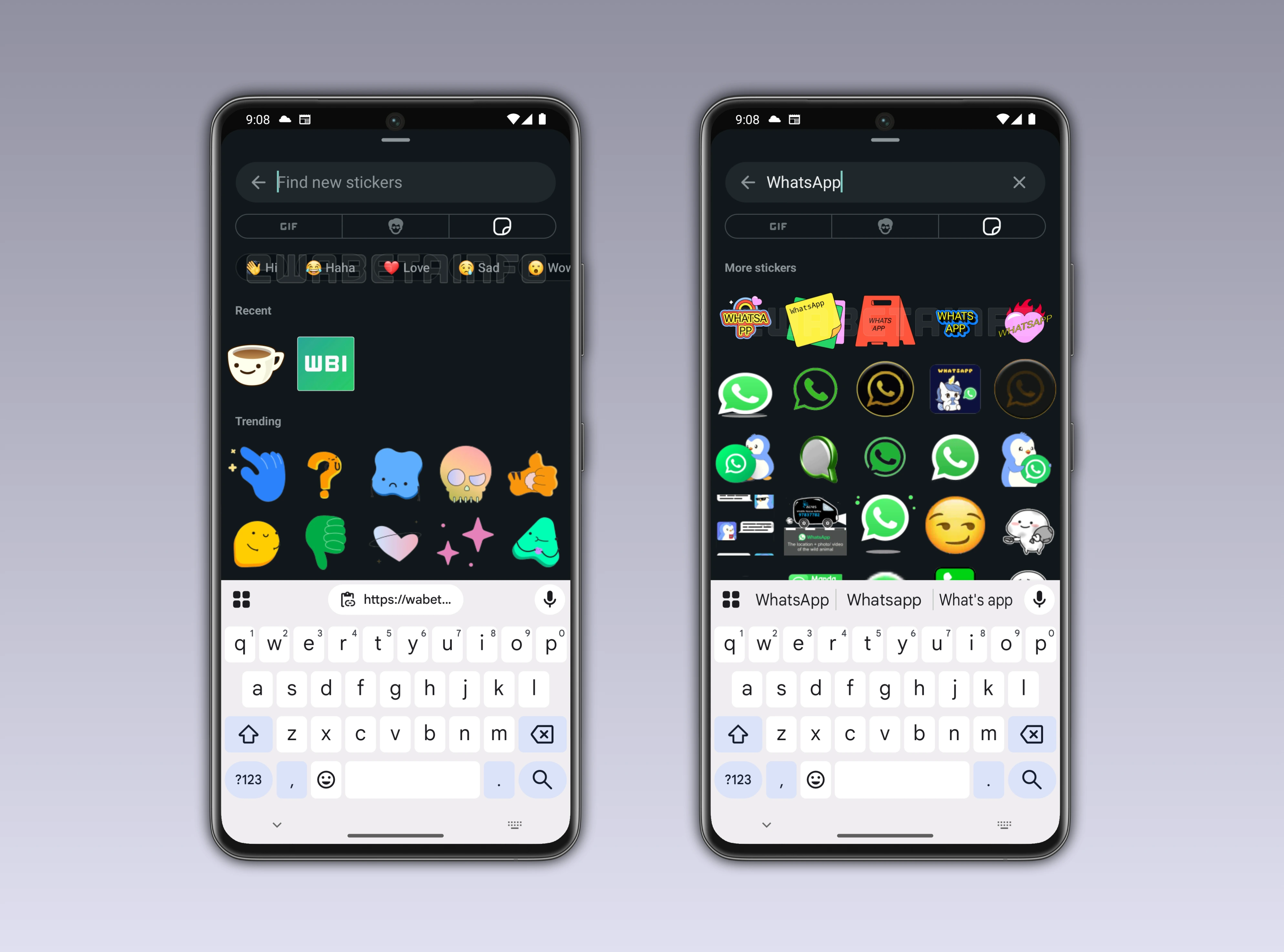
This week, WhatsApp is testing a new sticker search experience that gives some users faster ways to find and use stickers. The update introduces quick filters inside the sticker keyboard and special preset stickers, which dynamically turn typed words into instant stickers.
| Key points | Details |
|---|---|
| Name of the feature: | Find stickers and create custom text stickers |
| Feature availability: | Some features announced in this article may be under development and not yet available to all beta testers, or they may be gradually rolling out to users. If you're unable to access a certain feature, you will need to wait for a future update. Keep reading for more information. |
| News of last week: | WhatsApp is Rolling Out Advanced Clear Storage Tool With Selective Chat Cleanup Options on iOS! |
| Previous article: | WhatsApp beta for Android 2.26.1.18: what's new? WhatsApp is rolling out a feature that allows users to filter stickers and create custom text stickers! |
Weekly WhatsApp Beta Updates: New Features and Improvements
This weekly roundup brings together all the latest WhatsApp beta updates from the past week, giving you a single place to catch up on everything you might have missed. Whether you follow our updates closely or only check in occasionally, this summary ensures you stay informed about new features, improvements, and fixes. This week's highlight is the new sticker search experience, which introduces quick filters inside the sticker keyboard and preset text stickers that dynamically turn typed words into visually styled stickers. Stay in the loop and see what's new in WhatsApp before the next updates are available.
WhatsApp Web Voice and Video Calling With Notification Controls
WhatsApp has been developing voice and video calling for its web client, allowing users to place and receive calls directly from a browser without installing the desktop app. The upcoming feature supports both one to one and group calls and is designed to fit naturally into existing chat conversations. Recent beta findings show that WhatsApp is also preparing dedicated notification controls for calls within the WhatsApp Web settings panel. Users will be able to decide whether call alerts are enabled or disabled, adding more options alongside existing chat, group, and status notifications.
When calling becomes available, call notifications will be turned on by default so incoming calls can be noticed even while working in other tabs. The settings will allow users to turn these alerts off if they prefer handling calls on another device or want fewer interruptions on the web. Notification preferences on WhatsApp Web will remain separate from mobile devices, meaning changes on one platform will not affect the other. All calls on WhatsApp Web will continue to use end to end encryption based on the Signal protocol, with both calling and notification features planned for a future release.
WhatsApp Blog Highlights Festive Features for Welcoming 2026
In its official blog post, WhatsApp introduced a special 2026 animated sticker pack designed to bring a celebratory mood to chats and Status updates. The stickers can be shared in private conversations, group chats, and Status posts, offering a playful way to mark the start of the new year. WhatsApp also revealed new video call effects, including fireworks, confetti, and stars, which users can activate during calls to make virtual celebrations more lively. To add more energy to messaging, animated confetti reactions were highlighted, triggered by specific festive emojis like the party popper and clinking glasses.
The blog post confirmed that animated stickers are now supported in Status updates for the first time, allowing users to combine them with photos, videos, and layouts. These Status updates are meant to help people share New Year moments in a more expressive and visually engaging format. WhatsApp also shared practical tips for organizing New Year events through group chats, such as using pinned events, polls, and live location sharing. The post concluded with a warm New Year message from the WhatsApp team, encouraging users to celebrate, connect, and share joyful moments as 2026 begins.
WhatsApp Introduces Quick Filters for Sticker Search
Following the release of the WhatsApp beta for Android 2.26.1.18 update, some beta testers can now explore a new sticker search feature that adds quick filters directly in the sticker keyboard. Filters like "Hi", "Haha", "Love", "Sad", "Wow", "Yay", and "Yes" let users start a search with a single tap by automatically inserting the keyword into the search bar. These categories reflect the most commonly used sticker reactions and make finding relevant stickers faster. After selecting a filter, WhatsApp first searches the user’s personal sticker library before expanding to external sources for broader results.
Special preset stickers appear at the top, dynamically generating text stickers based on the search input using predefined templates. These templates visually style the text for casual conversations, allowing users to create custom stickers in real time. The combination of emoji-based matching and text templates makes sticker discovery more intuitive and playful. This feature adds flexibility and speed, helping users send expressive stickers without interrupting the flow of chats.
WhatsApp Web Preparing a Unified Updates Tab Experience
WhatsApp first introduced the redesigned Status tab, later named Updates, on mobile apps two years ago. At that stage, channels were not yet available, so the initial redesign mainly reorganized status updates and interface shortcuts. Muted statuses were moved into a separate section, and new shortcuts were added to simplify creating and managing status content. After channels launched, the Updates tab became the main place for both status updates and channels on mobile apps.
Now, WhatsApp is developing the same unified Updates tab for the web client. On WhatsApp Web, the Updates tab will show status updates with visual previews at the top, followed by a combined list of owned and followed channels. A suggestions section will appear below, helping users discover new channels and access the channel directory. This feature is still in development, but once released, it will bring a consistent Updates experience across mobile, desktop, and web platforms.
Concept for WhatsApp Call Support on Apple Watch
WhatsApp recently launched an official app for Apple Watch, moving beyond basic notifications to enable reading and sending messages, voice notes, and emoji reactions from the wrist. The app currently works as a companion, relying on a connected iPhone, which means some features like calls are not yet supported. Our concept envisions bringing full WhatsApp call functionality to the Apple Watch, allowing users to receive, answer, and manage calls directly from their wrist. The design proposes a simple interface with options to answer, end, or respond with quick messages, optimized for the small screen.
Additional features could include recent call logs, contextual shortcuts for predefined replies, and the ability to start calls from chat info screens. This should make handling WhatsApp calls effortless and fast, keeping interactions intuitive while complementing the iPhone experience. This concept is not currently implemented but illustrates the potential for a fully integrated Apple Watch experience that enhances connectivity on the go. Future updates could adopt such features if user demand and feedback support expanding WhatsApp's watchOS capabilities.
Concept for Custom WhatsApp Notification Tones
WhatsApp currently offers a limited set of notification tones, which users can assign to chats and groups for basic personalization. As messaging activity grows, the default tones make it harder to distinguish between conversations, reducing their effectiveness. Our concept proposes letting users import custom tones from the Files app, enabling sounds that reflect personal preferences.
Alongside importing, a dedicated Tones Store inside WhatsApp would offer a curated collection of tones for easy discovery and download. The store would include search and filter options, as well as a "Popular" section to highlight trending tones among users. Users could preview tones before downloading, with each tone's file size displayed to manage storage. This approach aims to give users greater control over notifications while keeping the experience simple and intuitive. Although not currently implemented, the concept could significantly improve personalization and usability for managing multiple chats, groups, and channels.
Key WhatsApp Updates and Features Released in 2025 for iOS and Android
We shared an article that summarizes all the main WhatsApp features released throughout 2025 for both iOS and Android users. The article offers a clear overview of how WhatsApp evolved during the year, highlighting the platform's focus on usability, privacy, and personalization. It explains that the updates were rolled out gradually and aimed to improve everyday communication for individuals and groups. It also provides readers with a single reference point to understand the most important changes introduced over the year.
Stay tuned with us to discover new features and updates about WhatsApp coming your way next week. We will continue tracking all the latest beta releases, improvements, and bug fixes so you never miss a thing. Make sure to check back regularly and stay ahead with the newest ways to enhance your WhatsApp experience.
Stay Connected with WABetaInfo
Following WABetaInfo on X is the best way to stay informed about new features under development and those released to WhatsApp beta for Android, iOS, Web, and Desktop. We love hearing your feedback, so let us know what you think! You can also explore our dedicated page to discover all our services, or join our Discord Server to chat with others, get help and advice, and stay up to date with the latest WABetaInfo announcements.