WhatsApp for iOS Introduces Message Reminders for Organized Chat Follow-Ups
This week, WhatsApp introduced message reminders, a new feature that lets iOS users set alerts on individual messages to revisit them later. This system helps users stay organized and ensures important details in chats are not forgotten.
| Key points | Details |
|---|---|
| Name of the feature: | Notification reminders for messages |
| Feature availability: | Some features announced in this article may be under development and not yet available to all beta testers, or they may be gradually rolling out to users. If you're unable to access a certain feature, you will need to wait for a future update. Keep reading for more information. |
| News of last week: | WhatsApp Introduces Threaded Message Replies for More Organized Conversations! |
| Previous article: | WhatsApp beta for iOS 25.25.10.72: what's new? WhatsApp is rolling out a feature that allows users to add verified Instagram profile links! |
NOTIFICATION REMINDERS FOR MESSAGES
This weekly roundup brings together all the latest WhatsApp beta updates from the past week, giving you a single place to catch up on everything you might have missed. Whether you follow our updates closely or only check in occasionally, this summary ensures you stay informed about new features, improvements, and fixes. In this post, we cover all the latest WhatsApp beta updates, with the new option to set reminders for messages standing out as a notable addition, now available to help iOS beta users stay on top of important conversations and follow-ups more easily. Stay in the loop and see what's new in WhatsApp before the next updates are available.
- With the WhatsApp beta for Android 2.25.25.11 update, some beta testers can experiment with redesigned drawing editor that introduces audience selection chips at the bottom of the screen, making it easier to control who can see status updates. These chips let users quickly switch between privacy options like "My Contacts" and "Only Share With" without leaving the editor. The system respects existing exclusions, allows trusted sharing with a restricted audience, and provides instant feedback on who will see each update.
- The WhatsApp for iOS 25.25.73 update introduces scheduled calls and a unified calling system, letting users view, adjust, and manage calls directly from the Calls tab or group chats. The new menu consolidates options like starting calls, creating call links, scheduling, and selecting participants for targeted conversations. This update is built using the iOS 26.0 SDK, ensuring better performance and integration with the latest system-level improvements. However, the Liquid Glass interface remains disabled for now, as WhatsApp continues refining its design before a public release.
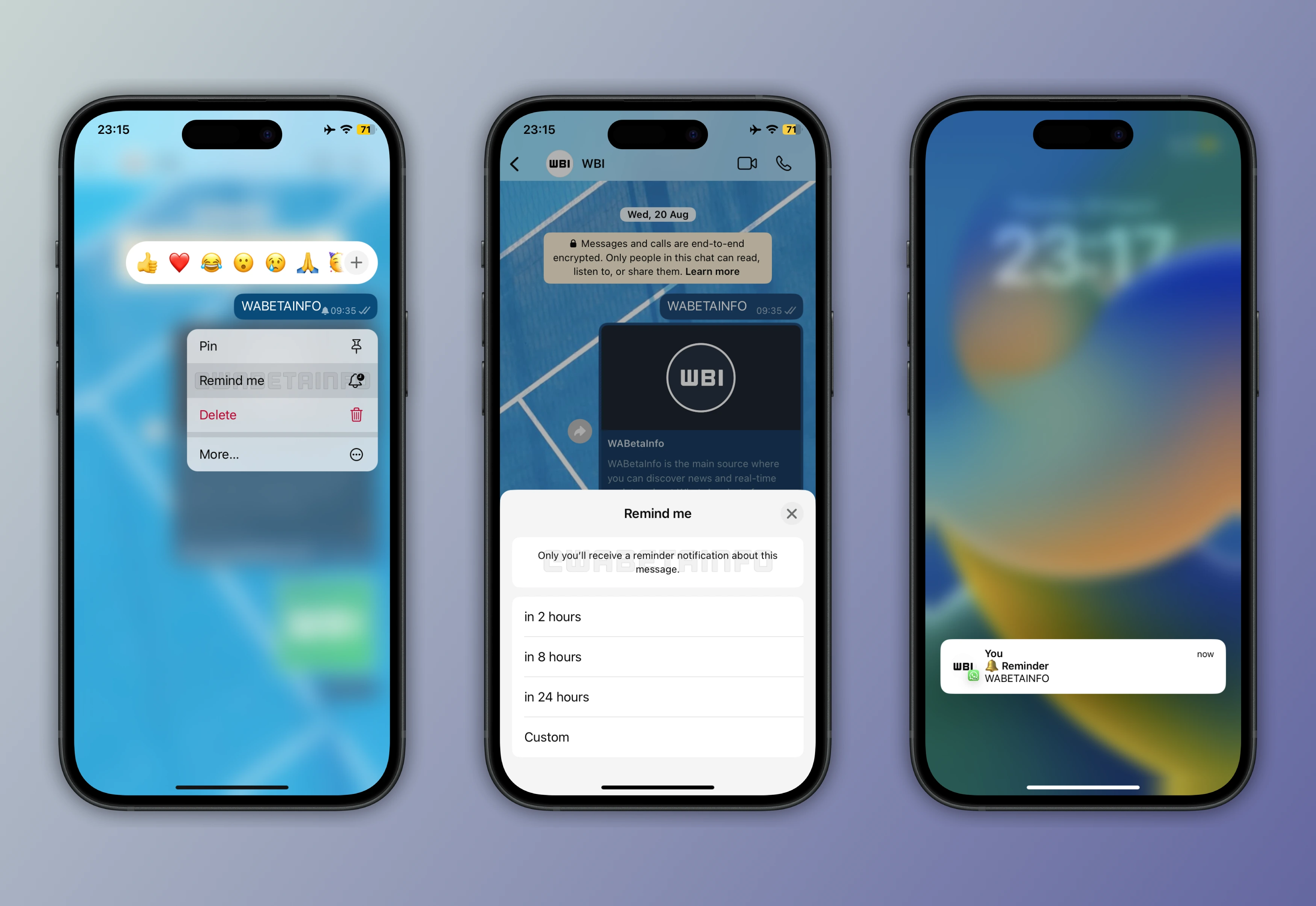
- Following the release of the WhatsApp for iOS 25.25.74 update, some users can finally set reminders directly on individual messages from the message actions menu. It's possible to pick from preset intervals like two hours, eight hours, or one day, or set a fully custom date and time for the alert. When a reminder is active, a bell icon appears on the message, and once it triggers, users receive a notification with the full text, media preview, and chat details. All reminders are processed entirely on-device, ensuring full privacy and preventing others, including WhatsApp, from accessing them. This built-in system helps users manage tasks and follow-ups without relying on external apps, keeping everything organized within the chat interface.
- In the article about the WhatsApp beta for Android 2.25.26.3 update, we announced that WhatsApp is developing a new feature that will let group members notify all participants in a chat at once. This feature will appear in the mention menu, making it easier to access alongside individual mentions and useful for large groups needing to broadcast important updates. Unlike status mentions, which had participant limits, this option seems more flexible and is expected to work even in large or community groups. Both admins and regular members will likely be able to use it, though WhatsApp may later add controls for admins to manage its use before the official release.
- WhatsApp is also developing the same feature to mention everyone for the iOS app, allowing users to notify all group members with a single tag directly from the mention menu. This was announced in the article covering the WhatsApp beta for iOS 25.25.10.70 update, where early indications suggest that the option will work in both regular and large community groups, without participant limits, and be accessible to both admins and regular members.
- With the WhatsApp beta for Android 2.25.26.12 update, WhatsApp is testing a feature that will let users add their Facebook profile links directly to the chat info screen, similar to the existing Instagram integration. This optional feature allows users to display a Facebook icon with their verified profile link, helping contacts identify authentic profiles more easily. Verification is handled through the Accounts Center, but users can also choose to share unverified links, which will simply appear with a generic icon and URL. Linking or verifying a Facebook account is not required as this feature is optional, giving users full control over how they connect their social media profiles to WhatsApp.
Stay tuned with us to discover new features and updates about WhatsApp coming your way next week. We will continue tracking all the latest beta releases, improvements, and bug fixes so you never miss a thing. Make sure to check back regularly and stay ahead with the newest ways to enhance your WhatsApp experience.
Following WABetaInfo on X is the best way to stay informed about new features under development and those released to WhatsApp beta for Android, iOS, Web, and Desktop. We love hearing your feedback, so let us know what you think! You can also explore our dedicated page to discover all our services, or join our Discord Server to chat with others, get help and advice, and stay up to date with the latest WABetaInfo announcements.